Subtotal $0.00



Email : 73
Introduction
Businesses today receive thousands of customer messages every day through WhatsApp, websites, social media, and email. Managing all these conversations manually is difficult and time-consuming. Many companies lose potential leads simply because they cannot respond quickly enough.
This is where AI agents integrated with WhatsApp and CRM systems become extremely powerful. AI agents can automatically respond to customers, collect lead information, update CRM records, schedule meetings, and even assist with sales and support tasks.
When AI agents are connected with WhatsApp and CRM platforms, businesses can create a fully automated communication system that works 24/7 without human intervention. Customers get instant responses, sales teams receive qualified leads, and businesses can manage conversations efficiently.
In this complete guide, you will learn how to connect AI agents with WhatsApp and CRM systems, the tools required, step-by-step integration methods, real business use cases, and best practices to automate your customer communication system.
What Are AI Agents?
Before understanding the integration process, it is important to understand what AI agents actually are.
AI agents are intelligent software programs that can perform tasks automatically using artificial intelligence. Unlike simple chatbots, AI agents can analyze information, make decisions, use external tools, and complete multi-step tasks.
AI agents can perform actions such as:
- answering customer queries
- collecting lead information
- scheduling appointments
- updating CRM data
- analyzing conversations
- recommending products
These capabilities make AI agents extremely useful for businesses that want to automate communication and customer management.
Why Connect AI Agents with WhatsApp and CRM Systems
Businesses use WhatsApp because it is one of the most popular messaging platforms in the world. At the same time, CRM systems help companies manage leads, customers, and sales processes.
Connecting AI agents with these systems creates a powerful automation ecosystem.
Before exploring the integration steps, let us understand the main benefits.
1. Instant Customer Response
Customers expect quick responses. AI agents can respond instantly 24/7.
Benefits include:
- faster response times
- improved customer satisfaction
- reduced support workload
2. Automatic Lead Collection
AI agents can collect customer details automatically.
This information can include:
- name
- phone number
- product interest
All these details can be directly stored in the CRM.
3. Sales Automation
AI agents can qualify leads and send them to the sales team.
They can also:
- recommend products
- share pricing
- schedule calls
4. Centralized Customer Data
CRM systems store all customer interactions in one place.
Integration allows businesses to track:
- conversation history
- purchase behavior
- customer preferences
5. 24/7 Business Availability
AI agents never sleep. They can handle conversations anytime.
This helps businesses capture leads even outside working hours.
Key Components Required for Integration
To connect AI agents with WhatsApp and CRM systems, several components are required.
Understanding these components will help you build a smooth integration.
1. AI Agent Platform
First, you need a platform to create AI agents.
Popular platforms include:
- LangChain
- CrewAI
- AutoGen
- OpenAI Assistants
- custom AI agents
2. WhatsApp Business API
WhatsApp Business API allows businesses to send and receive messages programmatically.
It enables automation and integration with external systems.
Features include:
- automated messaging
- chatbot integration
- message templates
- media sharing
3. CRM System
A CRM system stores and manages customer data.
Popular CRM platforms include:
- HubSpot
- Salesforce
- Zoho CRM
- Freshsales
4. Integration Middleware
Middleware connects AI agents with external systems.
Examples include:
- Zapier
- Make (Integromat)
- n8n
- custom APIs
These tools help automate workflows.
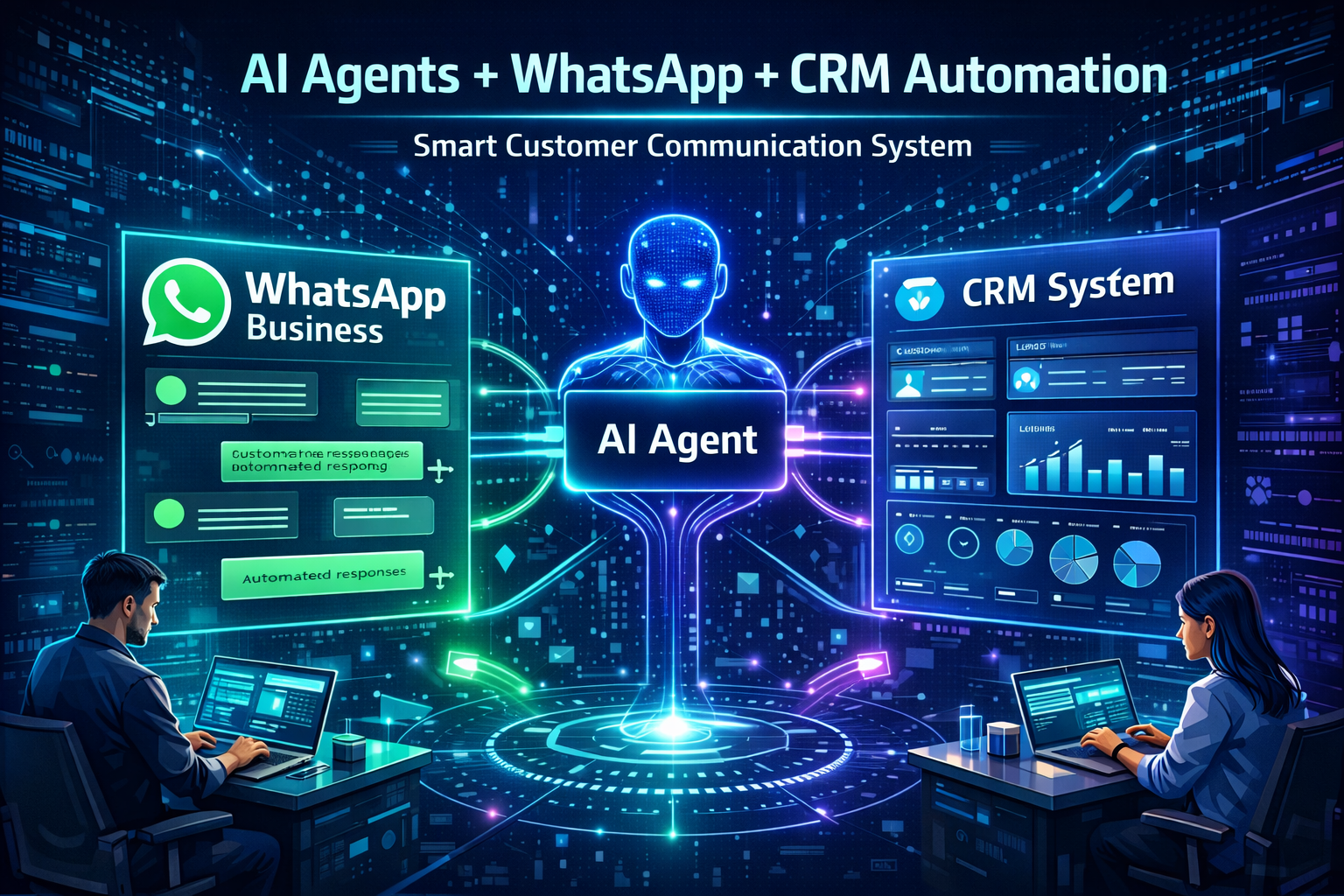
Architecture of AI Agent + WhatsApp + CRM Integration
To understand how the integration works, it is helpful to look at the system architecture.
The architecture usually includes multiple components working together.
Step-by-Step Flow
Below is a simple explanation of the workflow.
- Customer sends a message on WhatsApp.
- WhatsApp API receives the message.
- The message is sent to the AI agent.
- The AI agent analyzes the query.
- The agent generates a response.
- The response is sent back to WhatsApp.
- Customer data is stored in the CRM system.
This workflow creates an automated communication loop.
Step-by-Step Guide to Connect AI Agents with WhatsApp
Now we will look at the practical steps required to connect AI agents with WhatsApp.
Step 1: Set Up WhatsApp Business API
Before integration, you must create a WhatsApp Business API account.
The setup process includes:
- verifying your business
- registering a WhatsApp number
- configuring message templates
After approval, you receive API access.
Step 2: Build the AI Agent
Next, you need to build the AI agent that will handle conversations.
The agent should be trained to:
- understand customer queries
- respond with helpful answers
- collect lead information
- trigger CRM updates
You can build the agent using frameworks like:
- LangChain
- CrewAI
- OpenAI Assistants
Step 3: Connect WhatsApp API with AI Agent
The next step is to connect WhatsApp messages to the AI system.
This can be done using:
- webhooks
- API requests
- automation tools
The system forwards messages to the AI agent for processing.
Step 4: Generate AI Response
After receiving the message, the AI agent analyzes the query and generates a response.
It can perform tasks such as:
- answering questions
- recommending services
- asking follow-up questions
Step 5: Send Response Back to WhatsApp
The AI response is then sent back to the user through the WhatsApp API.
This creates a seamless conversational experience.
How to Connect AI Agents with CRM Systems
After handling customer messages, the next step is to connect the system with CRM platforms.
CRM integration allows businesses to store and manage customer data.
Step 1: Choose a CRM Platform
First select a CRM that supports API integration.
Common options include:
- HubSpot
- Salesforce
- Zoho CRM
- Pipedrive
Step 2: Define CRM Data Fields
Before integration, define what information should be stored.
Examples include:
- name
- phone number
- company name
- lead source
Step 3: Create CRM API Integration
Use the CRM API to send data from the AI agent.
The AI agent can automatically create:
- new leads
- contact records
- support tickets
Step 4: Automate Lead Updates
The AI agent can update CRM data based on conversation results.
Examples include:
- lead qualification
- meeting scheduling
- purchase interest
Automation Workflows for WhatsApp + CRM + AI Agents
Businesses can create many automation workflows using this integration.
Below are some common examples.
1. Lead Generation Automation
AI agents can capture leads from WhatsApp conversations.
The workflow may include:
- customer sends message
- AI asks questions
- lead details collected
- CRM record created
2. Appointment Booking
AI agents can schedule meetings automatically.
Steps may include:
- customer requests appointment
- AI checks calendar
- available slots shared
- booking confirmed in CRM
3. Customer Support Automation
AI agents can handle support queries.
They can:
- answer common questions
- check order status
- escalate complex issues
4. Sales Qualification
AI agents can qualify potential customers.
They can ask questions like:
- budget
- requirements
- timeline
Qualified leads are then sent to the sales team.
Best Tools for AI Agent Integration
Many tools help businesses integrate AI agents with WhatsApp and CRM systems.
Before selecting tools, it is important to understand their capabilities.
Popular Integration Tools
Some commonly used tools include:
- Zapier – simple automation workflows
- Make (Integromat) – visual automation builder
- n8n – open-source workflow automation
- Twilio – WhatsApp API integration
- 360Dialog – WhatsApp Business API provider
These tools simplify integration without heavy coding.
Best Practices for AI Agent Integration
Successful AI agent integration requires careful planning.
Below are some best practices businesses should follow.
1. Design Natural Conversations
AI responses should feel natural and helpful.
Avoid robotic or overly technical responses.
2. Ensure Data Privacy
Customer data must be handled securely.
Use encrypted APIs and follow data protection regulations.
3. Provide Human Escalation
Not every problem can be solved by AI.
Always provide an option to connect with a human agent.
4. Monitor AI Performance
Businesses should regularly analyze:
- response accuracy
- customer satisfaction
- automation efficiency
Real-World Business Use Cases
Many industries are already using AI agents connected with WhatsApp and CRM systems.
Examples include:
E-Commerce
- order tracking
- product recommendations
- return processing
Real Estate
- property inquiries
- appointment scheduling
- lead qualification
Healthcare
- appointment reminders
- patient inquiries
- support assistance
Education
- course inquiries
- admission support
- student engagement
Future of AI-Powered Customer Communication
AI agents will continue transforming business communication.
Future developments may include:
- fully autonomous AI sales agents
- advanced conversational AI
- predictive customer support
- AI-powered CRM analytics
Companies that adopt these technologies early will gain a strong competitive advantage.
Conclusion
Connecting AI agents with WhatsApp and CRM systems can transform how businesses communicate with customers. This integration allows companies to automate responses, capture leads, manage customer data, and improve sales processes.
With the right tools and architecture, businesses can create a powerful automated communication system that operates around the clock. AI agents not only reduce manual work but also improve customer satisfaction by providing instant and accurate responses.
As AI technology continues to evolve, integrating AI agents with messaging platforms and CRM systems will become a standard practice for businesses looking to scale their operations and improve efficiency.
FAQs
1. Can AI agents respond automatically on WhatsApp?
Yes. AI agents can respond automatically using the WhatsApp Business API and integration platforms.
2. Do I need coding knowledge to connect AI agents with WhatsApp?
Not always. Tools like Zapier, Make, and n8n allow integration without heavy coding.
3. Which CRM systems support AI integration?
Most modern CRMs such as HubSpot, Salesforce, Zoho CRM, and Pipedrive support AI integrations through APIs.
4. Is WhatsApp automation legal for businesses?
Yes, businesses can automate WhatsApp messages using the official WhatsApp Business API while following platform policies.
5. Can AI agents generate leads from WhatsApp conversations?
Yes. AI agents can ask qualifying questions, collect user information, and automatically create leads inside CRM systems.