Introduction
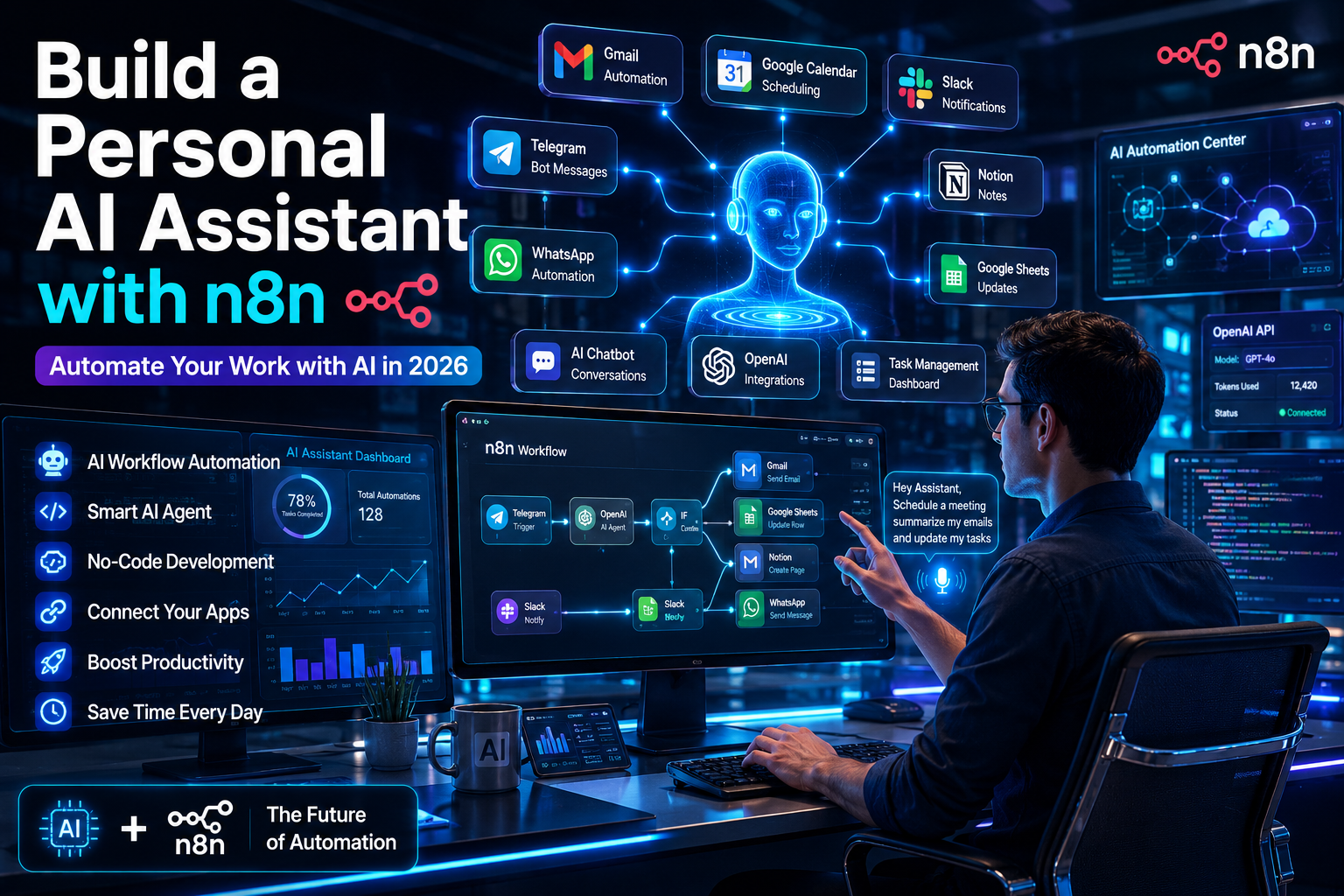
Artificial Intelligence is changing the way people work every day. Many repetitive tasks like checking emails, creating reminders, summarising documents, managing calendars, and answering common questions can now be automated. Instead of spending hours on small daily activities, you can build your own AI assistant that works for you 24/7. The best part is that you don’t need to be an expert programmer to create one. With Build a Personal AI Assistant with n8n, anyone can create powerful AI workflows using simple drag-and-drop automation. Whether you are a student, freelancer, business owner, content creator, or developer, an AI assistant can save time, improve productivity, and reduce manual work. In this complete guide, you will learn how to build a personal AI assistant with n8n, what tools you need, how it works, useful workflow ideas, common mistakes to avoid, and best practices to make your AI assistant smarter and more reliable.
What is n8n?
n8n is an open-source workflow automation platform that connects different applications together. It allows users to automate tasks using visual workflows without writing large amounts of code.
Unlike traditional automation software, n8n offers flexibility because users can customize every workflow according to their needs.
Some common services connected with n8n include:
- Gmail
- Google Calendar
- Slack
- Discord
- Telegram
- OpenAI
- Google Drive
- Notion
- Airtable
- GitHub
- Microsoft Teams
- Webhooks
- REST APIs
With AI integrations, n8n becomes much more powerful because it can think, analyse, summarise, classify, and generate responses automatically.
What is a Personal AI Assistant?
A Personal AI Assistant is software that performs tasks on your behalf using Artificial Intelligence.
Instead of manually completing repetitive work, the assistant understands requests and performs actions automatically.
Your AI assistant can help with:
- Managing emails
- Creating reminders
- Answering questions
- Summarising documents
- Scheduling meetings
- Researching information
- Managing tasks
- Writing content
- Tracking expenses
- Organising notes
Unlike basic chatbots, a personal AI assistant can connect with multiple applications and perform real actions.
Why Build a Personal AI Assistant with n8n?
Many AI assistants only answer questions.
An n8n AI assistant can actually perform tasks.
Some major advantages include:
Saves Time
Instead of switching between multiple applications, your assistant completes tasks automatically.
Increases Productivity
Daily repetitive work disappears so you can focus on important activities.
Works 24/7
Your AI assistant never sleeps and can automate workflows continuously.
No Heavy Coding
Most workflows are created using drag-and-drop nodes.
Connects Hundreds of Apps
You can integrate nearly every popular business application.
Cost Effective
n8n can be self-hosted, making it much cheaper than many enterprise automation platforms.
Things You Need Before Starting
Before building your AI assistant, prepare a few tools.
These include:
- n8n account or self-hosted installation
- OpenAI API key
- Google account
- Gmail access
- Google Calendar
- Telegram Bot (optional)
- Slack Workspace (optional)
- Database (optional)
- Vector database (optional)
Having these tools ready makes the setup process much easier.
How a Personal AI Assistant Works
Understanding the workflow helps beginners build better automation.
The process usually follows these steps.
Step 1: User Sends a Request
The request can come from:
- Telegram
- Slack
- Webhook
- Website
Step 2: n8n Receives the Request
The trigger node activates the workflow.
Step 3: AI Understands the Request
The workflow sends the message to OpenAI or another AI model.
The AI understands the user’s intention.
Step 4: AI Makes a Decision
The AI decides which action should happen.
Examples include:
- Send email
- Create reminder
- Save note
- Search document
- Reply to user
Step 5: n8n Executes the Action
n8n connects with APIs and performs the requested task.
Step 6: Response is Sent Back
The assistant sends the final answer to the user.
Step-by-Step Guide to Build a Personal AI Assistant with n8n
Building your assistant is easier when you follow a structured process.
Install n8n
You can either:
- Use n8n Cloud
- Self-host using Docker
- Install on VPS
- Install locally
After installation, log into the dashboard.
Connect OpenAI
Create an OpenAI API credential.
Add the API key inside n8n.
This allows the workflow to use AI responses.
Create a Trigger
Choose how users will communicate.
Common trigger options include:
- Telegram
- Webhook
- Slack
- Gmail
- Discord
Whenever a user sends a message, the workflow starts.
Add AI Node
Insert the AI model node.
Pass the user’s message.
The AI analyses the request.
Add Decision Logic
Use IF nodes or Switch nodes.
These help separate different requests.
Example:
If user asks for:
- Calendar
- Reminder
- Notes
The workflow performs different actions.
Connect Applications
Use connectors like:
- Gmail
- Google Sheets
- Google Calendar
- Notion
- Airtable
Each connector performs real-world tasks.
Return Results
Finally, send the answer back to the user.
The workflow is complete.
Best Features to Add
A powerful assistant should do more than answer questions.
Here are useful features.
Email Assistant
Your assistant can:
- Read emails
- Draft replies
- Categorise messages
- Delete spam
- Send follow-ups
Calendar Management
The AI can:
- Schedule meetings
- Cancel appointments
- Check availability
- Send reminders
Task Management
Automatically:
- Create tasks
- Update task status
- Organise projects
- Set deadlines
Document Summarisation
Upload PDFs or documents.
The AI generates quick summaries.
Voice Commands
Connect speech recognition.
Users can speak instead of typing.
Daily Briefing
Every morning, receive:
- Weather
- Calendar events
- Emails
- News
- Tasks
AI Note Taking
Save ideas directly into:
- Notion
- Google Docs
- Obsidian
Personal Knowledge Base
Store your documents.
The AI answers questions using your own information.
Real-Life Use Cases
Different users can build different assistants.
Students
Students can automate:
- Study reminders
- Assignment tracking
- Class schedules
- Notes
- Research
Freelancers
Freelancers can automate:
- Client emails
- Invoice reminders
- Project management
- Meeting scheduling
Business Owners
Businesses can automate:
- Customer support
- Sales reports
- Team reminders
- CRM updates
Content Creators
Creators can automate:
- Blog ideas
- YouTube scripts
- Social media captions
- Keyword research
Developers
Developers can automate:
- GitHub notifications
- Error alerts
- Code reviews
- Documentation
Advanced AI Assistant Features
Once your assistant is working, you can improve it further.
Some advanced features include:
Memory
The AI remembers previous conversations.
RAG (Retrieval-Augmented Generation)
The AI answers questions using your own documents.
Multiple AI Models
Switch between:
- OpenAI
- Claude
- Gemini
- Local LLMs
Image Generation
Generate AI images automatically.
Voice Assistant
Talk naturally using speech recognition.
Multi-Agent System
Different AI agents perform specialised tasks.
Examples include:
- Email Agent
- Research Agent
- Finance Agent
- Travel Agent
- Writing Agent
Common Mistakes to Avoid
Many beginners face similar problems.
Avoid these mistakes.
Ignoring Error Handling
Always create fallback workflows.
Giving AI Unlimited Permissions
Limit access to sensitive data.
Poor Prompt Writing
Clear prompts produce better results.
No Logging
Keep records of workflow execution.
Forgetting Rate Limits
APIs have request limitations.
No Testing
Always test workflows before using them daily.
Security Best Practices
Your AI assistant may access sensitive information.
Follow these safety practices.
Protect API Keys
Store keys securely.
Encrypt Sensitive Data
Never expose passwords inside workflows.
Use Authentication
Protect webhooks using authentication.
Limit Permissions
Only allow necessary actions.
Create Backups
Regularly back up workflows.
Best Integrations for n8n AI Assistants
These integrations make your assistant more useful.
- OpenAI
- Gmail
- Google Calendar
- Google Sheets
- Notion
- Airtable
- Slack
- Discord
- Telegram
- Dropbox
- GitHub
- Trello
- ClickUp
- Microsoft Outlook
Benefits of Building Your Own AI Assistant
Creating your own assistant provides long-term value.
Some important benefits include:
- Saves several hours every week
- Reduces repetitive work
- Improves organisation
- Works across multiple apps
- Learns from better prompts
- Easily scalable
- Supports business growth
- Boosts personal productivity
- Reduces manual errors
- Available anytime
Future of Personal AI Assistants
AI assistants are becoming more intelligent every year.
Future assistants will:
- Understand natural conversations better
- Complete multi-step tasks automatically
- Work with robotics
- Handle complex business operations
- Learn user preferences
- Perform autonomous decision-making
- Collaborate with multiple AI agents
- Offer voice-first experiences
- Integrate with smart devices
As AI technology continues to improve, n8n will remain one of the best automation platforms for building custom AI assistants.
Conclusion
Building a Personal AI Assistant with n8n is one of the smartest ways to automate daily work without spending months learning programming. By combining n8n’s workflow automation with powerful AI models, you can create an assistant that reads emails, manages calendars, summarises documents, creates reminders, organises tasks, and even communicates with users through chat applications. Whether you are an individual looking to save time or a business wanting to improve efficiency, n8n offers flexibility, scalability, and affordability. Start with a simple workflow, gradually add more features, and keep improving your assistant as your needs grow. The future of work belongs to intelligent automation, and building your own AI assistant today is an excellent step towards working smarter rather than harder.
Frequently Asked Questions (FAQs)
Is n8n free to use?
Yes. n8n offers a free self-hosted version, while cloud plans are available for users who prefer managed hosting.
Do I need coding knowledge?
No. Most workflows can be built using drag-and-drop nodes, although basic programming knowledge can help with advanced customisation.
Can I connect OpenAI with n8n?
Yes. n8n supports OpenAI integration using API keys, allowing AI-powered workflows.
Can my AI assistant send emails?
Yes. By connecting Gmail or Outlook, your assistant can read, draft, and send emails automatically.
Can n8n work with WhatsApp?
Yes. Using the WhatsApp Business API or supported providers, n8n can automate messaging workflows.
Is n8n secure?
Yes, if configured properly. Protect API keys, enable authentication, restrict permissions, and regularly back up workflows.
Can I build an AI assistant for my business?
Absolutely. Many businesses use n8n to automate customer support, CRM updates, reporting, scheduling, and internal operations.
Can I use local AI models instead of OpenAI?
Yes. n8n supports integrations with local large language models through APIs, giving you more control over privacy and costs.