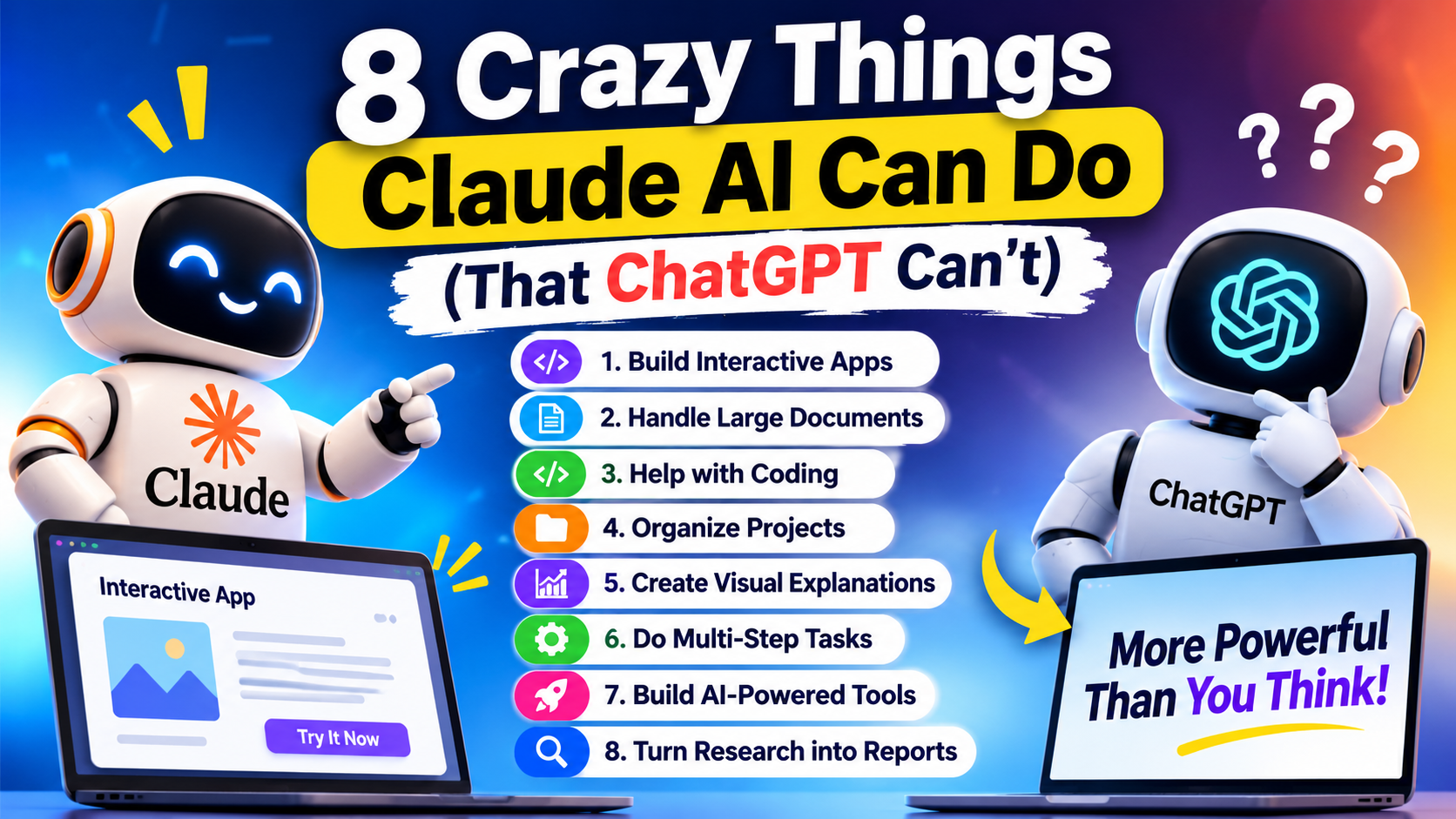
Artificial intelligence is changing how we work, learn, create content, and solve everyday problems. Two popular AI assistants, Claude AI and ChatGPT, are helping millions of people save time and improve their productivity. But have you ever wondered what Claude can do differently from ChatGPT? Some of Claude’s features make it especially useful for coding, working with long documents, creating interactive tools, and handling complex projects. For example, Claude can help developers build applications, analyze large amounts of information, and work with files in a structured way. Some of these abilities are also available in ChatGPT, but the experience and available tools can be different. In this article, we will explore eight impressive things Claude AI can do that may surprise you. You will learn how these features work, who can benefit from them, and when Claude might be a better choice for your daily work.
1. Claude AI Can Turn Simple Ideas Into Interactive Apps

One of the most interesting features of Claude AI is called Artifacts. It allows users to turn ideas into visible creations, such as interactive applications, website designs, diagrams, and code-based tools.
Instead of giving you only a written explanation, Claude can generate something you can preview and refine.
Imagine you want to create a simple calculator for your website. You do not need to write every line of code yourself. You can explain what the calculator should do, and Claude can generate an interactive version.
What can you build with Claude Artifacts?
- Interactive calculators for websites.
- Simple business dashboards.
- To-do list applications.
- Learning tools and quizzes.
- Website prototypes and landing-page designs.
- Charts, diagrams, and visual explanations.
For example, a digital marketing agency could create a basic SEO audit checklist or a keyword planning tool. A teacher could build an interactive quiz, while a startup founder could develop a prototype before hiring a developer.
Example prompt to try
“Create an interactive SEO audit checklist with checkboxes for title tags, meta descriptions, page speed, mobile responsiveness, internal links, and image alt text. Show a completion percentage and let users reset the checklist.”
Claude can generate a useful starting point that you can review and improve.
Why is this useful?
It makes software prototyping easier for people who do not have advanced programming skills. However, an Artifact is not automatically a complete production-ready application. Authentication, databases, payment systems, and external integrations may require additional development.
It is also important to be fair in the comparison: ChatGPT can create interactive outputs and build apps or websites through its own available tools. Artifacts are a distinctive part of Claude’s experience, not proof that ChatGPT cannot build applications.
2. Claude Can Work With Large Collections of Documents

Reading a long report can take hours. If you have several PDFs, research papers, business documents, or technical files, finding the most important information can become even more difficult.
Claude is designed to help with this kind of work through document uploads, project knowledge, and context-handling features. Depending on the plan and model, it can analyze lengthy materials and help you find useful information.
For example, suppose you have 20 documents related to a new business idea. You want to understand the market, customer problems, competitors, and possible risks.
You can upload supported files or organize them in a Claude Project, then ask questions about their contents.
What can Claude do with documents?
- Summarize lengthy reports in simple language.
- Compare information across multiple documents.
- Extract important dates, names, figures, and facts.
- Identify differences between two versions of a document.
- Create a list of important findings.
- Help you locate supporting evidence for a business decision.
Example prompt to try
“Analyze the documents I uploaded. Create a report covering the main findings, important statistics, repeated themes, differences between the sources, and unanswered questions. Clearly identify which document supports each important claim.”
This can be useful for researchers, students, business owners, consultants, and content writers.
Why is this useful?
Instead of reading every page from beginning to end, you can start with a structured overview and focus on the most relevant sections.
However, long context does not guarantee perfect understanding. Claude may overlook details, confuse similar figures, or produce an incorrect summary. Always check important claims against the original documents.
ChatGPT also supports document uploads and file analysis, so the practical difference depends on your file types, context limits, model, and workflow.
3. Claude Can Help Developers Build and Improve Code

Coding is one of the most popular uses of AI assistants. Developers can use AI to write code, explain unfamiliar programming languages, identify errors, and improve existing software.
Claude has gained attention for its coding capabilities, especially when developers need help understanding codebases, planning changes, or working through complicated programming problems. Anthropic also provides coding-focused products and tools for software development.
Imagine that your website has a navigation menu that stops working on mobile devices. You may not know whether the problem comes from JavaScript, CSS, or the HTML structure.
You can provide the relevant code and explain what is happening. Claude can inspect the code, suggest possible causes, and propose corrections.
How can Claude help with coding?
- Generate HTML, CSS, JavaScript, Python, and other code.
- Find possible bugs in existing code.
- Explain unfamiliar functions.
- Suggest improvements to website responsiveness.
- Help write and review API integrations.
- Break a large programming task into smaller steps.
- Assist with tests and documentation.
Example prompt to try
“Review this website header code. The mobile navigation button does not open the menu. Find the likely cause, explain the problem in simple language, and provide corrected HTML, CSS, and JavaScript. Keep the existing design and desktop layout unchanged.”
This kind of instruction is especially helpful because it explains both the problem and the parts that must not change.
Why is this useful?
Claude can act like a coding assistant that helps developers move from a vague problem to a testable solution.
But generated code still needs testing. It may introduce new bugs, misunderstand your framework, or overlook security issues. For important applications, use version control and test changes before deploying them.
ChatGPT also offers strong coding assistance. The best choice depends on the specific task, available tools, model quality, and your development environment.
4. Claude Can Keep Related Work Organized With Projects

Have you ever started an AI conversation, returned a few days later, and found yourself explaining the entire project again?
Claude Projects help reduce this problem by grouping related conversations, instructions, and reference materials into a dedicated workspace. Supported paid plans also provide project knowledge features for working with larger collections of information.
For example, you could create separate Projects for:
- An AI startup blog.
- Website development.
- SEO and digital marketing.
- Product descriptions.
- A research project.
- Business proposals and reports.
Each Project can have its own instructions and relevant documents.
How does this help in real work?
Suppose you publish articles about AI tools. You could create a Project containing your brand guidelines, preferred writing style, target audience, keyword research, and previous articles.
Then, when you ask Claude to write a new article, it can use the available project context instead of relying entirely on your latest message.
Example prompt to try
“Use the brand guidelines and previous articles in this Project. Create a new SEO article in simple English, avoid repeating the same examples, use clear headings, and distinguish verified facts from opinions.”
Why is this useful?
Projects can make repeated work more consistent. They are particularly useful for businesses and creators who produce content regularly or manage long-running tasks.
There is an important limitation: a Project is not a guarantee that every previous conversation is remembered perfectly. You should keep essential instructions and facts in the project knowledge area and check whether the relevant files are available.
ChatGPT also has Projects with files and instructions. Therefore, this is a useful Claude feature rather than an exclusive capability that ChatGPT lacks.
5. Claude Can Create Visual Explanations, Diagrams, and Data Views

Sometimes, a long explanation is not the best way to understand an idea. A diagram, chart, or interactive visual can make complicated information much easier to follow.
Claude can generate visual content through Artifacts, including diagrams, flowcharts, SVG graphics, and interactive components.
For example, imagine you want to explain how an AI agent works. You could ask Claude to create a flowchart showing how the agent receives a request, collects information, chooses an action, uses a tool, and produces a result.
Instead of reading several paragraphs, your audience can see the entire process.
What types of visual content can Claude create?
- Flowcharts explaining business processes.
- Diagrams showing how AI systems work.
- Interactive charts and simple dashboards.
- Visual study guides for students.
- Timelines for projects and product launches.
- SVG graphics and basic website components.
Example prompt to try
“Create an interactive flowchart that explains how an AI agent works. Include the user request, planning, tool selection, execution, result checking, and final response. Add short descriptions to each step and make the design easy for beginners to understand.”
Claude can produce a useful visual starting point that you can refine by asking for clearer labels, additional steps, or a different layout.
Why is this useful?
Visual explanations are helpful for educators, startup founders, marketers, developers, and anyone who needs to communicate complex ideas clearly.
For example, a startup could use a workflow diagram to explain its product to potential customers. A marketing team could turn a complicated lead-generation process into a simple visual guide.
However, complex visuals may contain inaccurate labels or confusing connections. Review the final result before publishing it.
ChatGPT can also create charts, diagrams, and visual outputs. The difference is often the workflow and presentation rather than the ability to produce visuals at all.
6. Claude Can Help With Multi-Step Computer Tasks

One of the most interesting developments in AI is the move from answering questions to performing actions through software.
Claude has computer-use capabilities in supported configurations, allowing it to interact with computer interfaces through methods such as viewing screens, clicking controls, and entering text. Access and setup depend on the particular Claude product, model, and integration. Anthropic has also documented computer use through its API.
This opens up possibilities for automating repetitive tasks that normally require a person to move between applications.
Imagine you need to review a group of records, compare information, and prepare a summary. With an appropriately configured computer-use workflow, an AI assistant may be able to carry out some of those steps through the available interface.
Examples of computer-use tasks
- Navigating supported websites.
- Entering information into forms.
- Moving between application screens.
- Performing repetitive interface actions.
- Helping test how a website behaves.
- Assisting with workflows involving several applications.
Example prompt to try
“Help me review these sample customer records. Open the approved spreadsheet, check the specified fields, identify missing values, and prepare a summary of the problems. Do not delete records or submit any forms without my approval.”
The exact task must be supported by the tools and permissions available in your environment.
Why is this useful?
Computer use can reduce repetitive manual work and help people connect tasks that would otherwise require many individual steps.
However, this technology is not perfect. An AI agent may click the wrong button, misread a screen, or fail when a website changes. Sensitive actions, such as payments, account changes, and deleting data, require particular care.
ChatGPT also supports computer interaction and agentic workflows in supported products. Therefore, it would be inaccurate to say that computer use is something Claude can do but ChatGPT cannot.
The practical advantage depends on which environment supports your particular task.
7. Claude Can Help Build AI-Powered Interactive Tools

Building an application that responds intelligently to user input usually requires more than a static webpage. You may need a user interface, logic, and a connection to an AI model.
Claude Artifacts can support certain AI-powered interactive experiences. Anthropic documents ways to create shareable applications that use Claude’s capabilities within the Artifact environment, subject to its platform restrictions.
This means you can explore an idea by describing the experience you want users to have.
For example, imagine you run a digital marketing agency and want to develop a simple tool that helps business owners generate marketing ideas.
A user could enter a business type, target audience, and service location. The tool could then provide suggestions based on the information entered.
What kinds of tools could you prototype?
- AI writing assistants.
- Content idea generators.
- Simple customer-support experiences.
- Interactive educational tools.
- Marketing planning interfaces.
- Personal productivity assistants.
Example prompt to try
“Build an interactive marketing idea generator for small businesses. Ask users for their business name, industry, target audience, and main service. Let them choose between social media ideas, blog topics, and advertising concepts. Display the results in a clean interface with a copy option.”
Claude can help generate the interface and code for a prototype. Depending on the functionality, you may need to refine the instructions and test the tool several times.
Why is this useful?
It allows entrepreneurs to test ideas before investing in full-scale software development.
For example, you can demonstrate a basic version of a product to potential customers, gather feedback, and identify the features people actually want.
Still, an interactive prototype is not necessarily a complete business application. Persistent data storage, user accounts, third-party API calls, payment processing, and production security may require an external backend or other development tools. Artifacts have platform-specific limitations that should be checked before planning a commercial product.
ChatGPT can also help build interactive tools and websites through its available development features. The right choice depends on the application you want to create.
8. Claude Can Help Turn Research Into Structured Reports

Research is not just about collecting information. You also need to organize the findings, compare evidence, identify important patterns, and explain what the results mean.
Claude can help with these stages by analyzing available documents, assisting with research, organizing findings, and creating structured reports. Its available web search, integrations, and research features depend on the product and configuration.
Suppose you want to research the AI startup market. You may need to investigate customer problems, emerging products, possible competitors, pricing approaches, and business opportunities.
Claude can help organize the investigation into a report rather than leaving you with a collection of disconnected notes.
What can Claude help you prepare?
- Market research summaries.
- Competitor comparison reports.
- Lists of customer problems and opportunities.
- Research questions and hypotheses.
- Reports based on uploaded documents.
- Structured findings with source references.
- Executive summaries for business owners.
Example prompt to try
“Prepare a beginner-friendly research report on AI startup opportunities. Organize it into market trends, customer problems, potential solutions, competition, risks, and next steps. Use reliable sources when web research is available, include citations for factual claims, and clearly label estimates and assumptions.”
Why is this useful?
A structured report helps you make sense of a topic and decide what to investigate next. It can be useful for startup founders, students, marketers, consultants, and business teams.
For instance, before launching a new AI service, a founder could use a research report to develop a list of customer questions and potential competitors to investigate.
But AI-generated research should not be treated as automatically correct. Check whether sources actually support the claims, confirm dates and figures, and distinguish facts from predictions.
ChatGPT also supports research and source-based reports. Claude may suit your workflow better in some cases, but the quality of the final report depends on the available sources, tools, and verification process.
Claude AI vs ChatGPT: Which One Is Better?
Now that we have explored eight interesting Claude AI capabilities, you may be wondering whether you should switch from ChatGPT to Claude.
The answer depends on what you want to accomplish. Both are powerful AI assistants, and their features change as new models and tools become available.
| Task | What to consider |
|---|---|
| Interactive apps and prototypes | Try Claude Artifacts and compare them with ChatGPT’s available app-building tools. |
| Long documents | Compare file support, context limits, and the accuracy of summaries. |
| Coding | Test both tools on the same real programming problem. |
| Ongoing projects | Compare Projects, file organization, and instruction handling. |
| Diagrams and visuals | Evaluate the quality of the generated output and how easily you can edit it. |
| Computer automation | Check which product supports the applications and actions you need. |
| AI-powered tools | Compare prototype capabilities, integrations, and deployment requirements. |
| Research and reports | Compare source quality, citations, analysis, and verification effort. |
OpenAI’s documentation also describes ChatGPT capabilities such as data analysis, file handling, Projects, and other tools.
When should you choose Claude AI?
Claude is worth trying if you want to experiment with Artifacts, organize work using Claude Projects, analyze documents, or use Claude’s coding and development tools.
It can be especially useful when your work involves creating and refining substantial pieces of content or building prototypes.
When should you choose ChatGPT?
ChatGPT may be a better fit if its available tools, integrations, custom assistants, data analysis, or other features match your workflow more closely.
You do not need to use only one assistant. Some people use different AI tools for different tasks and compare their results before making important decisions.
Is Claude AI better than ChatGPT in 2026?
There is no universal winner. Performance depends on the model, task, subscription, available tools, and the quality of your instructions.
The most reliable approach is to give both assistants the same task and compare their accuracy, usefulness, speed, and the amount of editing required.
Benefits of Using Claude AI for Everyday Work
Claude can be helpful even if you are not a programmer or AI expert. You can use it to organize ideas, understand information, prepare drafts, and explore new projects.
Here are some practical ways to get more value from it.
- Start with a clear goal. Explain what you want to achieve instead of asking a very broad question.
- Provide relevant context. Share the necessary documents, examples, or instructions.
- Ask for a specific output. For example, request a checklist, report, diagram, or working prototype.
- Improve the result step by step. Ask Claude to correct errors, simplify explanations, or change the design.
- Verify important information. Check factual claims, calculations, code, and sources before relying on them.
These simple habits can improve the quality of AI-generated work, regardless of which assistant you choose.
Conclusion
Claude AI offers several impressive features that make it useful for coding, document analysis, interactive applications, visual explanations, project organization, and research. Its Artifacts feature is particularly interesting because it allows users to turn ideas into interactive outputs without starting from scratch.
However, the title of this article needs one important clarification: there are very few broad capabilities that Claude can perform and ChatGPT categorically cannot. Both tools are developing quickly, and their abilities often overlap.
The real difference comes from how each tool implements a feature, which integrations are available, and how well it handles your particular task.
If you are a student, developer, content creator, or business owner, try Claude alongside ChatGPT on a real project. Compare the results, check the accuracy, and choose the assistant that saves you the most time and produces the most useful work.
The best AI tool is not necessarily the one with the most exciting features. It is the one that helps you solve real problems effectively.
AI in Cybersecurity: 6 Enterprise Trends for 2026
Frequently Asked Questions (FAQs)
1. What are the most amazing things Claude AI can do?
Claude AI can create interactive Artifacts, analyze documents, assist with coding, organize work through Projects, generate diagrams, support computer-use workflows, help prototype AI-powered tools, and organize research into structured reports.
2. Is Claude AI better than ChatGPT?
Neither tool is always better. Claude may suit certain coding, document, or Artifact workflows, while ChatGPT offers its own capabilities for research, data analysis, file handling, and interactive tasks. The best choice depends on your requirements.
3. Can Claude AI create a website?
Yes. Claude can generate website code and create website prototypes through supported features such as Artifacts. A complete production website may still require hosting, a domain, testing, security, and backend development.
4. Can Claude AI write code without human help?
Claude can generate and modify code from natural-language instructions. However, its output may contain errors or security problems. Human review and testing remain important, especially for production software.
5. What is Claude Artifacts?
Claude Artifacts is a feature that displays substantial outputs, such as code, documents, diagrams, and interactive applications, in a separate workspace. Users can review, edit, and refine supported outputs.
6. Can Claude AI analyze PDF files?
Yes. Claude supports document uploads, including PDFs, under supported file and usage limits. It can summarize documents, extract information, and answer questions about their contents. Always verify important details against the original file.
7. Can Claude AI build an app without coding knowledge?
Claude can help non-programmers create simple prototypes by describing what they want in ordinary language. More advanced applications may require programming knowledge, external services, databases, or a developer.
8. Is Claude AI free to use?
Claude offers a free option as well as paid plans. Available features, usage limits, and access to advanced capabilities vary by plan and can change. Check the official Claude website for current details.
9. Can Claude AI replace human developers?
Claude can assist with many programming tasks, but it does not reliably replace human developers in every situation. Complex systems still need architecture decisions, testing, security reviews, maintenance, and human responsibility.
10. Which is the best AI tool for startups in 2026?
The best tool depends on the startup’s needs. Claude and ChatGPT can both help with research, coding, content creation, and product prototypes. Compare their capabilities, pricing, integrations, and output quality before choosing.