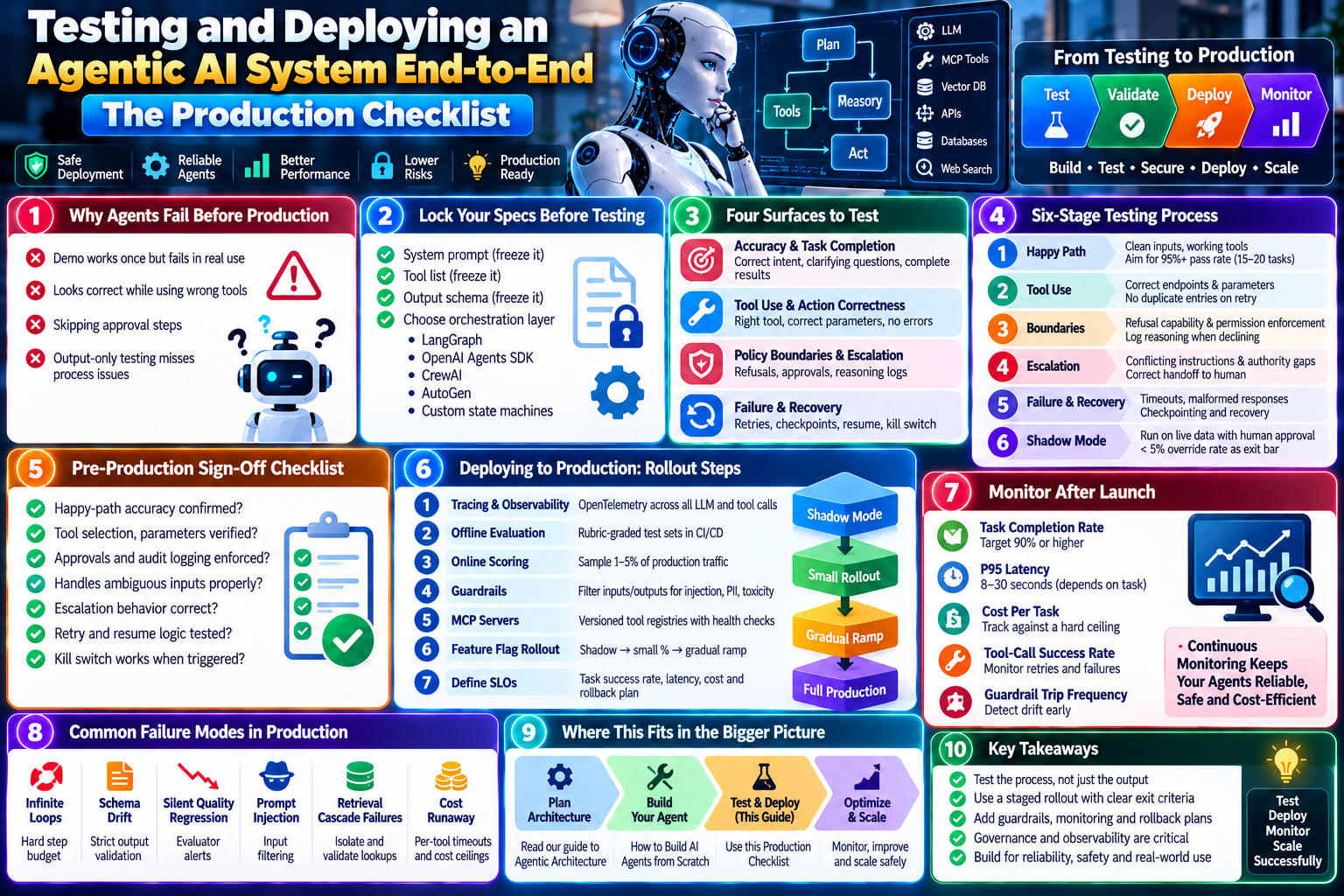
An agentic AI production checklist is the part most teams skip. They design the architecture. They build the agent. Then they ship it straight to users, with no structured testing pass in between. That gap is where most agentic systems fail in public. This guide covers the end-to-end process: what to test, how to run a staged rollout, and what to monitor once the system is live.

Why Most Agentic AI Systems Fail Before Production
A demo that works once proves very little. An agent can look correct while actually calling the wrong tool, or skipping an approval step. Specifically, output-only testing misses this entirely. A correct-looking result can still come from the wrong process underneath. That is the core reason an agentic AI production checklist has to test the process, not just the final answer.
Lock Your Specs Before You Start
Before any testing begins, freeze three things. First, the system prompt. Second, the tool list. Third, the output schema. Changing these mid-test invalidates everything you have measured so far. Once they are locked, pick your orchestration layer. LangGraph, the OpenAI Agents SDK, CrewAI, AutoGen, and custom state machines are the common choices.
The Four Surfaces an Agentic AI Production Checklist Must Test
Testing an agent means testing four separate surfaces, not just the final output.
- Accuracy and task completion: does the agent resolve intent correctly, ask clarifying questions when needed, and deliver a result that satisfies every requirement?
- Tool use and action correctness: did it pick the right tool, pass correct parameters, use the response properly, and execute without errors?
- Policy boundaries and escalation: does it refuse out-of-scope requests cleanly, enforce approval on high-impact actions, and log its reasoning?
- Failure and recovery: does it retry with proper backoff, track completed steps, resume from the last checkpoint, and respond to a kill switch?
The Six-Stage Testing Process
Run these stages in order. Do not skip ahead to shadow mode just because the happy path looks clean.
- Happy path: clean inputs and working tools. Aim for a 95%+ pass rate across 15 to 20 representative tasks.
- Tool use: correct endpoints and parameters, with response incorporation verified and no duplicate entries on retry.
- Boundaries: refusal capability and permission enforcement, with the agent logging its reasoning when it declines.
- Escalation: conflicting instructions and authority gaps. A correct handoff to a human should count as a pass, not a failure.
- Failure and recovery: timeouts, malformed responses, and interruptions. Confirm checkpointing works and partial states are recoverable.
- Shadow mode: run on live production data with human approval. Set a clear exit bar, such as under 5% override rate over a fixed number of days.
Pre-Production Sign-Off: The Checklist
Before anything ships, every item here needs a yes.
- Is happy-path accuracy confirmed across your representative task set?
- Are tool selection, parameters, and call sequencing all verified?
- Are required approvals and audit logging enforced on high-impact actions?
- Does the agent handle ambiguous or contradictory inputs appropriately?
- Is escalation behavior correct when the agent hits an authority gap?
- Have retry and resume logic been tested under real failure conditions?
- Does the kill switch actually work when triggered?
Deploying to Production: The Rollout Steps
Once sign-off passes, deployment itself follows a staged path. Skipping stages is how silent regressions reach every user at once.
- Implement tracing with OpenTelemetry-based visibility across every LLM and tool call.
- Run offline evaluation with rubric-graded test sets, wired into your CI/CD pipeline.
- Add online scoring that samples 1 to 5% of production traffic for ongoing quality checks.
- Add guardrails that filter inputs and outputs for prompt injection, PII, and toxicity.
- Stage your MCP servers as versioned tool registries with health checks.
- Roll out behind a feature flag: shadow mode for 24 to 72 hours, then a small percentage, then a gradual ramp.
- Define SLOs for task success rate, latency, and per-task cost, with a clear rollback procedure if they slip.
What to Monitor After Launch
Launch is not the finish line. These five metrics catch problems before users notice them.
- Task completion rate, with 90% or higher as a reasonable floor for most use cases.
- P95 latency, typically 8 to 30 seconds depending on task complexity.
- Cost per task, tracked against a hard ceiling.
- Tool-call success and retry rates.
- Guardrail trip frequency, which flags drift before it becomes a bigger problem.
Common Failure Modes in Production Agentic Systems
Six failure patterns show up again and again. Each one needs a specific architectural control, not just better prompting.
- Infinite loops, controlled with a hard step budget per task.
- Schema drift, caught with strict output validation.
- Silent quality regression, caught with evaluator alerts on your online scoring sample.
- Prompt injection, blocked with input filtering before the agent ever sees the content.
- Retrieval cascade failures, where one bad lookup poisons every step after it.
- Cost runaway, prevented with per-tool timeouts and hard cost ceilings.
Where This Checklist Fits With Architecture and Build
This checklist assumes you already have a working system. If you are still deciding how to structure the agent itself, start with our guide to agentic architecture. If you have not built anything yet, how to build AI agents from scratch covers that first step. For a deeper look at the testing framework behind this checklist, Codebridge’s practical testing framework is a strong reference.
FAQ: Agentic AI Production Checklist
How long should shadow mode run before full rollout?
Most teams run shadow mode for 24 to 72 hours before moving to a small percentage of real traffic. Set a clear exit bar in advance, such as a human override rate under 5% over that window.
What is the single most skipped step in an agentic AI production checklist?
Process-level testing. Teams check whether the final output looks correct, but skip verifying the tool trace, the parameters used, and whether required approvals actually fired.
Should a correct human escalation count as a test failure?
No. When an agent hits a genuine authority gap or conflicting instruction and hands off to a human, that is the correct behavior. Scoring it as a failure pushes teams toward agents that guess instead of escalating.