Businesses are changing how they work because artificial intelligence is becoming more powerful and useful. Earlier, most automation systems followed fixed rules. They performed the same steps every time, even when a situation changed. Today, a new approach called agentic AI is helping businesses build smarter and more flexible workflows. These systems can understand goals, analyze information, choose actions, use tools, and adjust their next steps according to the results.
Building dynamic workflows with an agentic system means creating processes that can respond to changing situations instead of following only a fixed sequence. This approach can help businesses save time, reduce repetitive work, improve customer service, and make better use of their resources.
In this guide, you will learn what dynamic workflows are, how agentic AI works, how these systems are built, and where they can be used in real life. You will also discover their benefits, challenges, tools, and future opportunities. Whether you are a beginner, business owner, developer, or startup founder, this article will help you understand how to start using agentic workflows in a practical way.
1. What Are Dynamic Workflows?
A dynamic workflow is a process that can change its steps according to the situation, available information, or final goal.
In a traditional workflow, every action is usually planned in advance. The system follows a fixed path from the first step to the last step. If something unexpected happens, a person may need to change the process manually.
A dynamic workflow is more flexible. It can evaluate new information and choose a suitable next action based on predefined rules, current conditions, or decisions made by an AI system.
For example, imagine an online store receives a customer complaint about a delayed order.
A traditional workflow may send the same automatic email to every customer. A dynamic workflow can check the order status, identify the reason for the delay, review the customer’s message, and select an appropriate response.
If the package is already on its way, the system may provide a delivery update. If the package is missing, it may create a support ticket for a human employee.
This is the basic idea behind dynamic workflow automation.
Main Features of Dynamic Workflows
Dynamic workflows have several important features that make them useful for modern businesses.
1. Flexibility: The workflow can follow different paths depending on the situation.
2. Real-time decisions: It can use new information to determine the next step.
3. Adaptability: It can respond to changes in data, business requirements, or task results.
4. Automation: It can complete repetitive activities with less human involvement.
5. Continuous improvement: Its performance can be reviewed and improved using feedback and operational data.
These features help organizations manage tasks that cannot always be handled through a single fixed process.
2. What Is an Agentic System?
An agentic system is an AI-powered system designed to work toward a goal by selecting and performing actions. Depending on its design, it may plan tasks, use external tools, evaluate results, and decide what to do next.
Unlike a simple chatbot that mainly responds to questions, an AI agent may be able to carry out a sequence of actions to complete a task.
For example, suppose a business wants to research competitors and prepare a report.
An agentic system could be designed to:
- Understand the research objective.
- Search approved information sources.
- Collect relevant details.
- Compare the available information.
- Identify important findings.
- Prepare a report.
- Ask a human to review the final result.
The system does not necessarily need a human to specify every individual step. It can select the next action based on its instructions, tools, and the information it receives.
However, an AI agent is not automatically correct or fully independent. Its abilities depend on the underlying model, available tools, permissions, workflow design, and safety controls.
How Agentic AI Differs From Traditional Automation
Traditional automation is useful when a process follows predictable rules. Agentic AI can be useful when a task requires interpreting information, handling different situations, or choosing between multiple possible actions.
For example, a traditional automation system may send an invoice reminder seven days after an invoice becomes overdue.
An agentic system may also review the customer’s payment status, check previous communications, classify the situation, draft a suitable reminder, and recommend whether a human should follow up.
The second system has more flexibility, but it also needs stronger monitoring and controls.
3. What Does Building Dynamic Workflows With Agentic AI Mean?
Building dynamic workflows with agentic AI means connecting AI agents, software tools, business data, and decision-making rules to create a process that can adjust its actions according to the task.
Instead of designing every possible path manually, developers define the goal, available tools, operating rules, and conditions that determine when the system should act or request help.
The AI agent then helps manage the steps within those boundaries.
Consider a marketing agency that wants to create and publish social media content.
A dynamic agentic workflow could:
- Review the content calendar.
- Identify the next planned topic.
- Research relevant information.
- Prepare a draft post.
- Check the content against brand guidelines.
- Create a suggested caption and hashtags.
- Send the draft for approval.
- Schedule the approved content.
- Record the publication status.
If the topic requires more research, the workflow can return to the research stage. If the content contains unsupported claims, it can request corrections. If approval is missing, it can wait rather than publishing automatically.
This creates a flexible process with clear decision points.
The goal is not to use AI for every step. The goal is to combine automation, AI reasoning, and human judgment in the most useful way.
4. How Does an Agentic Workflow Work?
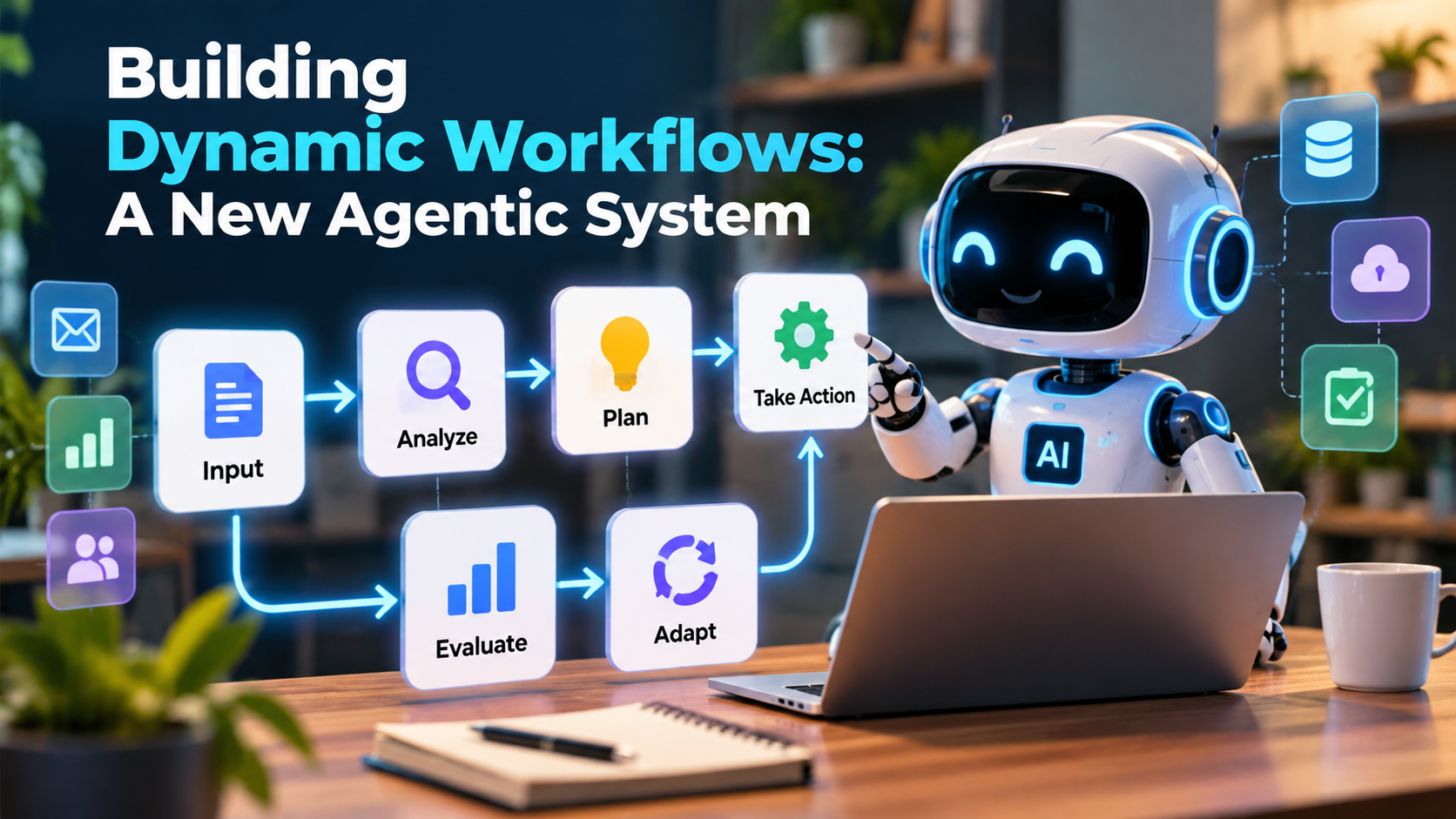
An agentic workflow usually follows a cycle of understanding, planning, acting, checking, and improving.
The exact structure depends on the task. Some workflows use one AI agent, while others coordinate several specialized agents.
Step 1: Define the Goal
Every workflow begins with a clear objective.
For example, a business may want to answer customer questions, process incoming leads, summarize reports, or prepare product descriptions.
A clear goal helps the system understand what successful completion looks like.
Instead of writing, “Handle customer messages,” a better goal would be, “Classify incoming customer messages, draft suitable responses using approved company information, and send unusual or sensitive cases to a human employee.”
Step 2: Collect Information
The workflow gathers the information required to complete the task.
This information may come from databases, documents, customer relationship management systems, spreadsheets, APIs, or approved websites.
For example, a sales agent may need a lead’s company name, business email, service requirements, and previous communication history.
The system should access only the information it is authorized to use.
Step 3: Analyze the Situation
The AI agent reviews the available information and identifies the next appropriate action.
It may classify a request, compare options, identify missing details, or determine whether additional research is required.
For example, a customer asking about delivery may need a simple status update. A customer reporting a damaged product may require a different process.
Step 4: Plan the Actions
The agent creates a plan or selects the next step based on its instructions and the information available.
A simple task may require only one action. A complex task may need several connected actions.
For example, preparing a market research report may require collecting data, checking sources, comparing competitors, and summarizing findings.
Step 5: Execute the Actions
The workflow uses approved tools to perform the selected actions.
These tools may include email systems, databases, web search, business applications, document editors, or internal APIs.
The agent might draft an email, update a record, generate a report, or create a support ticket.
Actions that have significant consequences should require appropriate permission and, where necessary, human approval.
Step 6: Check the Results
After completing an action, the system checks whether the result meets the expected requirements.
For example, an AI agent preparing a product description may check whether the draft includes the required product details and follows the brand’s writing rules.
If the result is incomplete, the workflow can retry, request more information, or send the task to a human.
Step 7: Adapt the Workflow
The workflow changes its next step according to the result.
If all requirements are satisfied, the task may continue to completion. If a problem appears, the workflow may use another tool, gather additional information, or request human assistance.
This feedback cycle is what makes an agentic workflow more adaptable than a purely fixed process.
5. Main Components of a Dynamic Agentic System
A reliable agentic workflow needs several components working together. Understanding these components helps beginners plan a system before choosing software or writing code.
5.1 AI Model
The AI model helps interpret information, understand instructions, generate content, and select suitable actions.
Different models have different capabilities, costs, response speeds, and reliability levels. A simple classification task may not need the most powerful model available.
Choosing a model that fits the task can help balance quality, speed, and cost.
5.2 AI Agent
The agent uses the model, instructions, and available tools to work toward a defined goal.
An agent may be responsible for research, customer support, content creation, data analysis, or another specific task.
Clear responsibilities make it easier to evaluate its performance.
5.3 Tools and Integrations
Tools allow the agent to interact with external systems.
For example, a workflow may use:
- Email tools to draft and send messages.
- Database tools to retrieve business information.
- CRM integrations to update customer records.
- Search tools to find relevant information.
- Spreadsheet tools to analyze data.
- Calendar tools to manage appointments.
Tool access should be limited to the actions the agent actually needs.
5.4 Memory and Context
Memory helps an agent retain or retrieve relevant information across the steps of a task.
Short-term context may include the instructions and results from the current workflow. Long-term memory may store approved preferences, project information, or other useful details.
Not every agent needs long-term memory. Some tasks are safer and simpler when the system uses only the information provided for the current task.
5.5 Workflow Orchestrator
The workflow orchestrator manages how tasks move between agents, tools, and decision points.
It may start tasks, wait for external responses, handle errors, track progress, and determine which step runs next.
In a multi-agent system, orchestration helps ensure that agents work in the correct order and share the necessary information.
5.6 Rules and Guardrails
Guardrails define what the system can and cannot do.
For example, a company may allow an AI agent to draft customer emails but require human approval before sending messages involving refunds or legal complaints.
Rules may also limit spending, restrict access to confidential data, prevent duplicate actions, and stop the workflow after a maximum number of retries.
5.7 Monitoring and Evaluation
Monitoring helps identify failures, delays, unexpected costs, and poor-quality results.
Evaluation checks whether the workflow is achieving its intended objective.
Useful measures include task completion rate, accuracy, average processing time, cost per completed task, and the percentage of tasks requiring human intervention.
Together, these components form the foundation of a reliable agentic system.
6. Types of Dynamic Agentic Workflows
Different business problems require different workflow designs. Selecting the right design can reduce complexity and improve reliability.
6.1 Sequential Workflow
A sequential workflow completes tasks in a particular order.
For example, an AI content workflow may research a topic, prepare an outline, write a draft, check SEO requirements, and send the article for review.
This design is suitable when later steps depend on earlier results.
6.2 Conditional Workflow
A conditional workflow selects a path based on a rule or decision.
For example, a customer support system may send billing questions to one process and technical questions to another.
AI can help classify the request, while explicit rules determine what happens next.
6.3 Parallel Workflow
A parallel workflow performs multiple independent tasks at the same time.
For example, a market research system could assign separate tasks to analyze customer reviews, competitor websites, and industry reports.
The results can then be combined into one report.
Parallel processing can reduce completion time, but the system must handle conflicting information and incomplete results.
6.4 Feedback-Based Workflow
A feedback-based workflow checks results and repeats selected steps when necessary.
For example, an AI writing agent may produce a draft, evaluate it against a quality checklist, and revise it if important requirements are missing.
The workflow should have a retry limit and a clear stopping condition to prevent endless loops.
6.5 Multi-Agent Workflow
A multi-agent workflow uses multiple AI agents with different responsibilities.
One agent may conduct research, another may analyze findings, and a third may prepare the final report.
This structure can be useful for complex tasks, but it introduces additional coordination, cost, and evaluation requirements.
A multi-agent approach is not always better than a single agent. The extra complexity should solve a real problem.
7. Step-by-Step Guide to Building a Dynamic Agentic Workflow
If you are a beginner, the best approach is to start with a small, well-defined task. You do not need to build a large AI platform to understand how agentic workflows work.
Step 1: Identify a Repetitive Business Problem
Start by finding a task that consumes time and follows a reasonably clear process.
Examples include answering common customer questions, summarizing reports, classifying leads, preparing content drafts, or organizing support tickets.
Choose a task that has measurable results and manageable risks.
Step 2: Map the Existing Process
Write down how the task is currently completed.
Identify the starting point, information required, actions performed, decisions made, final result, and common errors.
This process map helps you decide which steps should be automated and which should remain under human control.
Step 3: Decide Where AI Is Needed
Not every step requires an AI model.
For example, checking whether an invoice is overdue can often be handled with a simple rule. Understanding a customer’s free-text complaint may benefit from AI.
Use traditional automation for predictable operations and AI for tasks that require interpretation or flexible decision-making.
Step 4: Select the Tools
Choose tools according to your technical skills, budget, security requirements, and integration needs.
Beginners may prefer visual workflow builders. Developers may prefer code-based orchestration frameworks that provide greater control over execution and state.
Before connecting business accounts, review permissions, data handling, and the available safeguards.
Step 5: Create Clear Instructions
Give the agent a specific role, objective, available tools, operating rules, and expected output.
For example, a lead qualification agent may be instructed to review incoming leads, classify their requirements using an approved scoring system, identify missing details, and prepare a summary for the sales team.
It should not invent customer information or promise services without authorization.
Step 6: Define Decision Points
Identify situations in which the workflow should follow different paths.
For example:
- If the required information is available, continue to the next step.
- If important information is missing, request clarification.
- If the task is outside the agent’s permissions, stop and request human assistance.
- If a tool fails, follow the defined recovery process.
These conditions make the workflow more predictable and easier to manage.
Step 7: Add Tools and Permissions
Connect only the tools required for the task.
Start with read-only access where possible. Add permission to modify records or send messages only when needed.
For actions that can affect customers, finances, public content, or confidential records, consider requiring explicit approval.
Step 8: Test With Realistic Examples
Test the workflow with normal requests, incomplete information, unusual cases, incorrect inputs, and tool failures.
For example, a customer support agent should be tested with simple questions, unclear complaints, refund requests, and messages that contain conflicting information.
Record the results and identify where the workflow makes mistakes.
Step 9: Add Monitoring and Error Handling
A reliable workflow should record its progress and make failures visible.
Set limits for retries, execution time, and spending. Add alerts for important failures and ensure that unfinished tasks are not incorrectly marked as complete.
For actions that may be repeated after a failure, use safeguards against duplicate emails, payments, or database updates.
Step 10: Improve Gradually
Start with a limited group of tasks. Review the results and make improvements before expanding the workflow.
Measure accuracy, completion time, cost, and human review requirements.
The best workflow is not necessarily the one with the most AI agents. It is the one that completes the required task reliably, safely, and at a reasonable cost.
8. Best Tools for Building Dynamic Agentic Workflows
Several tools can help individuals and businesses create AI-powered workflows. The right choice depends on whether you prefer visual automation, application development, or advanced agent orchestration.
8.1 n8n
n8n is a workflow automation platform that connects applications, APIs, and automation steps. It also supports AI-related workflow patterns.
It can be useful for connecting AI models with email, spreadsheets, databases, and other business tools.
For example, a marketing agency could create a workflow that receives a content request, generates a draft, stores it in a document, and notifies a team member for review.
n8n can be a useful starting point for people who want to explore visual workflow automation while retaining options for custom logic.
8.2 LangGraph
LangGraph is a framework for building stateful AI agent workflows. It supports structured execution, branching, and workflows that may pause or resume.
It is particularly useful when developers need control over the state and movement of tasks through a complex process.
For example, a developer could build a research agent that gathers information, checks whether the evidence is sufficient, and either continues the research or prepares a report.
8.3 CrewAI
CrewAI provides tools for building systems in which multiple agents or task-focused components work together.
It may be useful when a project benefits from clearly defined roles, such as researcher, analyst, and report writer.
Developers should still test whether multiple agents improve results compared with a simpler workflow.
8.4 Microsoft Power Automate
Microsoft Power Automate helps automate business processes across supported applications and services.
It can be useful for organizations that already rely on Microsoft products and want to connect business rules, approvals, and AI-assisted activities.
For example, a business could route incoming documents for review and send notifications when approval is required.
8.5 Zapier
Zapier connects many applications through automated workflows. Its AI-related capabilities can help users create processes that involve information extraction, classification, and application actions.
It may be suitable for small businesses that want to automate common tasks without developing a large custom application.
8.6 Custom Python Workflows
Developers can build custom workflows using Python, APIs, AI model integrations, databases, and orchestration frameworks.
This approach provides flexibility but also requires more technical work, including error handling, testing, security, deployment, and maintenance.
Before selecting a tool, check its current features, pricing, integrations, and deployment options. These can change over time.
9. Real-World Applications of Dynamic Agentic Workflows
Dynamic agentic workflows can support many business activities. Their usefulness depends on how well the workflow fits the actual problem.
9.1 Marketing and SEO Automation
Marketing teams can use agentic workflows to support research, content planning, SEO analysis, and reporting.
For example, a workflow could identify a blog topic, gather supporting information, prepare an outline, draft an article, suggest related keywords, and create a review checklist.
It can also help prepare social media captions from an approved article.
However, human review remains important for factual accuracy, originality, brand voice, and search quality. Automatically publishing large amounts of unreviewed AI content can create quality and trust problems.
9.2 Customer Support
Customer support teams receive many questions that require different responses.
An agentic workflow can classify incoming messages, search approved help documents, draft a response, and route complex cases to the right employee.
Simple questions may be handled automatically when the system has been tested and authorized to do so.
Sensitive complaints, disputed payments, and requests involving exceptions may require human review.
9.3 Sales and Lead Management
Sales teams often receive leads from websites, forms, advertisements, and social media.
A dynamic workflow can collect lead information, identify missing details, classify customer needs, and prepare a summary for a salesperson.
It can also suggest an appropriate follow-up message based on approved business information.
The workflow should avoid making unsupported claims about a lead’s interests or sending repeated messages without appropriate consent and frequency controls.
9.4 E-Commerce Operations
Online stores can use dynamic workflows to assist with product questions, order tracking, inventory alerts, and support ticket management.
For example, a system may check order information and provide a delivery update. If the order data is missing or inconsistent, it can direct the case to a human employee.
Inventory changes, refunds, and financial transactions should be handled with clear permissions and reliable system checks.
9.5 Data Analysis and Reporting
Businesses often need to collect information from several sources before preparing a report.
An agentic workflow can retrieve authorized data, organize it, calculate selected metrics using reliable tools, identify unusual changes, and prepare an explanation.
For important financial or operational reports, calculations should be verified against source data rather than relying only on an AI-generated answer.
9.6 Human Resources
HR teams can use AI workflows to organize applications, summarize job-related information, and answer common employee questions.
However, employment decisions can have serious consequences. Screening, ranking, hiring, promotion, and disciplinary decisions require careful oversight, appropriate legal compliance, and checks for unfair outcomes.
An AI workflow should not replace responsible human judgment in high-impact decisions.
9.7 Software Development
Development teams can use agentic workflows to help review code, generate test cases, summarize bug reports, and investigate errors.
For example, an agent may analyze a bug report, identify the likely affected component, suggest a test, and prepare a proposed code change for review.
Code execution and production deployment should be controlled by suitable testing, permissions, and approval processes.
10. Benefits of Dynamic Agentic Workflows
Dynamic workflows can improve business operations when they are designed around a clear need.
Better Efficiency
Automation can reduce the time employees spend on repetitive activities. Workers may then focus on tasks that need creativity, communication, and decision-making.
More Flexible Processes
Unlike strictly fixed workflows, agentic systems can select different actions for different situations.
This flexibility can be useful when requests arrive in different formats or require different levels of attention.
Faster Information Processing
AI agents can help summarize large amounts of text, classify requests, and prepare structured information for review.
This can help teams respond more quickly when the workflow is appropriately designed.
Improved Consistency
A workflow can apply the same approved instructions and quality checks across many tasks.
Consistency still depends on the quality of the model, the available information, and the reliability of the implementation.
Easier Scaling
Once a workflow has been tested, it may be possible to handle more tasks without increasing manual effort at the same rate.
However, scaling may also increase model costs, integration demands, monitoring requirements, and the consequences of errors.
Better Use of Human Skills
A well-designed system handles routine steps and brings people into the process when judgment, approval, or specialist knowledge is needed.
This creates a practical balance between automation and human expertise.
11. Challenges of Building Agentic Workflows
Agentic workflows can be useful, but they introduce challenges that businesses should understand before deploying them.
11.1 Incorrect AI Decisions
AI models can misunderstand instructions, use incomplete information, or produce incorrect answers.
The solution is to use reliable sources, test important decisions, verify results, and require human review when errors could cause harm.
11.2 High Operating Costs
Complex workflows may call AI models several times, use external APIs, and require additional infrastructure.
Costs can increase when agents repeat tasks or generate unnecessary output.
To control costs, set execution limits, select appropriate models, and track spending per completed task.
11.3 Data Privacy and Security
Agents may process personal information, customer records, or confidential business documents.
Organizations should restrict access, protect credentials, review data retention practices, and comply with applicable privacy laws.
The system should not receive unrestricted access to every company application.
11.4 Integration Problems
Different software systems may use different data formats, authentication methods, and API limits.
A workflow can fail when an application changes or an external service becomes unavailable.
Developers should include error handling, retries where appropriate, and alerts for persistent failures.
11.5 Unpredictable Behavior
Because AI models can produce different outputs for similar requests, agentic workflows may be less predictable than traditional rule-based automation.
Clear instructions, structured outputs, validation rules, restricted tools, and explicit stopping conditions can reduce this risk.
11.6 Human Oversight
A workflow that performs well in testing may still fail in unusual real-world situations.
Human oversight is especially important for actions involving money, legal obligations, sensitive personal information, public communication, or major business decisions.
The level of supervision should match the potential impact of an error.
12. Best Practices for Building Reliable Agentic Systems
Following good design practices can make dynamic workflows easier to manage and safer to operate.
Start small. Begin with one clearly defined task before building a complex multi-agent system.
Use clear instructions. Define the objective, required information, allowed tools, restrictions, and expected output.
Set boundaries. Give each agent only the permissions required for its role.
Validate important results. Use code, business rules, trusted data sources, and human review to verify critical outputs.
Create stopping conditions. Define when the task is complete, when the agent should retry, and when it must request assistance.
Protect sensitive information. Limit data access and use secure methods to store credentials.
Monitor performance. Track errors, task completion, cost, processing time, and human intervention.
Keep an audit trail. Record relevant actions and outcomes so that failures can be investigated.
Test unusual cases. Include incomplete data, conflicting instructions, failed integrations, and unexpected requests in your testing process.
Review the workflow regularly. Update instructions, permissions, integrations, and evaluation tests when business needs change.
These practices help make agentic workflows more dependable without adding unnecessary complexity.
13. Dynamic Workflows vs. Traditional Automation
Understanding the differences between these approaches helps businesses select the right solution.
| Feature | Traditional Automation | Dynamic Agentic Workflow |
|---|---|---|
| Process structure | Mostly predefined | Can select different paths |
| Decision-making | Usually rule-based | Can combine AI reasoning and rules |
| Handling unexpected inputs | Often needs manual changes | May adapt within defined limits |
| Tool usage | Follows configured actions | May select among approved tools |
| Predictability | Usually high for stable tasks | Can vary with model outputs |
| Monitoring needs | Depends on process complexity | Often requires additional AI evaluation |
| Best use cases | Repetitive, predictable tasks | Tasks requiring flexible interpretation |
Neither approach is always better.
A fixed workflow is often the best choice for simple, repeatable operations. An agentic workflow may be more useful when information is unstructured or the next action depends on the context.
Many effective business systems combine both methods.
For example, an AI agent can classify an incoming request, while traditional automation performs the database update and checks whether the operation succeeded.
14. How to Measure the Success of an Agentic Workflow
Businesses should evaluate agentic workflows using measurable outcomes rather than relying only on impressive demonstrations.
Task Completion Rate
This measures how often the workflow completes its assigned task successfully.
A high completion rate is useful, but it should not be measured without checking the quality of the results.
Accuracy
Accuracy measures whether the output or decision meets the required standard.
For a support workflow, this might include correct classification and accurate answers based on approved documents.
Processing Time
Measure how long the workflow takes from the initial request to the completed result.
Compare this with the previous manual process to understand whether automation provides a meaningful improvement.
Cost Per Task
Calculate the model usage, API charges, infrastructure costs, and relevant human review costs associated with completing a task.
A workflow that saves time but costs more than the value it creates may need redesigning.
Human Intervention Rate
Track how often a task needs manual correction, clarification, or approval.
Human intervention is not necessarily a problem. For high-risk tasks, it may be an essential safety measure.
Error and Recovery Rate
Record how often the workflow fails, how successfully it recovers, and whether failures cause duplicate actions or incorrect outcomes.
These measurements help identify whether the workflow is ready for wider use.
15. Future of Dynamic Workflows and Agentic AI
Dynamic workflows are likely to become an important part of business automation as AI models, software integrations, and orchestration tools continue to develop.
One possible direction is more coordinated AI agents. Instead of relying on a single agent for every activity, businesses may use specialized agents for research, analysis, customer communication, and reporting.
Another direction is improved connections between AI systems and business applications. This may allow workflows to retrieve relevant information and complete approved actions across multiple systems.
AI evaluation and monitoring are also likely to remain important areas of development. Businesses need better ways to measure whether agents are accurate, safe, cost-effective, and consistent.
More organizations may adopt hybrid workflows that combine AI reasoning with deterministic rules. In these systems, AI handles flexible tasks while software rules control important conditions, permissions, and calculations.
However, greater autonomy does not remove the need for responsibility. Companies will still need to consider privacy, cybersecurity, transparency, human oversight, and regulatory requirements.
The future of agentic workflows is not simply about making AI perform more actions. It is about creating systems that can complete useful tasks while remaining understandable, controllable, and reliable.
16. Should Your Business Use Dynamic Agentic Workflows?
Dynamic agentic workflows may be a good choice if your business handles many repetitive tasks that require interpreting information or selecting different actions depending on the situation.
For example, a digital marketing agency may use them to organize content requests, prepare SEO briefs, draft social media posts, and create reporting summaries.
An online store may use them to classify customer questions and prepare order updates. A software company may use them to summarize bug reports and suggest tests.
Before starting, ask yourself three questions.
First, is the task repeated often enough to justify automation?
Second, can the result be checked using clear quality standards?
Third, can the system operate safely with limited permissions and appropriate human oversight?
If the answers are positive, begin with a small pilot project. Measure the results, fix weaknesses, and expand only when the workflow performs reliably.
If the task is simple and follows fixed rules, traditional automation may be cheaper and easier to maintain. Use agentic AI when its flexibility provides a real benefit.
Conclusion
Building dynamic workflows with an agentic system is a practical way to make automation more flexible and useful. Instead of following only a fixed sequence of steps, an agentic workflow can interpret information, select suitable actions, use approved tools, evaluate results, and adjust its next steps.
These capabilities can support marketing, customer service, sales, data analysis, e-commerce, and software development. They can reduce repetitive work and help employees focus on activities that require human judgment.
However, building a reliable system requires more than connecting an AI model to a few applications. Businesses must define clear goals, select suitable tools, set permissions, test different situations, monitor results, and establish human review where necessary.
For beginners, the best starting point is a small workflow that solves one real problem. Measure its accuracy, cost, and time savings before expanding it.
The most effective agentic systems do not try to automate everything. They combine AI reasoning, traditional automation, trusted information, and human oversight to complete tasks in a controlled and measurable way.
As AI technology continues to develop, understanding dynamic workflows can help businesses and individuals prepare for a more intelligent approach to automation.
Will AGI Replace Human Jobs? Jobs Most at Risk
Frequently Asked Questions (FAQs)
FAQ 1: What is a dynamic workflow in AI?
A dynamic workflow in AI is a process that can change its steps according to new information, task results, or specific conditions. It can select different actions instead of always following the same fixed sequence.
FAQ 2: What is an agentic system?
An agentic system is an AI-powered system that works toward a goal by selecting actions, using available tools, and evaluating results. Depending on its design, it may plan multiple steps and adjust its approach when circumstances change.
FAQ 3: How do agentic workflows work?
Agentic workflows generally understand a goal, collect information, select actions, execute tasks through approved tools, check the results, and decide what to do next. Some workflows also include feedback loops and human approval steps.
FAQ 4: What is the difference between AI automation and agentic AI?
Traditional AI automation often performs predefined tasks using fixed rules. Agentic AI can interpret a situation and select among available actions to achieve a goal. Many practical systems combine both approaches.
FAQ 5: Which tools are used to build dynamic agentic workflows?
Common options include n8n, LangGraph, CrewAI, Microsoft Power Automate, Zapier, and custom Python applications. The best tool depends on the task, technical skills, budget, integrations, and security requirements.
FAQ 6: Can beginners build agentic workflows without coding?
Yes. Beginners can use visual automation platforms to connect AI models with business applications. More advanced workflows may require programming, API integrations, or custom logic.
FAQ 7: What are the benefits of dynamic workflow automation?
The main benefits include reduced repetitive work, faster information processing, flexible task handling, more consistent processes, and improved scalability. Actual benefits depend on workflow quality and the cost of operating the system.
FAQ 8: What is a multi-agent workflow?
A multi-agent workflow uses multiple AI agents or specialized components to complete a task. For example, one agent may research information, another may analyze it, and a third may prepare a report.
FAQ 9: Are agentic workflows safe for business use?
They can be used safely when designed with suitable permissions, data protection, testing, monitoring, and human oversight. High-impact actions should have stronger controls, and agents should not receive unrestricted access to business systems.
FAQ 10: Can agentic workflows help with SEO and digital marketing?
Yes. They can help with keyword research, content briefs, draft creation, social media planning, competitor analysis, and reporting. Human review is important to check factual accuracy, search intent, originality, and brand quality.
FAQ 11: What are the main challenges of agentic workflows?
Common challenges include incorrect AI outputs, integration failures, unpredictable decisions, security risks, operating costs, and the need for ongoing monitoring. Good workflow design and testing can reduce these risks.
FAQ 12: How do I start building my first agentic workflow?
Start with one repetitive task, map the existing process, define a clear goal, choose a suitable tool, and create instructions and decision rules. Test the workflow with realistic examples, measure its performance, and expand gradually after it becomes reliable.
FAQ 13: Will agentic AI replace traditional automation?
No. Traditional automation remains useful for predictable, rule-based tasks. Agentic AI adds flexibility when tasks require interpretation or changing decisions. Combining the two is often the most practical solution.
FAQ 14: What is the future of agentic workflow automation?
The field is likely to develop through better tool integration, improved coordination between specialized agents, stronger evaluation methods, and more reliable workflow controls. Human oversight and security will remain important as these systems become more capable.