


Artificial Intelligence is changing how businesses build products, automate work, serve customers, and make decisions. Today, almost anyone can create a simple AI application using an AI model or an API. However, building an AI application that works reliably in the real world is a completely different challenge.
This is where AI System Design becomes important.
A production AI system needs more than a powerful AI model. It requires the right architecture, data pipelines, APIs, databases, security, monitoring, scalability, and cost management. Without proper planning, even an impressive AI application can fail when real users start using it.
In this practical guide, you will learn how to design, build, test, deploy, and maintain production-ready AI systems. We will explain important concepts in simple language, explore real-world examples, and discuss the technologies used by AI engineers. Whether you are a beginner, software developer, startup founder, or business owner, this guide will help you understand what it takes to turn an AI idea into a reliable product
1. What Is AI System Design?
AI System Design is the process of planning and building all the components required to make an artificial intelligence application work properly.
It explains how different parts of an AI application communicate with each other, where data comes from, how an AI model processes information, and how the final result reaches the user.
Think of an AI application as a complete machine. The AI model is only one part of that machine. Other components are equally important.
For example, imagine you want to build an AI customer support chatbot for an online shopping website.
The chatbot needs to understand customer questions, find relevant information, generate useful answers, connect with the company’s database, and respond quickly. It also needs to protect customer information and handle thousands of users without crashing.
All these requirements need proper system design.
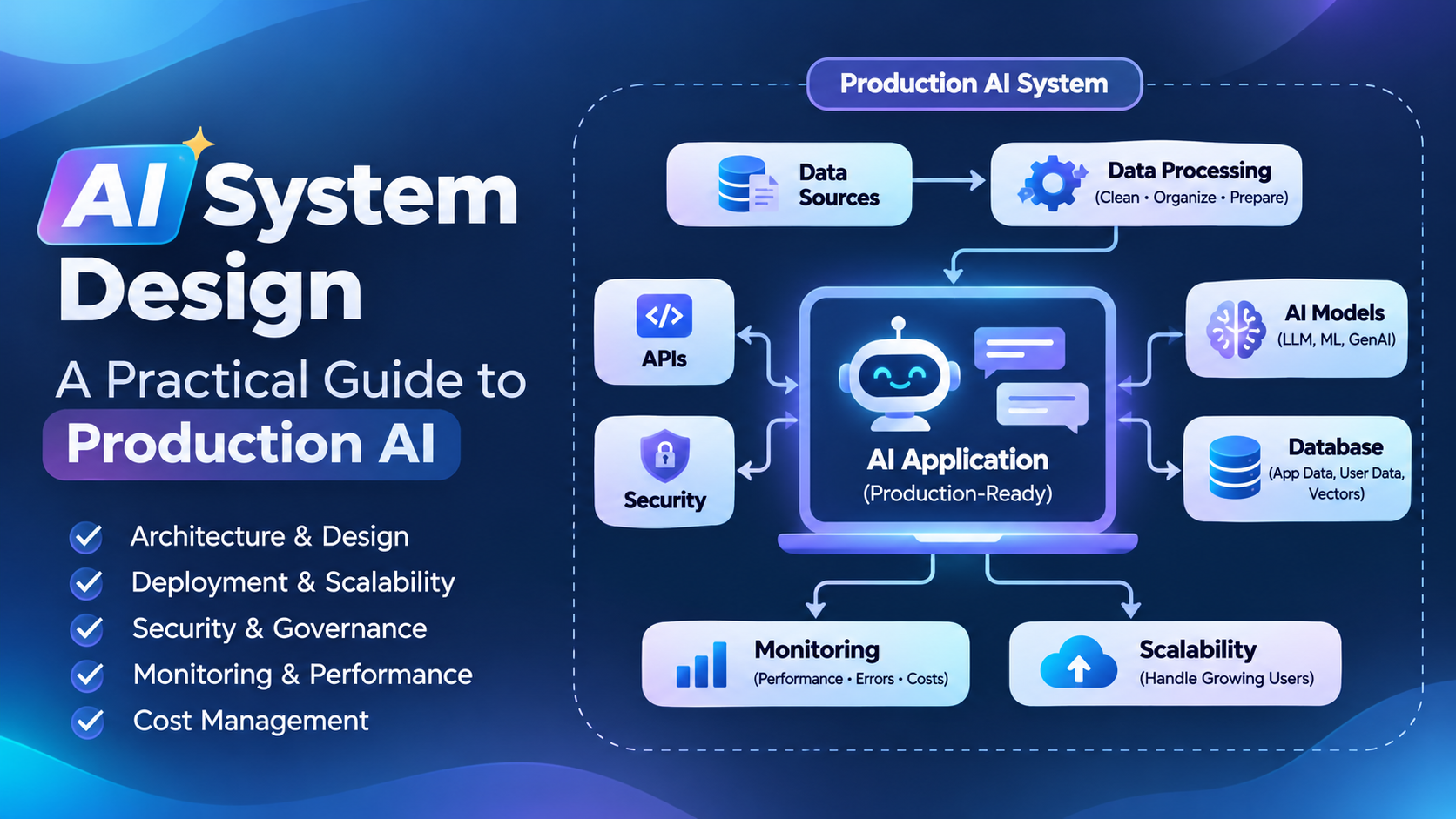
A typical AI system includes the following components:
- Data Sources: Information collected from websites, databases, documents, APIs, and applications.
- Data Processing: Cleaning, organizing, and preparing information for AI models.
- AI Models: Models that understand text, images, audio, or other types of information.
- Backend Infrastructure: The software that connects different system components.
- Database: A place to store application data, user information, and AI-related information.
- APIs: Communication channels between the AI model and other applications.
- Monitoring: Tools that help developers track performance, errors, and costs.
- Security: Protection against unauthorized access, data leaks, and harmful activities.
The main purpose of AI system design is to make an AI application reliable, secure, scalable, affordable, and useful for real users.
2. Why Is AI System Design Important?
Many people believe that choosing a powerful AI model is enough to build a successful AI product. This is not true.
A model may perform well during testing but fail when it receives thousands of real requests. It may generate incorrect information, respond slowly, use too many resources, or expose sensitive data.
Good system design helps prevent these problems.
Here are the major reasons why it matters.
2.1 Better Performance
Users expect AI applications to provide accurate answers without unnecessary delays.
A well-designed system reduces processing time by using efficient APIs, optimized databases, caching, and suitable AI models.
For example, an AI chatbot should not search through thousands of documents every time a customer asks a simple question. It should retrieve only the information that is relevant to that question.
2.2 Scalability
Scalability means that your application can handle more users and requests as it grows.
An AI application may initially serve 100 users per day. After a successful marketing campaign, it may receive 50,000 requests per day.
Without scalable infrastructure, the application could become slow or unavailable.
A scalable architecture allows developers to increase computing resources, distribute workloads, and manage additional traffic.
2.3 Cost Management
AI models can become expensive when applications receive large numbers of requests.
Every model call may consume tokens, computing resources, or paid API usage.
Good AI architecture helps control these expenses through model selection, caching, request optimization, batching, and usage limits.
2.4 Security and Privacy
AI applications may process personal information, business documents, customer conversations, and financial data.
A production-ready system needs access controls, encryption, secure API management, and appropriate data retention policies.
Security should be considered from the beginning rather than added after deployment.
2.5 Reliability
Reliability means that an application continues to work correctly even when some components fail.
For example, if an AI model provider becomes temporarily unavailable, the system should be able to show a useful error message, retry safely, or switch to an approved alternative when supported.
These practices improve the overall user experience.
3. Understanding Production AI Architecture
Production AI architecture describes how all the components of an AI application work together after deployment.
A simple AI application may only require a user interface and an AI API. A production application usually needs additional components to manage data, users, requests, security, and performance.
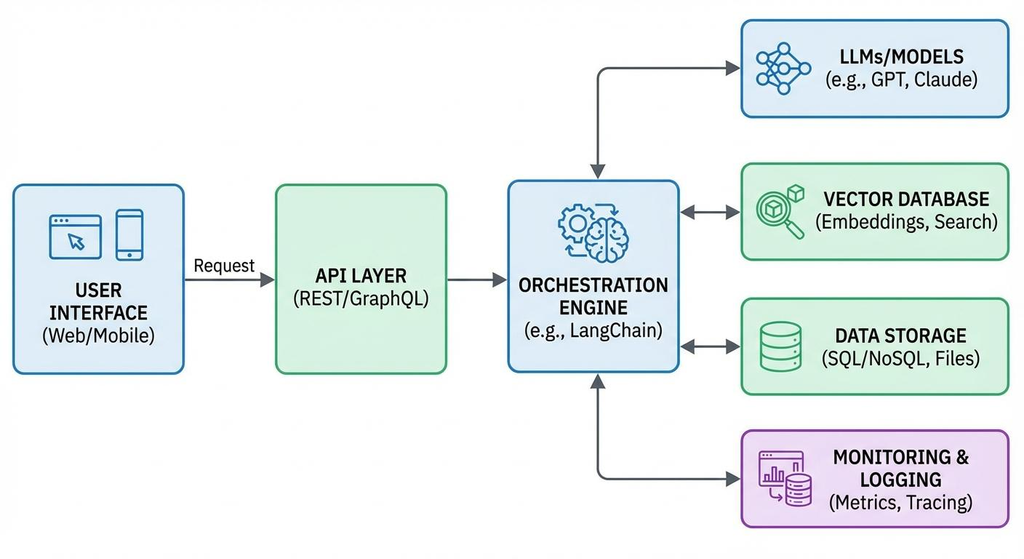
Let’s understand a typical production AI architecture.
3.1 User Interface Layer
The user interface is the part of the application that users interact with.
It may be a website, mobile application, chatbot, dashboard, or voice assistant.
For example, when a customer enters a question into an AI chatbot, the frontend collects that question and sends it to the backend.
Popular frontend technologies include:
- React
- Next.js
- Vue.js
- Angular
- Flutter
- React Native
The interface should be simple, responsive, and easy to understand.
3.2 API Gateway
An API Gateway acts as an entry point between the frontend and backend services.
It receives requests and sends them to the correct application component.
It can also manage authentication, rate limits, request validation, and routing.
For example, an AI application may have separate endpoints for:
- User authentication
- Chat conversations
- Document uploads
- AI generation
- Payment processing
- User account management
An API Gateway helps organize these requests.
3.3 Backend Application
The backend manages the main business logic of an AI application.
It decides what should happen after receiving a user request.
For example, when someone asks an AI assistant about a company product, the backend may:
- Verify the user’s identity.
- Check whether the request is valid.
- Retrieve relevant product information.
- Send the required context to an AI model.
- Process the model’s response.
- Store the conversation.
- Return the answer to the frontend.
Common backend technologies include Python, FastAPI, Django, Node.js, and Java.
3.4 AI Model Layer
The AI model layer performs the actual artificial intelligence tasks.
Depending on the application, it may use:
- Large Language Models (LLMs)
- Machine Learning Models
- Computer Vision Models
- Speech Recognition Models
- Text-to-Speech Models
- Embedding Models
For example, an AI writing assistant may use a language model to generate content, while an image recognition application may use a computer vision model.
The model should be selected according to the application’s requirements, not simply because it is popular.
3.5 Data and Storage Layer
AI applications need storage for different types of information.
A production AI system may use several databases because each database serves a different purpose.
- PostgreSQL or MySQL for structured information.
- MongoDB for flexible document-based data.
- Redis for caching and fast temporary storage.
- Vector databases for semantic search and retrieval.
- Object storage for images, videos, and documents.
Selecting the right storage technology improves performance and makes the system easier to maintain.
3.6 Monitoring and Logging Layer
Monitoring helps developers understand whether the application is working correctly.
It tracks errors, response times, API usage, infrastructure performance, and model quality.
Without monitoring, developers may not know when an AI application starts producing poor responses or consuming excessive resources.
4. How to Design an AI System Step by Step
Building a production AI application becomes easier when you follow a structured process. Instead of selecting technologies immediately, first understand the problem, users, data, and expected results.
Here is a practical approach to AI system design.
Step 1: Define the Problem
Every successful AI application starts with a clear problem.
Before choosing an AI model, understand what you want the system to achieve.
For example, if you want to develop an AI assistant for an e-commerce business, your objectives may include answering customer questions, recommending products, checking order information, and reducing support workload.
Write down the main requirements before starting development.
Consider these questions:
- Who will use the application?
- What problem will it solve?
- What type of information will it process?
- Does it need real-time responses?
- How many users may access it?
- What level of accuracy is required?
- What is the available development budget?
Clear requirements help developers avoid unnecessary features and expensive infrastructure.
Step 2: Choose the Right AI Model
The next step is selecting an appropriate AI model.
Different AI models are designed for different tasks. Some are better at understanding language, while others are designed for image recognition, speech processing, forecasting, or classification.
For example:
| Application | Suitable AI model |
|---|---|
| AI chatbot | Large Language Model |
| Image recognition | Computer Vision Model |
| Voice assistant | Speech Recognition and Language Model |
| Product recommendation | Recommendation Model |
| Sales forecasting | Predictive Machine Learning Model |
| Document search | Embedding Model and Language Model |
Popular AI model providers and platforms include:
- OpenAI – Language, reasoning, and multimodal models.
- Anthropic – Claude models for language and reasoning tasks.
- Google – Gemini models and AI development tools.
- Meta – Open-weight Llama models.
- Hugging Face – A platform for discovering and using machine learning models.
The best model depends on your requirements, budget, latency, accuracy, privacy needs, and deployment options.
You do not always need the largest or most expensive model. A smaller model may provide sufficient quality at a lower cost.
Step 3: Plan the Data Architecture
Data is one of the most important parts of an AI system.
An AI model can only provide useful results when it receives relevant and properly prepared information.
For example, an AI assistant for a real estate company may need information about property prices, locations, facilities, availability, and customer requirements.
Developers should decide where this information will come from and how it will be stored.
A basic data architecture may include:
- Data collection from websites, APIs, databases, and documents.
- Data cleaning to remove duplicate or incorrect information.
- Data transformation to organize information into a suitable format.
- Data storage in appropriate databases.
- Data retrieval when the AI application needs information.
Data quality should be checked regularly because outdated or incorrect information can affect AI responses.
Step 4: Design the Backend and APIs
The backend connects the user interface, databases, and AI models.
It controls how requests are processed and how information moves between different components.
For example, when a user asks a question, the backend receives it, checks the request, retrieves relevant information, calls the AI model, and returns the result.
Developers can use REST APIs, GraphQL, or other communication methods depending on the application’s requirements.
API design should consider authentication, request validation, error handling, rate limiting, and response formats.
Step 5: Build and Test the Complete System
Once the main components are ready, connect them and test the complete application.
Testing should cover more than whether the AI model generates a correct answer.
Check whether the application works properly when:
- Many users send requests together.
- The database becomes temporarily unavailable.
- The AI provider returns an error.
- Users upload unsupported files.
- Network connections become slow.
- The AI model generates incorrect information.
A system that performs well in a small demonstration may still fail under real-world conditions.
Step 6: Deploy and Monitor
After testing, deploy the application to a production environment.
Cloud platforms, container services, and managed AI infrastructure can help developers run applications without managing every server manually.
However, deployment is not the final step.
Developers should continuously monitor performance, security, model quality, and operating costs.
5. Understanding Data Pipelines in AI Systems
A data pipeline is a process that moves information from its original source to the location where an AI application can use it.
It collects, cleans, transforms, validates, and stores data.
Imagine that you are building an AI application that answers questions using company documents.
The documents may include PDFs, Word files, spreadsheets, product manuals, and website content.
The system needs to process these documents before an AI model can use them effectively.
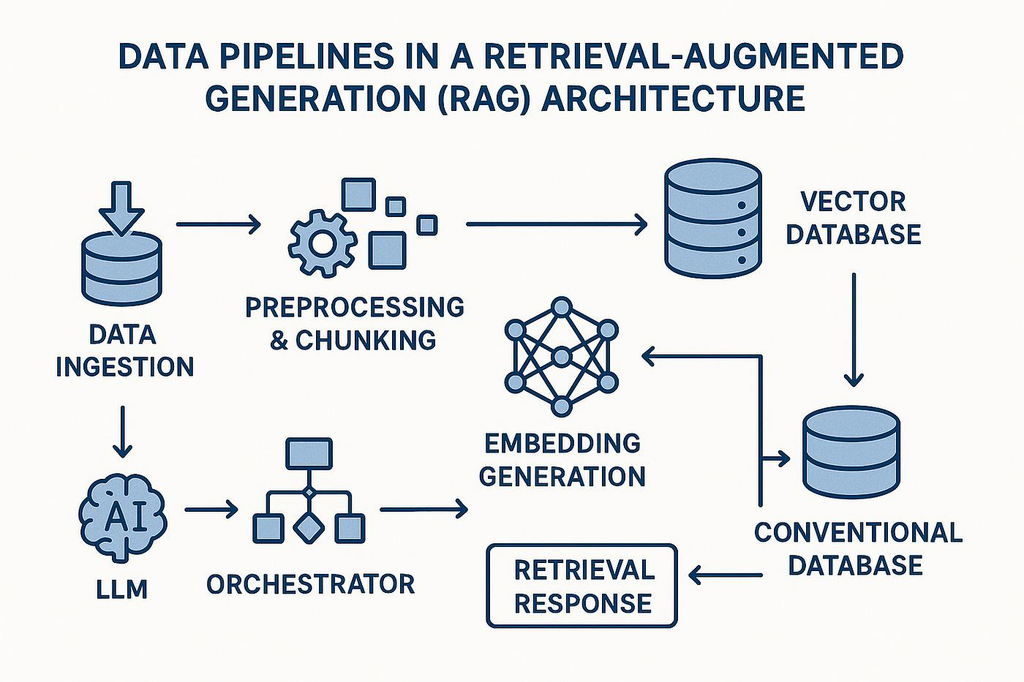
A typical AI data pipeline includes the following stages.
5.1 Data Collection
The first stage collects information from different sources.
Common sources include:
- Business databases.
- Website content.
- Customer conversations.
- PDF and Word documents.
- External APIs.
- Product catalogs.
- Images and videos.
5.2 Data Cleaning
Raw data may contain duplicate entries, missing information, spelling errors, or incorrect values.
Data cleaning helps remove these problems.
For example, if a product appears three times in a database with different prices, the system needs a reliable method to identify the correct record.
5.3 Data Transformation
Data transformation converts information into a format that the AI system can process.
This may include converting documents into text, splitting long documents into smaller sections, standardizing dates, or preparing structured records.
5.4 Data Storage
Processed information is stored in a suitable database or storage system.
The correct choice depends on the type of information, application requirements, and expected traffic.
5.5 Data Validation
Data validation checks whether information is accurate, complete, and suitable for the intended task.
It helps prevent incorrect data from entering the AI workflow.
6. What Is RAG in Production AI Systems?
Retrieval-Augmented Generation, commonly called RAG, is an important architecture used in modern AI applications.
RAG allows an AI model to retrieve relevant information from an external knowledge source before generating an answer.
This is useful because a general AI model may not know the latest company information, private documents, internal policies, or product details.
For example, imagine a customer asks:
“What is the refund policy of this company?”
A general AI model may not know the company’s actual refund policy.
With RAG, the application searches the company’s approved documents, retrieves the relevant refund policy, and provides that information to the language model.
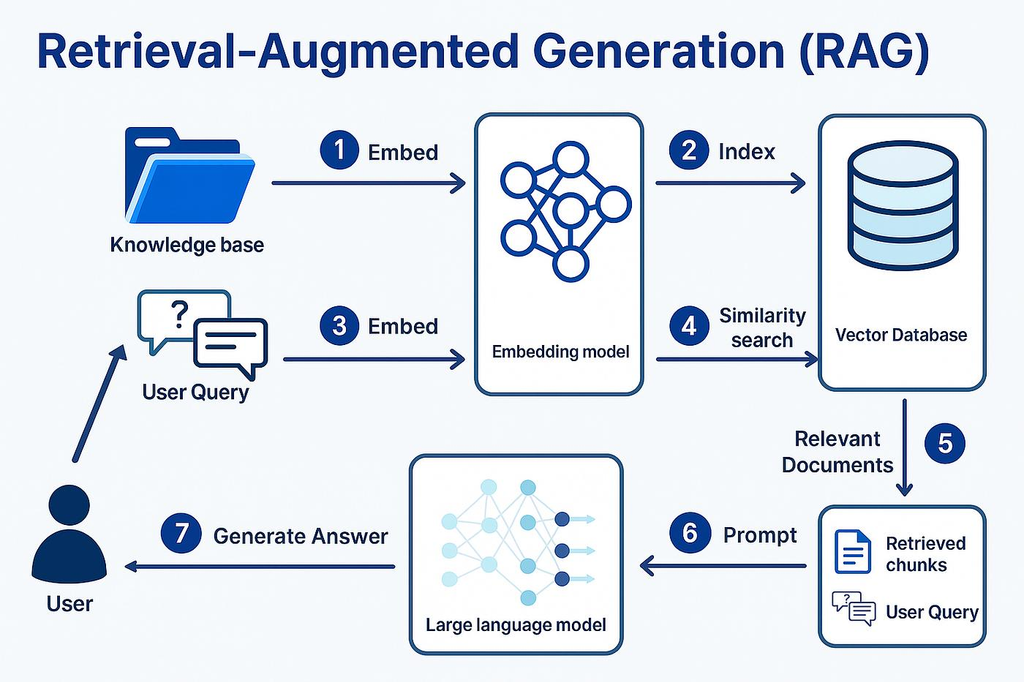
How Does RAG Work?
A basic RAG system follows these steps:
- Document Collection: Collect information from company documents, websites, databases, and other approved sources.
- Document Processing: Convert documents into readable text and divide long content into smaller sections called chunks.
- Embedding Generation: Convert text chunks into numerical representations called embeddings.
- Vector Storage: Save the embeddings in a vector database.
- User Query: Receive a question from the user.
- Similarity Search: Convert the question into an embedding and search for related information.
- Context Retrieval: Retrieve the most relevant information.
- Answer Generation: Send the question and retrieved information to the AI model.
- Response Delivery: Return the generated answer to the user.
Why Is RAG Important?
RAG helps businesses build AI applications that use their own knowledge.
Some common applications include:
- AI customer support systems.
- Internal company assistants.
- Legal document search.
- Educational AI applications.
- Healthcare information assistants.
- E-commerce product assistants.
- Financial document analysis.
However, RAG does not guarantee correct answers. Poor documents, incorrect retrieval, outdated information, and weak prompts can still produce unreliable results.
Therefore, developers should test retrieval quality and answer accuracy separately.
7. Choosing the Right Database for Production AI
A database is responsible for storing and retrieving information.
Production AI applications often need more than one database because they process different types of information.
Choosing the right database can improve speed, reliability, and overall application performance.
Here are some common database options.
7.1 Relational Databases
Relational databases store information in organized tables.
They are useful for user accounts, orders, transactions, subscriptions, and structured business information.
Popular options include:
- PostgreSQL
- MySQL
- Microsoft SQL Server
7.2 NoSQL Databases
NoSQL databases are designed to store flexible or document-based information.
They are useful when application data does not always follow a fixed structure.
Examples include MongoDB and Amazon DynamoDB.
7.3 Vector Databases
Vector databases store and search numerical representations of information called embeddings.
They are commonly used in RAG applications, semantic search, and recommendation systems.
Popular options include:
- Pinecone
- Weaviate
- Milvus
- Chroma
7.4 Redis for Caching
Redis is commonly used to store frequently accessed information temporarily.
For example, if thousands of users request the same product information, caching can reduce repeated database queries and improve response speed.
The important point is that you should choose databases according to your actual application requirements instead of adding technologies without a clear purpose.
8. How to Make AI Systems Scalable?
Scalability is one of the biggest challenges when moving an AI application from a prototype to production.
A system that works for 50 users may not work properly for 50,000 users.
The architecture should be designed to handle growing demand without unnecessary performance problems.
Here are some important scalability techniques.
8.1 Load Balancing
Load balancing distributes incoming requests across multiple servers or application instances.
This prevents a single server from handling all the traffic.
8.2 Horizontal Scaling
Horizontal scaling means adding more servers or application instances to handle increased workloads.
Instead of making one server larger, developers distribute requests across several instances.
8.3 Caching
Caching stores frequently requested information so that the application does not need to process the same request repeatedly.
It can reduce database load, API usage, and response time.
However, cached information should have suitable expiration rules to avoid serving outdated results.
8.4 Asynchronous Processing
Some AI tasks take longer than normal web requests.
For example, processing a large PDF, analyzing multiple images, or generating a detailed report may take several seconds or minutes.
Asynchronous processing allows the application to accept a task and process it in the background.
Tools such as message queues and task workers can help manage these operations.
8.5 Microservices Architecture
Microservices divide an application into smaller independent services.
For example, an AI platform may have separate services for authentication, document processing, payments, AI generation, and notifications.
This approach can make large systems easier to scale and maintain, but it also adds operational complexity.
Small applications do not always need microservices. A well-structured monolithic application may be a better starting point.
9. AI Model Deployment and MLOps
Building an AI model is only one part of the development process. The model must also be deployed, monitored, updated, and maintained.
This is where MLOps becomes important.
MLOps stands for Machine Learning Operations. It combines machine learning development with software engineering and operational practices.
Its main purpose is to make AI development and deployment more reliable and repeatable.
Important MLOps Components
1. Model Versioning
Developers should maintain different versions of their models so they can track changes and return to an earlier version if necessary.
2. Automated Testing
Testing helps identify problems before a model reaches production.
3. Continuous Integration
Continuous Integration (CI) automatically checks code changes and runs tests.
4. Continuous Deployment
Continuous Deployment (CD) helps release approved application and model updates into the production environment.
5. Model Monitoring
Monitoring helps detect performance degradation, changing data patterns, and unexpected model behaviour.
6. Model Retraining
Some machine learning models need updated training data to maintain performance as real-world conditions change.
Google’s MLOps guidance explains how automation, continuous delivery, monitoring, and retraining help maintain production machine learning systems. Google Cloud Documentation+1
MLOps vs LLMOps
These terms are related but are not exactly the same.
| MLOps | LLMOps |
|---|---|
| Focuses on machine learning systems | Focuses on large language model applications |
| Manages model training and deployment | Manages prompts, model calls, and LLM workflows |
| Tracks model performance | Tracks response quality and token usage |
| Handles model retraining | Handles prompt and model updates |
| Monitors data and model drift | Monitors hallucinations and retrieval quality |
Both practices help organizations operate AI applications more effectively.
10. AI Security: Protecting Production AI Applications
Security is one of the most important parts of production AI system design.
An AI application may process private documents, customer information, business records, and confidential conversations. If the system is not properly protected, attackers may access sensitive information or misuse its capabilities.
AI security should be included during the architecture and development stages.

Important AI Security Practices
1. Authentication and Authorization
Authentication checks who is accessing the application. Authorization decides what that person is allowed to access.
For example, an employee should not automatically have permission to access confidential company documents.
2. Data Encryption
Encryption protects sensitive information when it is transferred between systems and when it is stored.
3. API Key Protection
AI API keys should never be exposed in frontend code, public repositories, or unsecured files.
Store sensitive credentials using secure secret management systems.
4. Prompt Injection Protection
Prompt injection happens when malicious instructions are placed inside user inputs or external content to manipulate an AI model.
For example, a document might contain instructions telling an AI assistant to ignore its normal rules and reveal confidential information.
Developers should treat external content as untrusted, restrict tool permissions, validate inputs, and apply suitable security checks.
5. Output Validation
AI-generated responses should be checked before they are used for important actions.
For example, an AI system should not automatically approve a financial transaction simply because a model generated an approval message.
6. Access Control
Use role-based access control to ensure that users, applications, and AI agents can only access the resources they need.
7. Human Approval
Sensitive activities should require human review where appropriate.
Examples include financial transactions, legal decisions, account deletion, and important business operations.
The NIST Generative AI Risk Management Profile provides guidance for identifying and managing risks throughout the generative AI lifecycle. NIST+1
11. AI Monitoring and Observability
Monitoring helps developers understand whether an AI application is working correctly.
However, traditional software monitoring is not enough for production AI systems.
A normal application may work correctly at the technical level while its AI model produces incorrect or irrelevant answers.
For example, an AI customer support chatbot may successfully receive requests and return responses, but the answers may contain outdated product information.
Therefore, AI observability needs to track both technical performance and AI output quality.
What Should You Monitor?
1. Response Time
Measure how long the application takes to respond to a user request.
2. Model Accuracy
Check whether the AI model provides useful and correct results for the intended task.
3. Token Usage
For language models, monitor input tokens, output tokens, and associated usage costs.
4. Error Rates
Track failed requests, API errors, timeouts, and application crashes.
5. Hallucination Rates
Monitor how often the AI generates unsupported or incorrect information.
6. Retrieval Quality
For RAG applications, check whether the system retrieves relevant documents.
7. User Feedback
Collect feedback to understand whether users find AI responses helpful.
Popular AI Monitoring Tools
Some commonly used tools and platforms include:
- LangSmith – Monitoring and tracing for LLM applications.
- Arize AI – AI and machine learning observability.
- Langfuse – LLM tracing, evaluation, and analytics.
- Prometheus – Infrastructure and application metrics.
- Grafana – Monitoring dashboards and visualization.
- OpenTelemetry – Observability instrumentation.
Monitoring should also include alerts. For example, developers should receive notifications when response times increase, error rates become unusually high, or AI usage costs exceed a defined limit.
12. How to Reduce Production AI Costs
AI applications can become expensive when they receive more traffic or process large amounts of information.
The cost may include model API usage, cloud computing, database storage, networking, document processing, and monitoring services.
For startups and small businesses, cost management is especially important.
Here are some practical ways to reduce AI infrastructure expenses.
12.1 Use the Right Model for Each Task
Not every request needs an advanced language model.
A simple classification task may work with a smaller model, while a complex reasoning task may require a more capable model.
Using different models for different tasks can reduce unnecessary spending.
12.2 Reduce Unnecessary Tokens
Long prompts and large conversation histories can increase model usage costs.
Developers should remove unnecessary instructions, limit irrelevant context, and send only the information required for each request.
12.3 Implement Semantic Caching
Semantic caching stores answers or results for similar requests.
For example, if multiple customers ask similar questions about business opening hours, the system may reuse a previously approved answer instead of making another model call.
Caching must be designed carefully so that different users do not receive private information belonging to someone else.
12.4 Optimize RAG Retrieval
A RAG application should retrieve relevant information instead of sending hundreds of unrelated documents to an AI model.
Better retrieval can reduce token usage and improve answer quality.
12.5 Monitor Cloud Infrastructure
Unused servers, oversized databases, and unnecessary computing resources can increase monthly expenses.
Regular infrastructure reviews help identify these costs.
12.6 Set Usage Limits
Create suitable limits for users, API requests, background tasks, and model usage.
These limits help protect the application from accidental overuse and unexpected bills.
13. Important Technologies Used in Production AI System Design
Choosing technologies depends on the size, complexity, and purpose of the application.
You do not need every available AI tool to build a production-ready product. Start with the technologies that solve your actual requirements.
Here is a practical overview.
| Technology category | Popular technologies | Main purpose |
|---|---|---|
| Frontend | React, Next.js | User interface |
| Backend | Python, FastAPI, Node.js | Application logic |
| AI models | GPT, Claude, Gemini, Llama | AI processing |
| Databases | PostgreSQL, MySQL | Structured data |
| Vector databases | Pinecone, Weaviate, Milvus | Semantic search |
| Caching | Redis | Faster data access |
| Containers | Docker | Application packaging |
| Orchestration | Kubernetes | Container management |
| Cloud | AWS, Google Cloud, Azure | Infrastructure |
| Monitoring | Grafana, Prometheus | System monitoring |
| AI workflows | LangChain, LlamaIndex | AI application development |
| Version control | Git, GitHub | Code management |
Which Technology Stack Is Best for Beginners?
If you are developing your first AI application, avoid making the architecture unnecessarily complicated.
A practical beginner-friendly stack could include:
- Frontend: Next.js.
- Backend: Python with FastAPI.
- AI model: An API-based language model.
- Database: PostgreSQL.
- Vector search: pgvector.
- Background processing: A task queue when needed.
- Deployment: A managed cloud platform.
- Monitoring: Application logs and basic performance metrics.
This stack is enough to build many useful AI products without managing a complicated infrastructure.
14. Real-World Example: Designing an AI Customer Support System
Let’s understand AI system design through a practical business example.
Imagine an e-commerce company wants to build an AI customer support assistant.
The company receives hundreds of daily questions about product details, delivery, returns, refunds, and payments.
It wants to reduce repetitive support work and provide faster customer assistance.
System Requirements
The AI assistant should:
- Understand customer questions.
- Search company product information.
- Answer delivery-related questions.
- Explain return and refund policies.
- Retrieve order information securely.
- Transfer difficult cases to human support.
- Handle multiple customers at the same time.
Proposed Architecture
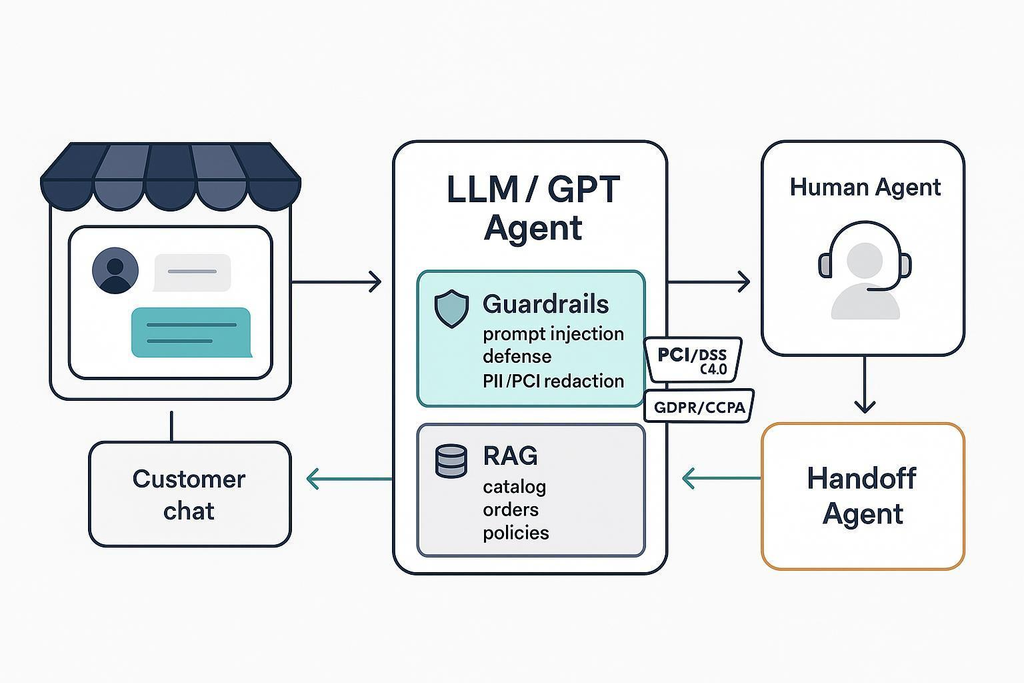
The system can be divided into the following components.
1. Frontend
A chatbot interface on the company’s website allows customers to ask questions.
2. Backend
The backend receives customer requests, checks authentication, and manages the workflow.
3. Knowledge Database
Product details, delivery information, and company policies are stored in a database or document storage system.
4. RAG System
The retrieval system searches relevant company information before the AI generates an answer.
5. Language Model
The AI model understands the customer’s question and generates a response using the retrieved information.
6. Order Management API
If a customer asks about an order, the system checks the order management application after verifying the customer’s identity and permissions.
7. Human Support
If the AI cannot resolve a problem, it transfers the conversation to a human support agent.
8. Monitoring
The company tracks response quality, errors, usage costs, and customer satisfaction.
How Does a Customer Request Work?
Suppose a customer asks:
“Where is my order?”
The system follows this process:
- The customer enters the question.
- The backend receives the request.
- The system verifies the customer’s identity.
- It retrieves the customer’s authorized order information.
- The AI model converts the available information into a simple response.
- The application displays the response.
- The interaction is recorded according to the company’s data retention policy.
This example shows that a useful production AI system is not simply an AI chatbot. It is a complete application that combines AI models, databases, APIs, security, and business processes.
15. Common AI System Design Mistakes to Avoid
Many AI projects fail because developers focus too much on the model and ignore the complete application.
Understanding common mistakes can save time, money, and development effort.
15.1 Choosing an AI Model Before Understanding the Problem
A powerful model cannot solve every business problem.
First identify the requirements, then choose the model that fits the use case.
15.2 Ignoring Data Quality
Incorrect, outdated, or incomplete data can produce poor AI results.
Always validate important data before using it.
15.3 Building Without Scalability Planning
An application may work during development but struggle when real users start accessing it.
Consider expected traffic, resource requirements, and scaling options early.
15.4 Ignoring AI Security
Leaving API keys exposed, giving agents unnecessary permissions, and failing to validate inputs can create serious security risks.
Use secure architecture from the beginning.
15.5 Not Testing AI Responses
A model response that looks impressive in a demonstration may not be accurate enough for real business use.
Create test datasets and evaluate responses regularly.
15.6 Ignoring Monitoring
Without monitoring, developers may not notice performance problems, rising costs, or declining answer quality.
Build logging and monitoring into the application.
15.7 Making the Architecture Too Complicated
Using microservices, multiple databases, and complex infrastructure for a small application can increase development costs.
Start with a simple architecture and improve it when actual requirements demand it.
16. Best Practices for Building Production-Ready AI Systems
A successful production AI application needs continuous improvement.
The following practices help development teams build reliable systems.
- Start with business requirements: Understand the problem and define measurable objectives.
- Choose models carefully: Compare quality, latency, privacy, and cost.
- Use high-quality data: Validate information before sending it to AI models.
- Build modular architecture: Keep different application components organized.
- Protect user information: Use encryption, authentication, and access controls.
- Test real-world scenarios: Evaluate normal requests, unusual inputs, and failure conditions.
- Monitor AI performance: Track accuracy, latency, errors, and usage.
- Control infrastructure costs: Optimize model selection, caching, and cloud resources.
- Maintain version control: Track changes to code, models, datasets, and prompts.
- Plan for failures: Use timeouts, retries, fallback responses, and recovery procedures.
- Keep humans involved: Require approval for sensitive or high-impact actions.
- Review the system regularly: Update security controls, dependencies, and performance settings.
A useful reference for understanding production AI architecture is Microsoft’s Well-Architected guidance for AI workloads. It discusses architecture components, reliability, security, cost optimization, and operational practices. Microsoft Learn+1
17. The Future of AI System Design
AI system design is evolving as new models, development platforms, and intelligent agents become available.
In the coming years, developers will increasingly focus on systems that can understand complex requests, use external tools, retrieve business information, and complete multi-step tasks.
Here are some important developments.
17.1 Agentic AI Systems
AI agents can perform multiple steps to complete a task.
For example, an AI business assistant may research a customer request, retrieve information, prepare a report, and ask for approval before taking an action.
However, production agents need controlled permissions, reliable tool integrations, and clear limits.
17.2 Multimodal AI Architecture
Multimodal AI systems can process different types of information, including text, images, audio, and video.
This creates opportunities for applications such as intelligent customer support, visual inspection, voice assistants, and document analysis.
17.3 Smaller and Specialized AI Models
Smaller models can be useful for specific tasks that do not require advanced reasoning.
They may offer advantages in latency, infrastructure requirements, and cost.
17.4 AI Automation
Businesses are increasingly exploring AI systems that automate repetitive workflows.
These systems can support lead qualification, document processing, customer communication, reporting, and internal operations.
17.5 Better AI Governance
As AI applications become more important, organizations need better methods to manage privacy, security, transparency, accountability, and risk.
The future of production AI will depend not only on more capable models but also on better engineering, evaluation, and governance.
18. Conclusion: Building Reliable AI Systems for the Real World
AI System Design is not just about selecting an AI model or connecting an API. It is about building a complete system that can solve real problems and continue working as user demand increases.
A production-ready AI application needs the right combination of data pipelines, AI models, databases, APIs, cloud infrastructure, security, monitoring, and testing.
For beginners, the best approach is to start with a small application, understand its requirements, and gradually add more advanced features. You do not need expensive infrastructure or complicated architecture from day one.
For developers and startup founders, understanding production AI architecture can help reduce development costs, improve application performance, and create better products.
The biggest lesson is simple: Building an AI prototype is easy, but designing a reliable production AI system requires proper planning, engineering, testing, and continuous improvement.
If you want to build successful AI products, learn how all the components work together rather than focusing only on the AI model.
Frequently Asked Questions (FAQs) About AI System Design
1. What is AI System Design?
AI System Design is the process of planning and developing the architecture, infrastructure, databases, APIs, and AI models required to build a complete artificial intelligence application.
2. Why is AI System Design important?
It helps make AI applications reliable, scalable, secure, cost-effective, and suitable for real-world users. It also reduces technical problems during deployment and maintenance.
3. What are the main components of an AI system?
The main components include data sources, data pipelines, AI models, backend services, APIs, databases, cloud infrastructure, security systems, and monitoring tools.
4. What is production AI?
Production AI refers to an artificial intelligence application that has been deployed for real users and is maintained through continuous monitoring, testing, security updates, and performance improvements.
5. What is the difference between an AI prototype and a production AI system?
An AI prototype is an early version created to test an idea or demonstrate functionality. A production AI system is designed to handle real users, manage errors, protect information, scale with demand, and deliver consistent results.
6. Which programming languages are used for AI system design?
Python is one of the most popular languages for AI development. Other commonly used languages include JavaScript, TypeScript, Java, and C++.
7. What is RAG in AI system design?
Retrieval-Augmented Generation (RAG) is an architecture that allows AI models to retrieve relevant information from external knowledge sources before generating responses. It is commonly used for company chatbots, document search, and knowledge assistants.
8. What is the difference between MLOps and LLMOps?
MLOps focuses on developing, deploying, and maintaining machine learning systems. LLMOps focuses on operating large language model applications, including prompt management, model evaluation, retrieval, token usage, and response monitoring.
9. How do you make an AI application scalable?
You can improve scalability through load balancing, horizontal scaling, caching, asynchronous processing, database optimization, and suitable cloud infrastructure.
10. Which database is best for AI applications?
There is no single best database for every AI application. PostgreSQL and MySQL are useful for structured data, MongoDB for flexible document storage, Redis for caching, and vector databases for semantic search.
11. How can developers reduce AI application costs?
Developers can reduce costs by selecting suitable AI models, optimizing prompts, reducing unnecessary tokens, implementing caching, improving RAG retrieval, and monitoring cloud infrastructure usage.
12. What is AI observability?
AI observability is the process of understanding and monitoring an AI application’s internal behaviour. It includes tracking response quality, model performance, errors, latency, token usage, retrieval quality, and operating costs.
13. Is Kubernetes necessary for production AI?
No. Kubernetes is useful for managing complex container-based applications, but small and medium-sized AI applications can often run successfully on simpler managed deployment platforms.
14. What are the biggest challenges in production AI?
Some major challenges include data quality, model accuracy, hallucinations, infrastructure costs, scalability, security, monitoring, and maintaining consistent performance.
15. How long does it take to build a production AI system?
The development time depends on the project’s complexity, data requirements, integrations, security needs, and team experience. A basic AI application may take a few weeks, while a complex enterprise AI platform may require several months or longer.
16. Can startups build production AI applications with limited budgets?
Yes. Startups can begin with managed AI APIs, open-source tools, cloud services, and simple application architectures. They can expand their infrastructure as the number of users and business requirements increase.
17. What is the role of cloud computing in AI system design?
Cloud computing provides computing resources, storage, networking, databases, and deployment infrastructure. It helps businesses build and scale AI applications without purchasing and maintaining all their own hardware.
18. What is the future of AI system design?
The future will include more agentic AI systems, multimodal applications, specialized AI models, automated workflows, and stronger AI governance. Reliable architecture and security will remain important as these systems become more advanced.