Introduction
Artificial Intelligence is no longer just a tool for answering questions. Today, AI can think through tasks, make decisions, connect with different applications, and complete work automatically. These intelligent systems are called AI agents, and they are changing the way businesses operate. From customer support and email management to content creation and data analysis, AI agents can handle repetitive work while allowing people to focus on more important tasks.
One of the best platforms for building AI agents is n8n. It is an open-source workflow automation platform that lets you connect AI models, APIs, databases, and business applications without writing a lot of code. Whether you are a beginner, freelancer, developer, marketer, or business owner, n8n makes it easy to create powerful AI workflows.
In this complete guide, you will learn How to Build AI Agents Using n8n step by step. We will explain every concept in simple language, show you how AI agents work, and help you build intelligent workflows that save time, improve productivity, and automate your business processes.
What Is an AI Agent?
Before building an AI agent, it is important to understand what it actually is.
An AI agent is an intelligent software system that can receive information, understand it, make decisions, use different tools, and complete tasks automatically with little or no human intervention.
Unlike a simple chatbot that only answers questions, an AI agent can think through a problem, choose the best action, connect with multiple applications, and continue working until the task is completed.
For example, an AI agent can:
- Read customer emails.
- Understand customer requests.
- Search company documents.
- Generate professional replies.
- Update the CRM.
- Schedule follow-up tasks.
- Notify the sales team.
Instead of performing only one task, an AI agent manages the complete workflow.
AI Chatbot vs AI Agent
Many people confuse AI chatbots with AI agents. Although both use artificial intelligence, they are designed for different purposes.
An AI chatbot mainly answers user questions based on prompts or predefined knowledge. It usually waits for a user to send a message before responding.
An AI agent goes much further. It can:
- Plan tasks.
- Make decisions.
- Use memory.
- Connect to APIs.
- Access databases.
- Perform multiple actions.
- Complete workflows automatically.
This makes AI agents much more useful for business automation.
What Is n8n?
n8n is an open-source workflow automation platform that helps you connect different applications and automate repetitive tasks through visual workflows.
Instead of writing hundreds of lines of code, you simply drag and connect workflow nodes.
Each node performs a specific action, such as:
- Receiving data
- Calling an API
- Running AI prompts
- Updating databases
- Sending emails
- Creating documents
- Posting on social media
- Executing JavaScript
- Saving files
By connecting these nodes together, you create intelligent workflows.
Why Choose n8n for AI Agents?
There are many workflow automation platforms available today, but n8n has become one of the most popular choices for AI automation.
It combines flexibility, affordability, and powerful integrations in one platform.
Some of the biggest advantages include:
- Open-source platform
- Self-hosted or cloud deployment
- Visual workflow builder
- Hundreds of integrations
- AI-ready architecture
- JavaScript support
- REST API support
- Webhooks
- Database integrations
- Easy scalability
Because of these features, startups and enterprise businesses are increasingly choosing n8n for AI workflow automation.
Real-World Examples of AI Agents Built with n8n
AI agents can automate work in almost every industry.
Some common examples include:
Customer Support Agent
This AI agent answers customer questions, checks company documentation, creates support tickets, and forwards difficult cases to human representatives.
Sales Agent
A sales AI agent qualifies leads, updates CRM systems, sends follow-up emails, and schedules meetings automatically.
Content Writing Agent
This agent creates blog articles, social media captions, product descriptions, and newsletters using AI.
Research Agent
It searches multiple data sources, summarizes information, generates reports, and shares insights with users.
HR Recruitment Agent
The recruitment agent reviews resumes, scores candidates, schedules interviews, and communicates with applicants automatically.
These examples demonstrate how AI agents can replace repetitive manual work while improving efficiency.
How Does an AI Agent Work?
Every AI agent follows a series of logical steps.
Understanding this process makes it much easier to build your own workflows.
The basic workflow looks like this:
- Receive a request.
- Understand the request.
- Search for information.
- Use available tools.
- Make a decision.
- Perform an action.
- Generate a response.
- Save the results.
- Wait for the next task.
Although each project may have different requirements, most AI agents follow this general structure.
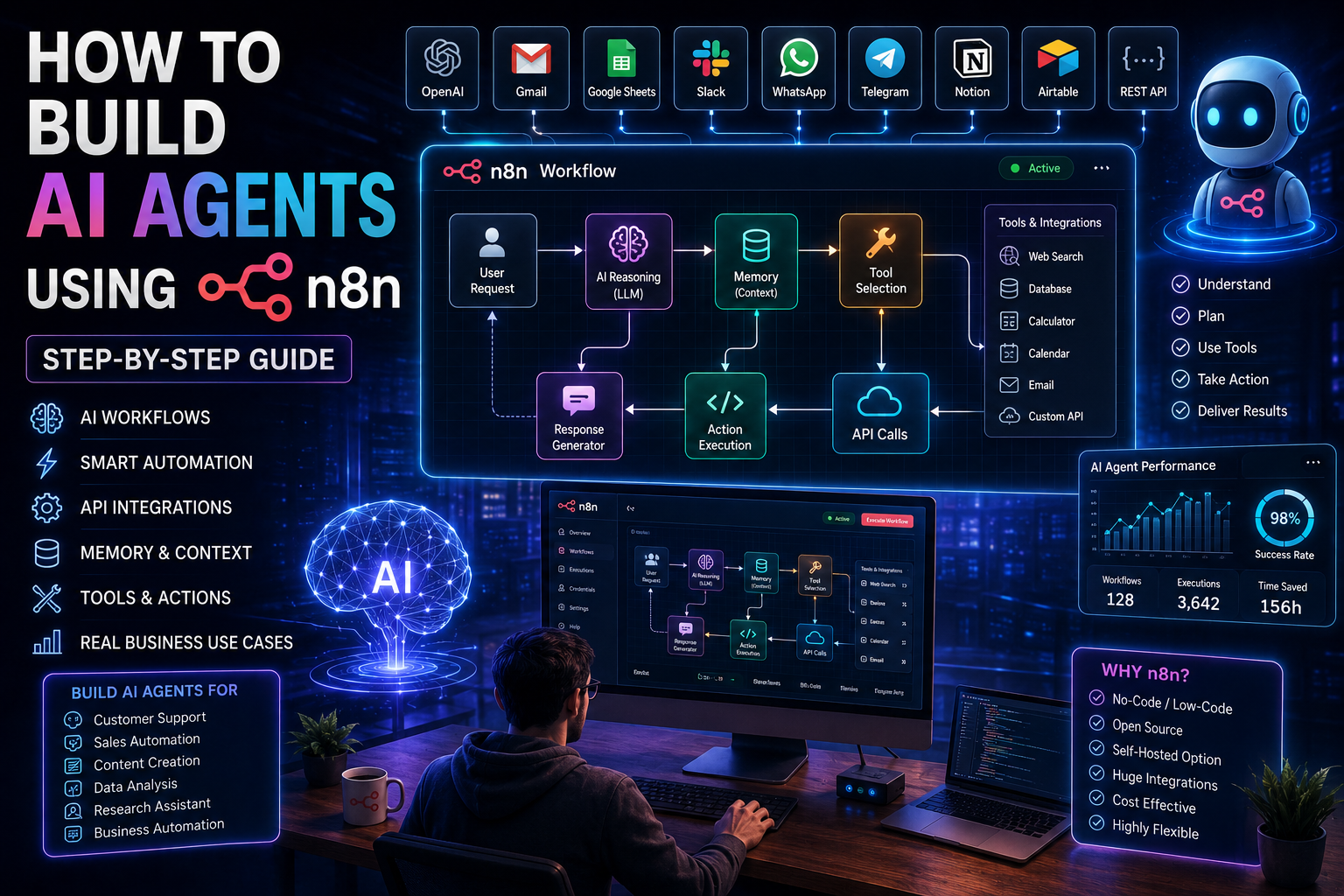
AI Agent Architecture in n8n
Before creating workflows, you should understand the main building blocks of an AI agent.
User Input
Everything begins with a request.
The request might come from:
- Website chatbot
- Telegram
- Slack
- Gmail
- API
- Mobile app
- Voice assistant
- Webhook
This serves as the starting point of the workflow.
Trigger Node
The trigger tells n8n when the workflow should start.
Popular trigger options include:
- Webhook
- Schedule
- Gmail Trigger
- Slack Trigger
- Telegram Trigger
- Database Trigger
- HTTP Request
- File Upload
- Form Submission
Whenever the trigger detects new information, the workflow begins automatically.
Large Language Model (LLM)
The LLM is the brain of the AI agent.
It reads instructions, understands context, and generates intelligent responses.
Common AI models include:
- OpenAI GPT
- Anthropic Claude
- Google Gemini
- Mistral AI
- Llama
The LLM performs reasoning and language understanding.
Memory
Memory allows the AI agent to remember previous conversations and tasks.
Instead of treating every interaction as new, the agent can continue conversations naturally.
Memory helps with:
- Long conversations
- Customer support
- Personal assistants
- Business workflows
- Context retention
Without memory, AI responses may become inconsistent.
Tool Selection
AI becomes much more powerful when it can use external tools.
Instead of only generating text, the AI agent can interact with applications and services.
Examples include:
- Gmail
- Google Calendar
- Google Sheets
- WordPress
- Notion
- Airtable
- Slack
- GitHub
- CRM software
- SQL databases
These tools allow AI to perform real business actions.
Decision Engine
Not every workflow follows the same path.
The decision engine evaluates information and determines what should happen next.
For example:
If the customer is new:
- Create CRM record.
- Send welcome email.
If the customer already exists:
- Update customer information.
- Notify the sales team.
Decision nodes make workflows intelligent.
Action Node
Once the AI has made a decision, it performs an action.
Actions include:
- Sending emails
- Updating spreadsheets
- Creating invoices
- Posting social media content
- Scheduling meetings
- Creating documents
- Sending WhatsApp messages
- Updating databases
This is where automation provides real value.
Prerequisites Before Building Your AI Agent
Before you start building workflows in n8n, make sure you have the basic tools and accounts required.
You do not need to be an expert developer, but preparing these resources will make the process much easier.
You should have:
- An n8n account or a self-hosted n8n installation.
- An API key from your preferred AI provider, such as OpenAI or another compatible large language model.
- A basic understanding of workflows and triggers.
- Access to the applications you want to connect, such as Gmail, Google Sheets, Slack, or WordPress.
- A database or storage option if your AI agent needs to remember information.
- Basic knowledge of APIs and authentication, which is helpful but not mandatory.
Once these prerequisites are ready, you can begin creating intelligent AI workflows with confidence.
Step 1: Install and Set Up n8n
The first step is to install n8n. You can either use the cloud version for quick setup or self-host it on your own server for greater control.
After installation:
- Sign in to your n8n dashboard.
- Create a new workflow.
- Give your workflow a meaningful name.
- Familiarize yourself with the workflow editor.
- Test that your instance is working correctly.
At this stage, your automation environment is ready.
Step 2: Create Your First Workflow
Every AI agent starts with a workflow.
Think of the workflow as the roadmap that tells the AI what to do.
Your first workflow should remain simple.
For example:
- Receive a message.
- Send it to the AI model.
- Receive the response.
- Return the answer to the user.
Starting with a simple workflow helps you understand how each node works before building more advanced automations.
Step 3: Add a Trigger Node
Every workflow requires a starting point.
Choose a trigger based on how users will interact with your AI agent.
Popular trigger options include:
- Webhook for websites
- Gmail Trigger for emails
- Telegram Trigger for bots
- Slack Trigger for team communication
- Schedule Trigger for automated tasks
- Form Submission Trigger for lead generation
The trigger listens for new events and starts the workflow automatically.
Step 4: Connect Your AI Model
The next step is connecting an AI model that will process user requests and generate intelligent responses.
Most AI providers offer API access, which can be connected directly inside n8n using the appropriate nodes or HTTP requests.
Once connected, you can:
- Send user prompts to the AI model.
- Define clear system instructions.
- Control the style and tone of responses.
- Receive structured outputs.
- Pass the results to the next workflow step.
At this stage, your AI agent has its “brain” and can understand requests, reason through tasks, and generate useful responses.
Step 5: Add Memory to Your AI Agent
One of the biggest differences between a basic AI chatbot and an intelligent AI agent is memory. Without memory, the AI treats every conversation as completely new. With memory, it can remember previous interactions, user preferences, and important business information.
In n8n, memory can be stored in databases, spreadsheets, vector databases, or other storage systems. The workflow retrieves previous information before sending the prompt to the AI model, giving it the context needed to respond more accurately.
A typical memory workflow includes these steps:
- Receive a user request.
- Search previous conversation history.
- Retrieve relevant information.
- Combine the context with the new request.
- Send everything to the AI model.
- Save the updated conversation for future use.
Adding memory creates more natural and personalized conversations while improving the quality of AI responses.
Step 6: Connect External Tools
AI becomes much more powerful when it can interact with external applications instead of only generating text.
n8n supports hundreds of integrations that allow AI agents to perform real business tasks automatically.
Popular tools you can connect include:
- Gmail
- Google Sheets
- Google Drive
- Google Calendar
- Slack
- Discord
- Telegram
- WhatsApp Business API
- WordPress
- Notion
- Airtable
- HubSpot
- Salesforce
- Shopify
- PostgreSQL
- MySQL
- REST APIs
For example, instead of simply telling a customer that an appointment is available, the AI agent can check the calendar, book the appointment, and send a confirmation email automatically.
Step 7: Add API Integrations
Most modern business software provides APIs that allow different applications to exchange information.
n8n makes connecting APIs simple through its HTTP Request node or dedicated integrations.
A typical API workflow includes:
- Receive user input.
- Send a request to an external API.
- Receive the response.
- Process the returned data.
- Pass the information to the AI model.
- Complete the workflow.
API integrations allow AI agents to work with:
- Weather services
- Payment gateways
- CRM systems
- Inventory software
- ERP platforms
- Booking systems
- Financial applications
- AI services
- Analytics tools
This flexibility allows one AI agent to coordinate work across multiple business systems.
Step 8: Build Intelligent Decision Logic
Not every workflow should follow the same path. AI agents often need to make decisions based on user input or business rules.
n8n provides conditional nodes that allow workflows to branch into different actions.
For example, a customer support workflow might follow this logic:
- If the issue is related to billing, send it to the finance team.
- If it is a technical problem, create a support ticket.
- If it is a product question, generate an AI response.
- If the customer requests a refund, notify a manager.
Decision logic makes workflows more efficient and reduces unnecessary manual work.
Step 9: Test Your AI Agent
Before deploying your AI agent, it is important to test every part of the workflow.
Testing helps identify missing data, incorrect prompts, failed API calls, or unexpected responses.
During testing, you should:
- Test different user questions.
- Verify API connections.
- Check memory retrieval.
- Confirm data accuracy.
- Review AI-generated responses.
- Monitor workflow execution.
- Test error handling.
Proper testing ensures your AI agent performs reliably in real-world situations.
Step 10: Deploy Your AI Agent
Once testing is complete, your workflow is ready for deployment.
Depending on your project, you can publish the AI agent in different ways.
Common deployment options include:
- Website chatbot
- Customer support portal
- Telegram
- Slack
- Discord
- Internal company dashboard
- Mobile application
- REST API
- Scheduled automation
After deployment, monitor performance regularly and improve the workflow based on user feedback.
Understanding AI Agent Memory
Memory allows AI agents to remember information beyond a single interaction. This creates more useful and personalized experiences.
There are different types of memory used in AI automation.
Short-Term Memory
Short-term memory stores information related to the current conversation.
Examples include:
- User name
- Current question
- Selected product
- Recent actions
This helps the AI maintain context during an active session.
Long-Term Memory
Long-term memory stores information for future interactions.
Examples include:
- Customer preferences
- Purchase history
- Previous conversations
- Account details
- Frequently asked questions
Long-term memory enables the AI to provide personalized assistance over time.
Vector Memory
Vector databases allow AI to search through large collections of documents based on meaning instead of exact keywords.
This is especially useful for:
- Company documentation
- Technical manuals
- Legal documents
- Research papers
- Internal knowledge bases
Vector search helps AI retrieve the most relevant information quickly.
What Is Retrieval-Augmented Generation (RAG)?
Retrieval-Augmented Generation, often called RAG, is a technique that improves AI responses by retrieving relevant information before generating an answer.
Instead of relying only on what the AI model already knows, RAG allows the AI to search trusted data sources such as documents, databases, or company knowledge bases.
A basic RAG workflow looks like this:
- Receive a user question.
- Search the knowledge base.
- Retrieve relevant documents.
- Send the documents to the AI model.
- Generate an accurate response.
- Return the answer to the user.
This approach helps reduce incorrect answers and improves reliability.
Adding Model Context Protocol (MCP)
Model Context Protocol (MCP) is becoming an important standard for connecting AI models with external tools and data sources.
Using MCP with n8n allows AI agents to access additional capabilities while maintaining a structured and secure connection.
Benefits of MCP include:
- Standardized tool access
- Better context sharing
- Easier integration
- Improved scalability
- Enhanced AI capabilities
As more AI platforms adopt MCP, it will become easier to connect AI agents with business applications.
Building Different Types of AI Agents
One of the greatest strengths of n8n is its ability to create AI agents for different business needs.
Here are some practical examples.
Customer Support AI Agent
A customer support agent can answer questions, search documentation, create support tickets, and escalate complex issues.
Typical workflow:
- Receive customer inquiry.
- Search the knowledge base.
- Generate an AI response.
- Create a ticket if needed.
- Notify the support team.
AI Sales Assistant
Sales teams can automate lead qualification and customer follow-ups.
The workflow includes:
- Receive a new lead.
- Analyze lead information.
- Assign a lead score.
- Update the CRM.
- Generate a follow-up email.
- Schedule reminders.
This improves sales efficiency and response times.
AI Content Creation Agent
Content creators can automate much of the writing process.
The workflow performs these tasks:
- Receive a topic.
- Generate an outline.
- Write a draft.
- Optimize for SEO.
- Save the content.
- Notify the editor.
This helps maintain a consistent publishing schedule.
AI Research Agent
Researchers often need information from multiple sources.
The workflow can:
- Receive a research topic.
- Search approved data sources.
- Summarize findings.
- Organize key points.
- Generate a report.
This saves time while improving research productivity.
AI Email Assistant
Email management becomes easier with automation.
The workflow performs:
- Monitor incoming emails.
- Categorize messages.
- Draft AI responses.
- Save replies for approval.
- Send emails automatically if appropriate.
This reduces repetitive communication tasks.
AI Social Media Manager
Managing multiple social platforms can be time-consuming.
An AI social media agent can:
- Generate captions.
- Create hashtags.
- Schedule posts.
- Publish content.
- Track engagement.
- Generate performance summaries.
This supports consistent social media marketing.
Security Best Practices
AI agents often handle sensitive business information, making security an important consideration.
Follow these recommendations when building workflows:
- Store API keys securely using n8n credentials.
- Encrypt sensitive business data.
- Limit access to workflows.
- Validate all incoming information.
- Monitor workflow activity.
- Use secure authentication methods.
- Back up important workflows regularly.
- Keep software updated.
Strong security practices help protect business data and maintain customer trust.
Optimizing AI Prompts
The quality of an AI agent depends heavily on the prompts you provide.
A well-designed prompt should clearly explain:
- The AI’s role.
- The expected task.
- The desired output format.
- Business rules.
- Writing style.
- Response limitations.
Clear prompts lead to more accurate and consistent AI responses.
Real Business Use Cases
AI agents built with n8n are already helping businesses automate daily operations across many industries.
Common use cases include:
- Customer support automation
- Sales lead management
- HR recruitment
- Marketing automation
- Content creation
- Financial reporting
- Inventory management
- Email automation
- Appointment scheduling
- Document processing
- Business analytics
- Internal knowledge management
These examples demonstrate how AI agents can improve productivity while reducing manual work.
Advanced AI Agent Workflows
Once you understand the basics of AI agents, you can start building more advanced workflows. These workflows combine multiple AI models, external tools, databases, and business applications to complete complex tasks automatically.
Instead of handling only one action, advanced AI agents can manage complete business processes from beginning to end.
Some examples include:
- Customer onboarding
- Invoice processing
- Employee recruitment
- Marketing campaign management
- Sales automation
- Financial reporting
- Technical support
- Research automation
- Business analytics
- Content publishing
These workflows reduce manual work while improving speed and accuracy.
Building Multi-Agent Systems
As businesses grow, one AI agent may not be enough to handle every task efficiently. Instead of creating one large workflow, many organizations use multiple specialized AI agents that work together.
Each agent focuses on a specific responsibility and shares information with other agents through n8n workflows.
A multi-agent system may include:
Research Agent
This agent collects information from trusted websites, databases, documents, and APIs. It organizes the information before sending it to the next agent.
Typical tasks include:
- Search multiple sources.
- Collect relevant information.
- Remove duplicate content.
- Organize findings.
- Send data for analysis.
Content Agent
The content agent creates written material based on the research provided.
Its responsibilities include:
- Generate blog outlines.
- Write articles.
- Create product descriptions.
- Produce social media captions.
- Generate email newsletters.
Review Agent
Quality control is important before publishing content or sending responses.
The review agent can:
- Check grammar.
- Improve readability.
- Verify formatting.
- Ensure SEO optimization.
- Approve content for publishing.
Publishing Agent
After approval, the publishing agent distributes content automatically.
It can:
- Publish WordPress articles.
- Schedule LinkedIn posts.
- Post on Facebook.
- Share on X.
- Send newsletters.
- Update internal documentation.
This modular approach makes workflows easier to maintain and expand.
Human-in-the-Loop Approval
Although AI agents are highly capable, some business processes still require human review before important actions are taken.
Adding a human approval step improves accuracy and reduces business risks.
Examples include:
- Approving financial transactions.
- Reviewing legal documents.
- Publishing blog articles.
- Sending marketing emails.
- Approving refunds.
- Confirming large purchases.
A typical approval workflow follows these steps:
- AI completes its analysis.
- Generate a draft or recommendation.
- Send it to a manager for review.
- Wait for approval.
- Continue the workflow only after approval.
This combines AI speed with human judgment.
Workflow Monitoring and Logging
After deployment, it is important to monitor how your AI agents perform.
Monitoring helps you identify slow workflows, failed API calls, incorrect responses, and integration problems before they affect users.
You should regularly monitor:
- Workflow execution time.
- Failed workflow runs.
- API response times.
- AI response quality.
- Error frequency.
- System resource usage.
- User satisfaction.
Maintaining logs also makes troubleshooting much easier.
Optimizing Workflow Performance
As workflows become larger, performance optimization becomes increasingly important.
Here are some practical ways to improve workflow speed and reliability:
- Break large workflows into smaller reusable workflows.
- Avoid unnecessary API requests.
- Cache frequently used data.
- Reuse credentials instead of creating duplicates.
- Optimize AI prompts to reduce token usage.
- Use batch processing for large datasets.
- Schedule heavy workflows during off-peak hours.
- Archive unused workflows.
These optimizations improve efficiency while reducing operating costs.
Common Mistakes to Avoid
Many beginners encounter problems because they build workflows too quickly without planning.
Understanding these common mistakes can help you create more reliable AI agents.
1. Starting with Complex Workflows
Many users try to automate an entire business process in their first project.
Instead, begin with a simple workflow and gradually add new features.
2. Ignoring Error Handling
External services sometimes fail or return unexpected results.
Always include error-handling nodes to prevent workflow failures.
3. Poor Prompt Design
AI only performs as well as the instructions it receives.
Avoid vague prompts and provide clear, detailed instructions.
4. Not Using Memory
Without memory, AI agents lose important context.
Adding conversation history or long-term storage improves response quality.
5. Forgetting Security
Never expose API keys or sensitive business data.
Always use encrypted credentials and secure authentication.
6. Not Testing Workflows
Testing should be performed before every deployment.
Test different scenarios to ensure your AI agent behaves correctly.
7. Ignoring API Limits
Most AI providers have usage limits.
Monitor API consumption to avoid unexpected service interruptions or additional costs.
8. Overusing AI
Not every workflow step requires artificial intelligence.
Use traditional automation whenever AI is unnecessary to reduce costs and improve speed.
Best Practices for Building AI Agents with n8n
Following proven best practices helps create workflows that are easier to maintain and scale.
Consider these recommendations:
- Define a clear business objective before building.
- Start with a small workflow.
- Use descriptive node names.
- Keep prompts simple and specific.
- Secure API credentials.
- Store important data safely.
- Monitor workflow performance.
- Review logs regularly.
- Update integrations when required.
- Document your workflows for future maintenance.
These practices improve collaboration, reduce errors, and simplify future enhancements.
Future of AI Agents with n8n
Artificial intelligence is evolving rapidly, and AI agents are becoming more autonomous every year. Future AI workflows will not only respond to user requests but will also plan tasks, collaborate with other agents, learn from previous interactions, and make better decisions based on business goals.
Several trends are shaping the future of AI agents built with n8n:
Multi-Agent Collaboration
Instead of relying on one AI agent, businesses will deploy teams of specialized agents that work together on research, customer support, content creation, analytics, and decision-making.
Voice AI Integration
Voice assistants will become more capable of interacting with workflows, allowing users to control automations through natural speech.
Smarter Business Automation
AI agents will manage increasingly complex processes such as supply chain optimization, predictive maintenance, financial planning, and personalized customer experiences.
Wider Adoption of MCP
The Model Context Protocol (MCP) will make it easier for AI agents to connect with external tools and enterprise systems using standardized interfaces.
Improved Decision-Making
Future AI agents will analyze larger amounts of structured and unstructured data, helping businesses make faster and more informed decisions.
Organizations that begin learning AI automation today will be better positioned to take advantage of these advancements as the technology continues to mature.
Conclusion
Artificial intelligence is changing the way people work, and AI agents are at the center of this transformation. By combining AI models with workflow automation, n8n enables businesses and individuals to automate repetitive tasks, connect multiple applications, and build intelligent systems that work around the clock.
In this guide, you learned How to Build AI Agents Using n8n, starting with the basics of AI agents and workflow architecture, then moving through installation, triggers, memory, APIs, external tools, and practical business applications. You also explored advanced concepts such as multi-agent systems, Retrieval-Augmented Generation (RAG), Model Context Protocol (MCP), workflow optimization, and security best practices.
The best way to learn is by building. Start with a simple workflow such as an AI email assistant or customer support agent, then gradually add memory, external tools, and decision logic. As your confidence grows, you can create more advanced automations that improve productivity, reduce manual effort, and deliver better experiences for customers and teams.
Whether you are a beginner exploring automation or a business looking to scale operations, n8n provides a flexible and powerful platform for creating intelligent AI agents that can adapt to your needs today and continue growing with your business in the future.
Read More Blogs-AI Startup Edge
Frequently Asked Questions (FAQs)
1. What is an AI agent in n8n?
An AI agent in n8n is an automated workflow that combines artificial intelligence with integrations, APIs, and business logic to perform tasks such as answering questions, managing data, sending emails, and making decisions.
2. Is n8n good for building AI agents?
Yes. n8n is one of the best workflow automation platforms for building AI agents because it offers visual workflows, hundreds of integrations, self-hosting options, and strong support for AI models and APIs.
3. Do I need coding skills to use n8n?
No. Most workflows can be created using n8n’s drag-and-drop interface. Basic JavaScript knowledge is only helpful for advanced customizations.
4. Which AI models can I connect with n8n?
You can integrate popular AI providers such as OpenAI, Anthropic, Google Gemini, Mistral, Llama-based models, and other compatible APIs.
5. What is the role of memory in an AI agent?
Memory allows the AI agent to remember previous conversations, user preferences, and business data, making responses more accurate and personalized.
6. What is Retrieval-Augmented Generation (RAG)?
RAG is a method where an AI agent retrieves relevant information from documents or databases before generating a response, improving accuracy and reducing incorrect answers.
7. What is Model Context Protocol (MCP)?
MCP is a standardized way for AI models to access external tools, applications, and data sources, enabling more reliable and scalable integrations.
8. Can n8n connect with Google Workspace?
Yes. n8n supports integrations with Gmail, Google Sheets, Google Drive, Google Calendar, and other Google Workspace applications.
9. Can I build customer support AI agents with n8n?
Yes. You can create AI-powered customer support workflows that answer questions, search knowledge bases, create support tickets, and escalate complex issues to human agents.
10. Is n8n suitable for small businesses?
Yes. Small businesses can use n8n to automate repetitive tasks, improve productivity, and reduce operational costs without needing a large development team.
11. How do I keep my AI workflows secure?
Use encrypted credentials, secure authentication methods, role-based access where available, regular backups, and proper validation of incoming data to protect sensitive information.
12. Can I automate marketing tasks with AI agents?
Yes. AI agents can generate content, schedule social media posts, manage email campaigns, qualify leads, and analyze marketing performance.
13. Can AI agents interact with databases?
Yes. n8n supports databases such as PostgreSQL, MySQL, MongoDB, and others, allowing AI agents to read, update, and store business data.
14. How can I improve the performance of my AI workflows?
Optimize prompts, reduce unnecessary API calls, use modular workflows, monitor execution logs, cache frequently used data, and test workflows regularly.
15. Why should I learn to build AI agents with n8n in 2026?
Learning to build AI agents with n8n helps you automate repetitive work, improve productivity, reduce costs, integrate AI into business processes, and prepare for the growing demand for intelligent workflow automation in the years ahead.