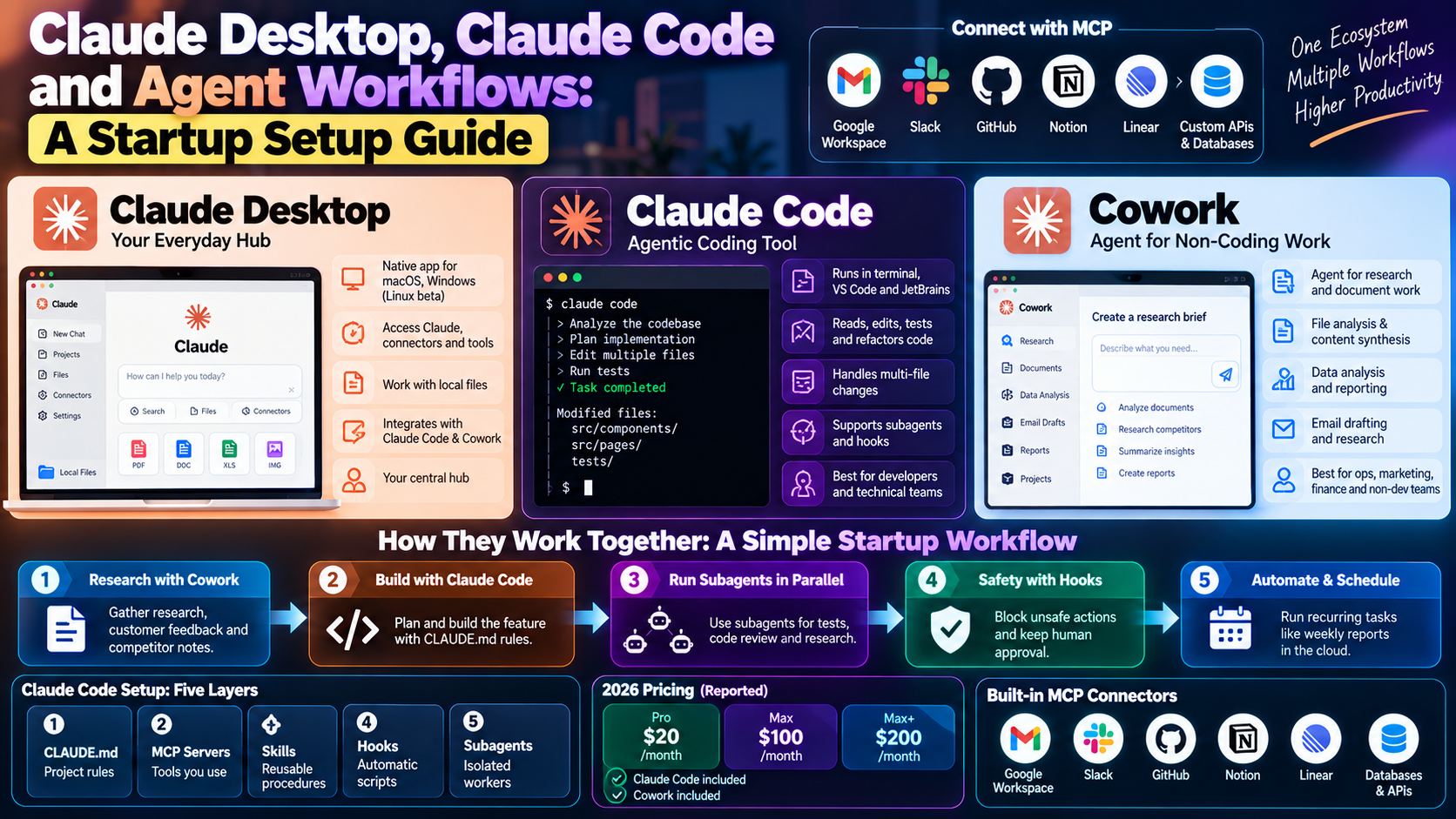
Claude agent workflows now span three surfaces: the desktop app, Claude Code, and Cowork. Each one fits a different kind of work. However, most startups use only one and miss the rest. This guide explains what each does, how to set them up, and how to combine them into one practical workflow.
Claude Agent Workflows: The Three Surfaces
Claude Desktop is the native app for macOS and Windows, with a Linux beta. In practice, it acts as the hub where you reach Claude, connectors, and the other tools. Claude Code is the agentic coding tool. Specifically, it runs in the terminal, in VS Code and JetBrains, and inside the desktop app. Cowork is the agent for non-coding work. Cowork launched in January 2026 and became generally available in April, according to one 2026 guide.
- Claude Desktop: your everyday hub, plus local files and connectors.
- Claude Code: reads, edits, tests, and refactors code across a repo.
- Cowork: handles file work, research, and document tasks for non-developers.
Which Surface to Use for Which Job
Match the surface to the task. Developers should reach for Claude Code when they need bug investigation, feature work, or multi-file refactors. Meanwhile, ops, marketing, and finance staff get more from Cowork, which suits document synthesis, data analysis, email drafting, and research.
Plans matter too. Reported 2026 pricing puts Pro at $20 a month, with Max at $100 and $200. Notably, these plans include both Claude Code and Cowork. Free accounts, however, do not. Check Anthropic’s pricing page, because plans change often.
Connect Tools With MCP
The Model Context Protocol, or MCP, lets Claude use outside tools. Built-in connectors reportedly cover Google Workspace, Slack, GitHub, Linear, Notion, and local files. In addition, developers can build custom MCP servers for databases and internal APIs.
There is one catch. Local MCP servers start and stop with the desktop app. In contrast, remote MCP servers stay available across clients, even when your computer is off. As a result, put anything a teammate or a scheduled job needs on a remote server.
Set Up Claude Code Agent Workflows in Five Layers
A good Claude Code setup has five layers. Start minimal and add one layer at a time. Then add a layer only when it solves a real problem.
- CLAUDE.md: short, project-specific rules, such as file structure and what the agent must never touch.
- MCP servers: only the tools you actually use, because tool output costs context.
- Skills: reusable markdown procedures, loaded only when relevant.
- Hooks: automatic scripts, such as blocking commits that contain credentials.
- Subagents: isolated workers for tasks that would clutter the main context.
Run Subagents in Parallel
Subagents let a main agent delegate work. For example, one author reported spawning three research agents at once, which cut a half-day task to about 15 minutes. Therefore, use this pattern for research, code review, and report generation. Finally, keep each subagent narrow, with one clear job.
A Simple Startup Workflow That Combines All Three
- Use Cowork to gather research, customer feedback, and competitor notes into one brief.
- Hand the brief to Claude Code to plan and build the feature, with CLAUDE.md rules in place.
- Run subagents for tests and code review in parallel.
- Use hooks to block unsafe actions, and keep a human approving anything that ships.
- Schedule recurring tasks, such as weekly reports, to run in the cloud.
Mistakes to Avoid With Claude Agent Workflows
- Writing a huge CLAUDE.md instead of a short, specific one.
- Adding every MCP server you find, which bloats context.
- Running unattended agents with no hooks or review step.
- Forgetting that local tasks need the desktop app to stay open.
Next Steps
Start with one real task and one layer. For pricing details, see our AI coding tools guide. To see how Claude Code has changed over time, read the Claude Code evolution post. Additionally, for the broader concepts, our agentic AI workflows guide is a good companion. Finally, for a fuller product overview, O-Mega’s guide to Claude Desktop, Cowork and Code is worth a read.
FAQ: Claude Agent Workflows
Do I need all three tools?
No. Instead, most developers can start with Claude Code alone. Add Cowork when non-technical teammates need agent help.
Is Claude Code included in the Pro plan?
Yes, reported 2026 plans include it on Pro and above, but not on the free plan. Confirm current limits on Anthropic’s pricing page.
How do I keep agents safe?
Use hooks to block risky actions, keep secrets out of the repo, and require human approval for anything that ships.