AI agents are becoming an important part of modern businesses. They can answer customer questions, automate repetitive tasks, analyze information, manage workflows, and help developers build smarter applications. However, creating an AI agent that works in a real business environment is not as easy as building a simple chatbot. A production-ready AI agent needs reliable tools, secure data access, memory, monitoring, error handling, and proper deployment.
This is where open-source projects for AI agents in production become useful. They give developers access to frameworks, automation platforms, testing tools, and other resources without requiring them to build everything from scratch. Many projects also allow teams to customize their systems according to their business needs.
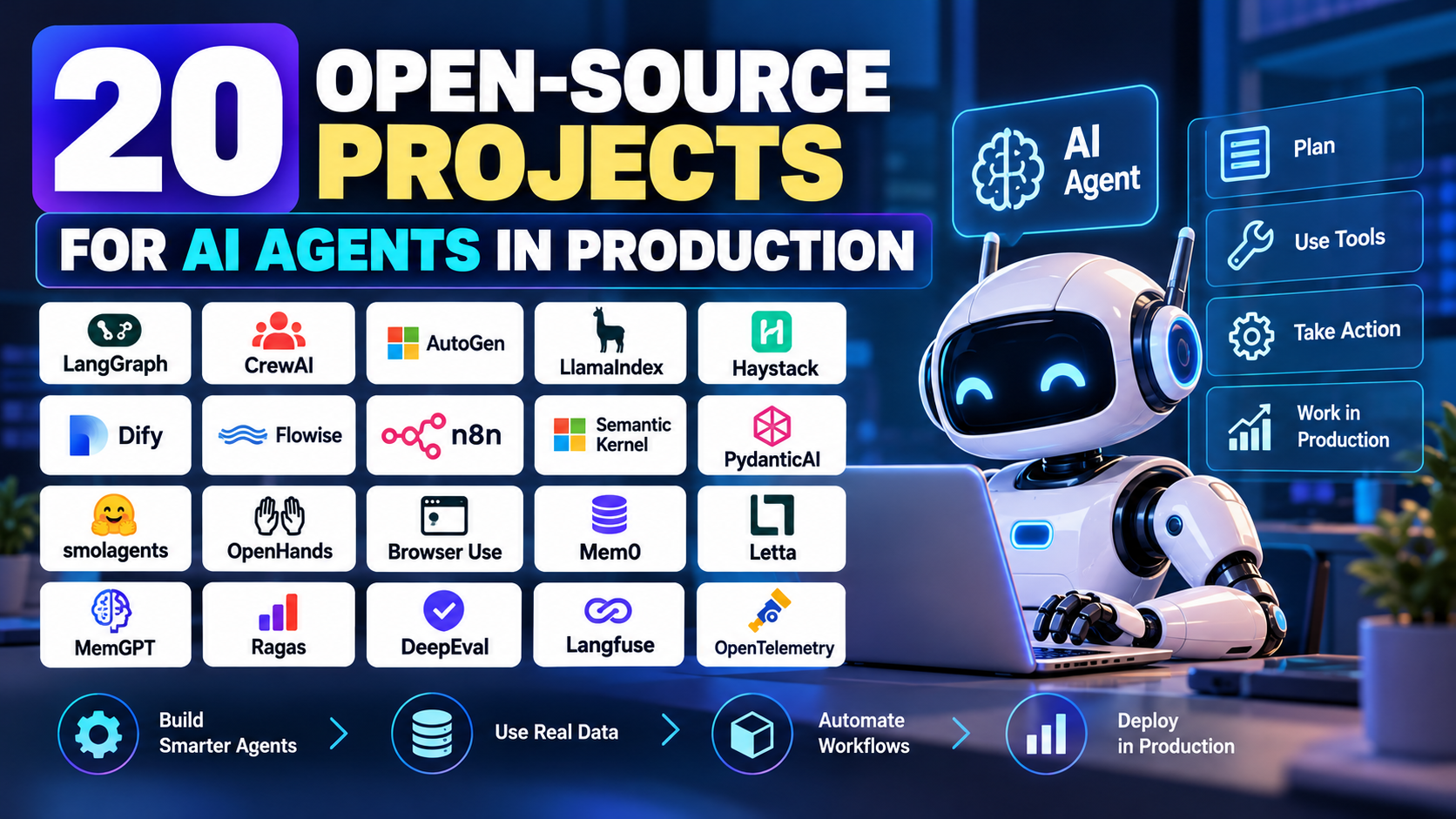
In this guide, we will explore 20 useful open-source projects for building and running AI agents in production. You will learn what each project does, its main benefits, and when to consider using it. Whether you are a startup founder, developer, or business owner, this guide will help you choose the right tools for your next AI project.
What Are Open-Source AI Agent Projects?
Open-source AI agent projects are software tools whose source code is available for people to inspect, use, modify, or contribute to under their respective licenses.
These projects help developers build AI agents that can understand instructions, use external tools, retrieve information, make decisions, and complete tasks with limited human intervention.
For example, an AI customer support agent might search a company knowledge base, check an order status, prepare a response, and ask a human employee for approval before issuing a refund.
Different open-source projects support different parts of this process. Some provide agent development frameworks, while others manage workflows, connect data sources, run code, or evaluate agent performance.
It is important to understand that an open-source project is not automatically production-ready. Developers must still review security, licensing, reliability, performance, and maintenance before using it in a business application.
Why Use Open-Source Projects for AI Agents in Production?
Open-source tools offer several advantages for startups, software companies, and development teams.
Lower development costs: Many tools can be used without paying a software license fee. However, hosting, model API calls, storage, and support may still cost money.
More customization: Developers can often modify the code, connect their preferred models, and adapt workflows to specific business needs.
Greater control: Teams can choose where to host their applications and how to manage their data, subject to each tool’s architecture and license.
Faster development: Existing frameworks and integrations reduce the amount of code developers need to write.
Community support: Active projects may provide documentation, examples, bug fixes, and contributions from other developers.
Reduced dependence on one provider: Some frameworks support multiple language models, allowing developers to change model providers more easily.
The best approach is to select tools based on the actual requirements of your application rather than choosing a project simply because it is popular.
20 Open-Source Projects for AI Agents in Production
The following projects cover different parts of the AI agent development process. They include agent frameworks, workflow automation platforms, memory systems, browser automation, and testing tools.
Project capabilities and licensing can change over time, so check the official repository before selecting a tool for commercial deployment.
1. LangGraph
Best for: Stateful AI agents and complex workflows.
LangGraph is an open-source framework for building AI applications that need to maintain state and follow structured workflows. It is particularly useful when an agent must complete several steps, pause for approval, recover from errors, or continue a task after receiving new information.
Instead of relying on one long instruction, developers can organize an agent into nodes and transitions. Each node performs a specific action, such as calling a model, searching a database, or checking a result.
For example, an insurance support agent could collect claim details, retrieve policy information, check for missing documents, and send the case to a human reviewer when required.
Its main strength is control over workflow execution. Developers can design more predictable processes instead of allowing an agent to make every decision without clear boundaries.
Key features:
- Stateful, graph-based workflows.
- Support for human approval and intervention.
- Checkpointing and recovery capabilities.
- Integration with language models and external tools.
Production consideration: Design explicit limits for loops, retries, tool access, and execution time. Check the official project documentation for current persistence and deployment options.
Official website: https://www.langchain.com/langgraph
2. CrewAI
Best for: Multi-agent collaboration.
CrewAI helps developers create AI systems in which multiple agents work together. Each agent can have a defined role, goal, and set of tools.
For example, a marketing automation system could use one agent to research competitors, another to prepare content ideas, and a third to check the draft against brand guidelines.
The advantage is that complex work can be divided into smaller tasks. Developers can define how those tasks are assigned and how their results are combined.
CrewAI is particularly attractive for startups experimenting with AI-powered research, business operations, and content workflows.
Key features:
- Role-based agent design.
- Task assignment and workflow coordination.
- Tool integration.
- Support for sequential and other coordinated processes.
Production consideration: Multiple agents can increase model usage, latency, and debugging complexity. Use separate agents only when they provide a clear benefit over a simpler workflow.
Official website: https://www.crewai.com/
3. Microsoft AutoGen
Best for: Experimental multi-agent applications and conversational agent systems.
Microsoft AutoGen is an open-source framework for building applications that use AI agents to communicate and collaborate. It has been used for systems involving coding assistants, problem-solving agents, and coordinated AI workflows.
A team might use one agent to generate code, another to review it, and a third to run tests or analyze failures.
AutoGen is relevant for developers exploring complex agent interactions. However, its ecosystem and recommended development approach have evolved, so teams should review Microsoft’s current agent development guidance before starting a new production project.
Key features:
- Agent-to-agent communication patterns.
- Support for tool-using agents.
- Configurable interaction workflows.
- Integration with language models and application code.
Production consideration: Set clear stopping conditions and enforce permissions for every tool. Unrestricted agent conversations can consume excessive resources or create unpredictable results.
Official repository: https://github.com/microsoft/autogen
4. LlamaIndex
Best for: AI agents that work with private documents and business data.
LlamaIndex helps developers connect language models to external information sources. It supports data ingestion, indexing, retrieval, and agent-related application patterns.
Consider a company that stores product manuals, internal policies, contracts, and customer support documents. An AI agent can use a retrieval system to find relevant passages before generating an answer.
This makes LlamaIndex useful for retrieval-augmented generation (RAG), document assistants, research tools, and data-focused agents.
Key features:
- Data connectors and ingestion.
- Document indexing and retrieval.
- Query and retrieval workflows.
- Tools for building data-aware AI applications.
Production consideration: Retrieval quality is essential. Test the system with real questions, control document permissions, and ensure the agent cannot access information that the current user is not allowed to see.
Official website: https://www.llamaindex.ai/
5. Haystack
Best for: Search-based AI applications and enterprise knowledge assistants.
Haystack is an open-source framework for building applications that combine search, retrieval, language models, and structured pipelines.
It can help developers create an AI assistant that searches company documents, retrieves relevant information, and generates an answer based on the available evidence.
For instance, a legal research application might retrieve relevant clauses from approved documents before preparing a summary for a professional to review.
Haystack is useful when a project needs a clearly defined retrieval pipeline rather than an agent that makes every decision freely.
Key features:
- Modular pipelines.
- Search and document retrieval.
- Language model integration.
- Components for building retrieval-augmented applications.
Production consideration: Evaluate retrieval accuracy, source relevance, response quality, and access control separately. A fluent answer does not necessarily mean the system retrieved the correct information.
Official website: https://haystack.deepset.ai/
6. Dify
Best for: Building AI applications with visual workflows.
Dify is an open-source platform for developing AI applications, including workflows, knowledge-based assistants, and tool-connected applications.
Its visual interface can make it easier for teams to design AI workflows without writing every component manually. Developers can combine model calls, knowledge retrieval, conditional steps, and integrations.
A small business could use Dify to create an internal assistant that answers employee questions using company documents or helps prepare customer support responses.
It can be useful for teams that want to prototype an AI application and then improve it as requirements become clearer.
Key features:
- Visual AI workflow builder.
- Knowledge-base capabilities.
- Model integrations.
- Application management and API access.
Production consideration: Review authentication, deployment configuration, data storage, and the security of connected tools. Self-hosting does not remove the need for security updates and operational monitoring.
Official website: https://dify.ai/
7. Flowise
Best for: Visual development of LLM applications and agent workflows.
Flowise is an open-source, low-code platform that helps developers connect AI models, tools, data sources, and application components through a visual interface.
It can be useful for quickly building prototypes, testing retrieval strategies, and demonstrating an AI assistant to stakeholders.
For example, a startup could connect a language model to a vector database and selected company documents to create an initial customer-facing knowledge assistant.
Key features:
- Visual workflow construction.
- Connections between models, tools, and data sources.
- Rapid prototyping.
- APIs for integrating workflows into applications.
Production consideration: Treat visual workflows as software that requires testing and version control. Secure administrative interfaces and avoid exposing sensitive credentials through workflow configuration.
Official repository: https://github.com/FlowiseAI/Flowise
8. n8n
Best for: Business process automation with AI agents.
n8n is a workflow automation platform that connects applications, APIs, databases, and automation steps. Its AI-related integrations allow developers to include language models and agent-like components in broader business processes.
For example, a lead management workflow could receive a website enquiry, extract important details, classify the lead, draft a response, and create a record in a CRM.
This is valuable because most business automation requires more than AI reasoning. It also requires connecting systems and moving data between them.
Key features:
- Visual workflow automation.
- Large selection of integrations.
- API and webhook support.
- AI components within business workflows.
- Options for self-hosting.
Production consideration: Use retries, error handling, execution limits, credential management, and approval steps for sensitive actions. Check the current n8n license and commercial usage terms before deploying it.
Official website: https://n8n.io/
9. Semantic Kernel
Best for: Integrating AI agents into existing business software.
Semantic Kernel is an open-source SDK from Microsoft that helps developers connect language models with application functions, plugins, and business logic.
It is particularly relevant to teams building AI features inside existing software rather than creating an entirely separate agent platform.
For example, an enterprise application could allow an assistant to retrieve account details, summarize a support case, and prepare an action using approved application functions.
Key features:
- Integration with application code.
- Function and plugin calling.
- Support for multiple programming languages and model integrations.
- Building blocks for AI-powered workflows.
Production consideration: Treat model-generated function requests as untrusted input. Validate parameters, enforce user permissions, and check the current SDK guidance before choosing an architecture for a new project.
Official repository: https://github.com/microsoft/semantic-kernel
10. PydanticAI
Best for: Type-safe AI applications built with Python.
PydanticAI is a Python framework designed to make AI application development more structured. It uses typed data models and validation to help developers define the information an agent should return.
Suppose an agent must extract a customer’s name, enquiry type, budget, and preferred contact method. Instead of accepting an unrestricted paragraph, the application can validate a structured response.
This is especially useful when agent outputs feed into APIs, databases, dashboards, or other automated processes.
Key features:
- Structured output validation.
- Python type hints.
- Integration with supported model providers.
- Testing and development support for AI applications.
Production consideration: Type validation checks the format of an answer, not necessarily whether the answer is factually correct. Combine schema validation with business rules and appropriate testing.
Official website: https://ai.pydantic.dev/
11. smolagents
Best for: Lightweight agents that use tools.
smolagents is an open-source Python library from Hugging Face for building AI agents with a relatively small amount of code.
It is suitable for developers who want to experiment with tool-using agents without introducing a large framework into their project.
An agent might search for information, call a permitted API, perform a calculation, and return a result.
Key features:
- Lightweight agent development.
- Tool-based task execution.
- Integration with Hugging Face models and other supported model options.
- Support for code-oriented agent approaches.
Production consideration: Code-executing agents require strong isolation. Use restricted execution environments, resource limits, and carefully controlled tool permissions.
Official repository: https://github.com/huggingface/smolagents
12. OpenHands
Best for: AI software development agents.
OpenHands is an open-source project focused on AI systems that can assist with software engineering tasks. Depending on the configuration, such systems can inspect repositories, edit files, run commands, and help resolve development issues.
A software team might use an agent to investigate a bug, propose a code change, run tests, and prepare a pull request for human review.
It is relevant to companies that want to explore coding automation while keeping their development workflows under their control.
Key features:
- Software engineering task support.
- Repository and coding workflows.
- Command and tool interaction.
- Integration options for development environments.
Production consideration: Do not give an agent unrestricted access to production credentials, deployment systems, or sensitive repositories. Run tasks in isolated environments and require review before merging or deploying code.
Official repository: https://github.com/OpenHands/OpenHands
13. Browser Use
Best for: Agents that interact with websites through a browser.
Browser Use is an open-source project that helps AI agents interact with web pages and browser-based applications.
It can support tasks such as navigating a website, finding specific information, filling out forms, or collecting details from permitted pages.
For example, a research agent might open several public product pages, collect specified information, and prepare a comparison for a human user.
Key features:
- Browser interaction through agent workflows.
- Web page navigation.
- Form and page interaction.
- Integration with language model-based automation.
Production consideration: Websites can change their layout, and automated interactions can fail. Respect website terms, privacy requirements, access restrictions, and rate limits. Use human approval before purchases or other sensitive actions.
Official repository: https://github.com/browser-use/browser-use
14. Mem0
Best for: Adding memory to AI assistants and agents.
Mem0 is an open-source memory layer designed to help AI applications retain useful information across interactions.
Without memory, an assistant may need to process the same information repeatedly. A memory system can store selected facts or preferences so future interactions have more context.
For example, a customer support assistant might remember a customer’s preferred language or an ongoing issue, subject to the company’s privacy and retention policies.
Key features:
- Memory extraction and retrieval.
- User-specific contextual information.
- Support for persistent conversational experiences.
- Integration options for AI applications.
Production consideration: Decide what should be remembered, how long it should be stored, and how users can correct or delete it. Avoid storing sensitive information without a clear purpose and appropriate safeguards.
Official website: https://mem0.ai/
15. Letta
Best for: Stateful agents with long-term memory.
Letta is an open-source platform for building AI agents that can maintain state and use memory across interactions.
It is relevant to applications where context must continue beyond a single request. Examples include personal assistants, ongoing research agents, and support systems that handle long-running conversations.
Developers can explore memory-management patterns and agent behavior without building every memory component themselves.
Key features:
- Stateful agent architecture.
- Persistent memory concepts.
- Tools for managing agent context.
- Support for long-running agent interactions.
Production consideration: Persistent memory can introduce privacy and accuracy problems if incorrect information remains stored. Build memory review, update, and deletion mechanisms into the application.
Official website: https://www.letta.com/
16. MemGPT
Best for: Understanding memory management in long-running AI conversations.
MemGPT is a research-originated project associated with managing limited model context through memory hierarchies. Its ideas helped inspire work on stateful AI agents and persistent context.
It is worth studying when designing agents that must handle long conversations or larger collections of information than can fit into one model context window.
However, developers should distinguish the original project and its research ideas from the current Letta ecosystem. Check the repository and current documentation to understand which components are actively maintained and recommended.
Key features and concepts:
- Memory management beyond a single context window.
- Separation of active context and stored information.
- Stateful conversation patterns.
- Ideas for long-running AI assistants.
Production consideration: Do not select a project based only on its historical popularity. Confirm its maintenance status, current architecture, dependencies, and migration guidance before adopting it.
Official repository: https://github.com/cpacker/MemGPT
17. Ragas
Best for: Evaluating retrieval-augmented AI applications.
Ragas is an open-source evaluation framework designed to help assess RAG systems and related AI application behavior.
A RAG application can produce an incorrect answer even when the language model is capable. It might retrieve the wrong document, miss important evidence, or generate a claim that is not supported by the retrieved information.
Ragas provides evaluation methods that can help teams examine aspects of retrieval and generation quality.
Key features:
- Evaluation metrics for RAG applications.
- Tools for analyzing retrieval and generated responses.
- Support for evaluation datasets and experiments.
- Integration with AI evaluation workflows.
Production consideration: Automated evaluation scores are not a replacement for human review. Use representative test cases, domain-specific checks, and real-world feedback to understand actual performance.
Official repository: https://github.com/vibrantlabsai/ragas
18. DeepEval
Best for: Testing and evaluating AI agents before and after deployment.
DeepEval is an open-source framework for evaluating LLM applications. It can help developers create repeatable tests for response quality, relevance, and other application-specific criteria.
For example, a customer support agent can be tested against a collection of realistic questions to check whether it follows company policies and provides useful answers.
Teams can use evaluation tests during development and as part of continuous integration.
Key features:
- Automated LLM evaluation.
- Test datasets and evaluation metrics.
- Support for repeatable experiments.
- Testing workflows for AI applications.
Production consideration: Evaluation results depend on the quality of the test dataset and the chosen metrics. Include adversarial inputs, edge cases, and human-reviewed examples.
Official website: https://deepeval.com/
19. Langfuse
Best for: Observability and debugging of LLM applications.
Langfuse is an open-source LLM engineering and observability platform. It helps teams understand what happens during AI application execution.
When an agent gives a wrong answer, developers need more than the final response. They may need to inspect the model calls, prompts, tool executions, latency, and token usage that led to the result.
Langfuse can help teams investigate these issues and understand how application behavior changes over time.
Key features:
- Tracing for LLM application execution.
- Prompt and experiment management capabilities.
- Usage and performance analysis.
- Evaluation and debugging workflows.
Production consideration: Traces can contain private prompts, customer information, or credentials if applications are not designed carefully. Configure redaction, access control, retention policies, and appropriate hosting.
Official website: https://langfuse.com/
20. OpenTelemetry
Best for: Standardized monitoring and observability.
OpenTelemetry is an open-source observability framework for collecting and exporting telemetry such as traces, metrics, and logs. It is not an AI agent framework, but it is valuable for monitoring the services that AI agents depend on.
For example, a production agent may call a model API, retrieve documents, query a database, and update a CRM. OpenTelemetry instrumentation can help developers trace requests across these components.
This makes it easier to identify slow services, failed requests, and performance bottlenecks.
Key features:
- Distributed tracing.
- Metrics and log instrumentation.
- Vendor-neutral telemetry collection.
- Integration with monitoring backends.
Production consideration: Observability is useful only when teams define meaningful alerts and protect sensitive data. Avoid logging secrets or retaining unnecessary personal information.
Official website: https://opentelemetry.io/
How to Choose the Right Open-Source AI Agent Project
Choosing a tool becomes easier when you begin with the business problem instead of the technology.
Use the following guidelines to narrow your options.
- For multi-agent workflows: Consider CrewAI, LangGraph, or Microsoft AutoGen after checking their current capabilities and maintenance status.
- For document-based assistants: Consider LlamaIndex or Haystack for retrieval and knowledge management.
- For visual AI application development: Evaluate Dify or Flowise.
- For business process automation: Consider n8n for connecting AI steps with business applications.
- For Python applications with structured outputs: Evaluate PydanticAI.
- For browser-based tasks: Consider Browser Use with strong isolation and permission controls.
- For persistent agent memory: Evaluate Mem0 or Letta based on your data and memory requirements.
- For AI quality testing: Use Ragas for RAG evaluation and DeepEval for broader LLM application testing.
- For debugging and monitoring: Consider Langfuse and OpenTelemetry together or separately, depending on your architecture.
- For AI coding assistance: Evaluate OpenHands in a restricted development environment.
Before making a final decision, compare each project’s license, maintenance activity, documentation, integration support, security features, deployment requirements, and operational cost.
How to Deploy an AI Agent in Production
Moving from a prototype to production requires careful engineering. A successful demonstration does not prove that an agent is reliable enough for real users.
Step 1: Define a narrow use case
Start with one clear task, such as answering questions from approved documents or classifying incoming support tickets. Avoid giving the agent many unrelated responsibilities in the first version.
Step 2: Choose the right model and framework
Select a model based on accuracy, latency, cost, privacy, and tool-use requirements. Then choose a framework that supports the workflow you need.
A simple application may only require a model API and a few validated functions. More complex applications may benefit from a graph-based workflow or a multi-agent architecture.
Step 3: Connect only the required data
Give the agent access to the minimum information needed for its task. Add authentication, permission checks, and appropriate data filtering.
Step 4: Set boundaries for tool use
Define which tools the agent can access and which actions require human approval. For example, an agent may prepare a refund request but should not issue a large refund without authorization.
Step 5: Test before release
Create a test dataset that includes normal questions, ambiguous requests, incorrect information, and attempts to bypass instructions. Evaluate both the final answers and the actions taken by the agent.
Step 6: Add monitoring and error handling
Track failures, latency, model usage, tool calls, and application costs. Add timeouts, retry limits, alerts, and fallback behavior where appropriate.
Step 7: Deploy gradually
Start with internal users or a small group of customers. Review the results, fix problems, and expand access only when the system performs reliably.
Step 8: Review and improve regularly
Models, dependencies, APIs, and business requirements change. Review performance, security updates, evaluation results, and user feedback on an ongoing basis.
Best Practices for Running AI Agents in Production
Production AI agents need stronger controls than experimental applications. The following practices can help teams reduce risk and improve reliability.
- Apply least-privilege access: Give each agent only the permissions it needs.
- Validate all important outputs: Check structured data and business rules before executing actions.
- Use human approval for sensitive tasks: Require review for payments, account changes, destructive operations, and high-impact decisions.
- Set budgets and limits: Control model usage, execution time, retries, and the number of tool calls.
- Protect user information: Redact sensitive data and define retention policies for logs and memory.
- Monitor real performance: Track task completion, failure rates, response times, and operating costs.
- Test for prompt injection: Check whether malicious instructions in user input or retrieved documents can change agent behavior.
- Keep dependencies updated: Review security advisories, project maintenance, and license changes.
- Plan for failure: Provide safe fallback behavior when a model, API, database, or external service becomes unavailable.
- Maintain human accountability: Make it clear who is responsible for important decisions made with AI assistance.
The goal is not to remove every possible error. It is to make failures detectable, limited in impact, and easier to correct.
Common Mistakes to Avoid
Developers sometimes focus too much on agent intelligence and overlook the practical requirements of production systems.
Using too many agents: Multiple agents are not always better. A simple workflow may be cheaper, faster, and easier to debug.
Skipping evaluation: Testing only a few successful examples can hide serious problems. Build a repeatable evaluation process before launch.
Giving broad permissions: An agent should not have unrestricted access to databases, email accounts, file systems, or production infrastructure.
Ignoring operating costs: Every additional model call, tool execution, and retrieval step can increase the total cost of a task.
Trusting memory without review: Stored information may be incomplete, outdated, or incorrect. Provide ways to update and delete it.
Confusing open source with free operation: Hosting, infrastructure, model inference, maintenance, and security reviews may require significant resources.
Ignoring project maintenance: A framework that worked well in a prototype may not be the best choice for a long-term production system.
Final Thoughts
Open-source projects for AI agents in production give developers and businesses a practical way to build intelligent applications without creating every component from scratch.
LangGraph and CrewAI can help organize agent workflows. LlamaIndex and Haystack support data-focused applications. Dify, Flowise, and n8n can simplify visual development and automation. Mem0 and Letta address memory-related needs, while Ragas, DeepEval, Langfuse, and OpenTelemetry help teams test, understand, and monitor their systems.
There is no single best project for every use case. The right choice depends on the task, team skills, data requirements, budget, security needs, and expected scale.
For most startups, a good starting point is to build one narrow AI workflow, measure its results, and add complexity only when necessary. With proper testing, access controls, monitoring, and human oversight, open-source tools can provide a strong foundation for reliable AI applications.
Read More Blog– Ai Startup Edge
Frequently Asked Questions (FAQs)
1. What are the best open-source projects for AI agents in production?
LangGraph, CrewAI, PydanticAI, LlamaIndex, Haystack, and smolagents are useful options for different development needs. The best choice depends on your workflow, programming language, data requirements, and production goals.
2. Are open-source AI agent frameworks free to use?
Many open-source frameworks can be used without a software license fee. However, hosting, model API usage, databases, monitoring, and maintenance can create additional costs. Always review the current license before commercial use.
3. Which open-source AI agent framework is best for beginners?
Dify and Flowise are useful starting points for people who prefer visual workflow builders. Developers who know Python may find smolagents or PydanticAI suitable for learning code-based agent development.
4. Which AI agent framework is best for production applications?
LangGraph is worth evaluating for stateful workflows that need explicit control and human approval. PydanticAI is useful for structured Python applications, while CrewAI is designed for collaborative multi-agent workflows. Production suitability still depends on implementation and testing.
5. Can I build AI agents without coding?
Yes. Platforms such as Dify and Flowise provide visual interfaces for creating AI workflows. n8n can also connect AI components with business applications. Advanced integrations, security controls, and custom requirements may still need programming skills.
6. What is the difference between an AI agent and an AI agent framework?
An AI agent is an application that uses a model and tools to work toward a goal. An AI agent framework provides the software components developers use to build, coordinate, test, and manage that application.
7. Which open-source tools are best for multi-agent systems?
CrewAI, LangGraph, and Microsoft AutoGen are relevant options for multi-agent development. Compare their current documentation and maintenance status before selecting one. For simple tasks, a single agent or a conventional workflow may be more efficient.
8. How can I give an AI agent long-term memory?
You can evaluate memory-focused projects such as Mem0 and Letta. A memory system can store selected information between interactions, but it should include access controls, retention policies, and ways to correct or delete stored data.
9. How do I monitor an AI agent in production?
Langfuse can help track LLM application execution, while OpenTelemetry supports traces, metrics, and logs across application services. Teams should monitor failures, latency, token usage, task completion, and security events.
10. How do I test an AI agent before deployment?
Create a test dataset with realistic questions, incorrect inputs, edge cases, and malicious instructions. Ragas can help evaluate retrieval-augmented applications, while DeepEval supports broader LLM application evaluation. Combine automated tests with human review.
11. Are open-source AI agents safe for business use?
They can be used in business environments when properly configured, but open source does not guarantee security. Use restricted permissions, secure credentials, isolated execution, data protection, monitoring, and human approval for sensitive actions.
12. Can startups build commercial products using open-source AI agent tools?
Yes, many startups use open-source components to build commercial AI applications. However, each project’s license may have different conditions, especially for hosted services, redistribution, and commercial integrations. Review the exact license and any third-party model terms before launch.
13. Which open-source AI agent projects are best for business automation?
n8n is useful for connecting AI tasks with business applications. Dify and Flowise support visual AI workflows, while LangGraph can help coordinate more complex, stateful processes.
14. What is the biggest challenge when deploying AI agents in production?
Reliability is one of the biggest challenges. Agents may retrieve incorrect information, call tools incorrectly, exceed budgets, or misunderstand instructions. Testing, validation, access control, monitoring, and human oversight help reduce these risks.
15. What should I consider before choosing an open-source AI agent project?
Check the project’s license, maintenance activity, documentation, security practices, model compatibility, deployment options, integration support, and operating costs. Start with the simplest architecture that meets your requirements and expand only when necessary.