


APIs are an important part of modern software development. Whether you are building an AI chatbot, an AI agent, a business automation tool, or a simple web application, APIs help your software communicate with other services and access useful information.
The good news is that you do not always need an expensive API subscription to start building something useful. Many platforms offer free APIs that developers can use for learning, testing, experimenting, and even building early-stage projects.
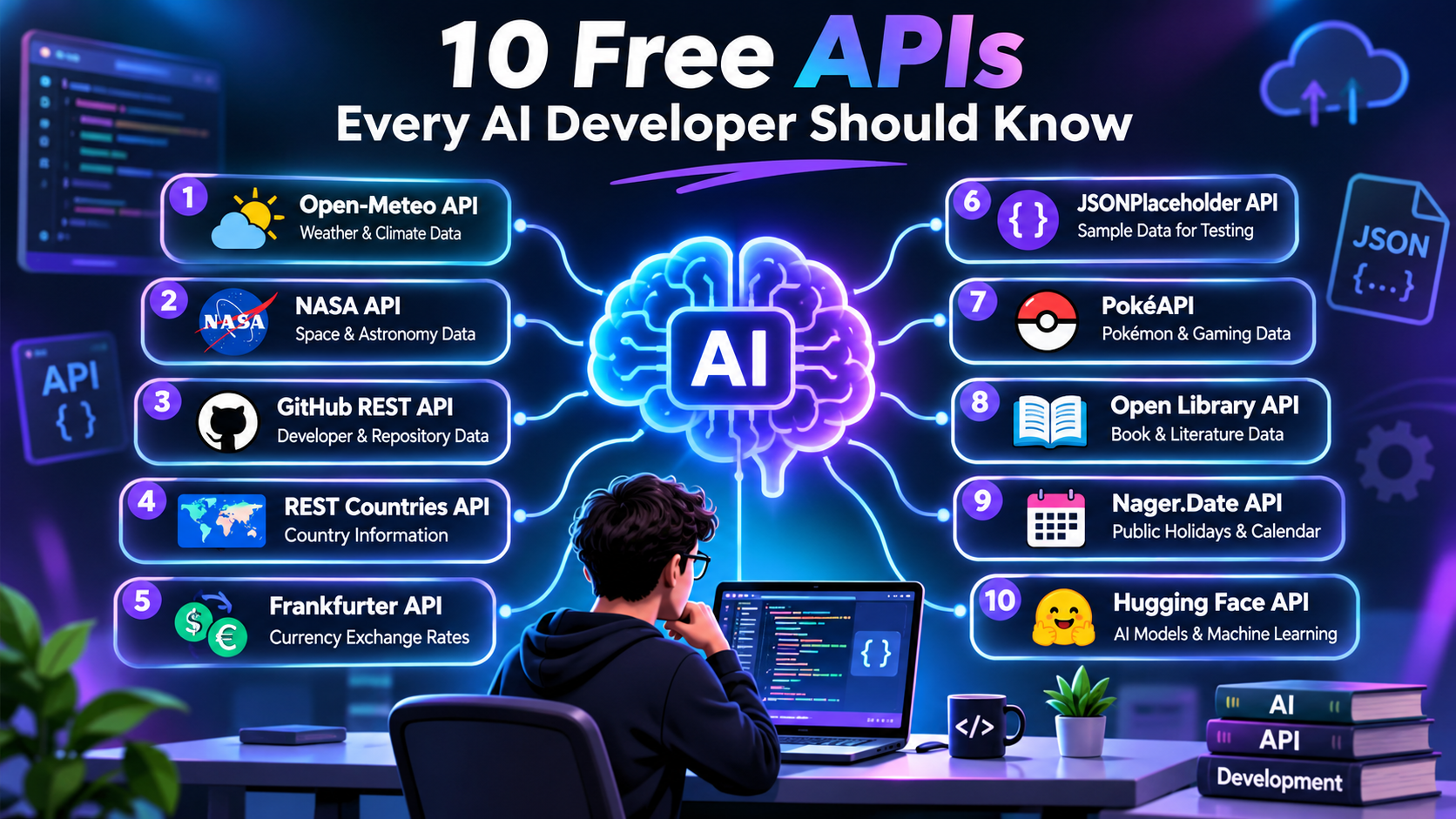
In this guide, we will explore 10 free APIs every AI developer should know in 2026. You will learn what each API does, how it works, whether you need an API key, and how you can use it in real-world AI projects.
If you are a beginner, startup founder, software developer, or someone learning AI automation, this list will help you save development time, reduce costs, and build smarter applications.
What Are Free APIs and Why Do AI Developers Need Them?
An API (Application Programming Interface) allows two different software applications to communicate with each other. It works like a bridge between your application and an external service.
For example, imagine you are building an AI travel assistant. You want it to provide weather information, currency conversion, and country details. Instead of collecting and maintaining all this information yourself, you can connect your application to different APIs.
When your AI application sends a request, the API processes it and returns information, usually in JSON format. Your application can then use that information to generate a useful response.
Free APIs are especially helpful because they allow developers to experiment without spending money on expensive services.
Here are some important reasons why AI developers use free APIs:
- Reduce development costs: Start building applications without purchasing expensive API subscriptions.
- Save development time: Use existing services instead of creating every feature from scratch.
- Build AI agents: Connect AI agents with external tools and real-world information.
- Test applications: Use sample data and API responses during development.
- Create automation: Connect different platforms and automate repetitive tasks.
- Learn API integration: Understand HTTP requests, JSON responses, authentication, and API documentation.
However, remember that free does not always mean unlimited. Some APIs have request limits, commercial-use restrictions, or paid plans for additional features.
10 Best Free APIs for AI Developers in 2026
The following APIs are useful for AI development, web applications, automation workflows, and software testing. Some do not require an API key, while others offer free accounts or limited free credits.
1. Open-Meteo API – Free Weather Data API
Free for non-commercial use
Website: Open-Meteo
API type: Weather and climate data
API key: Not required for free non-commercial access.
Open-Meteo is one of the most useful free APIs for developers who want to work with weather information. It provides current weather conditions, hourly forecasts, daily forecasts, and historical weather data.
You can use this API to build weather applications, travel assistants, farming tools, and AI-powered recommendation systems.
For example, imagine you are developing an AI travel agent. A user asks, “What is the weather like in Manali this weekend?” Your application can request weather information from Open-Meteo and send the result to an AI model to generate a helpful answer.
Main features of Open-Meteo:
- Current weather information.
- Hourly and daily weather forecasts.
- Historical weather information.
- Global weather coverage.
- Temperature, rainfall, wind speed, and humidity data.
- No API key for free non-commercial access.
Example API request:
https://api.open-meteo.com/v1/forecast?latitude=28.61&longitude=77.20¤t=temperature_2mThis example requests current temperature information for Delhi.
Best AI project ideas:
- AI weather assistant.
- Smart travel planning agent.
- Agriculture recommendation application.
- Weather-based business automation.
Important: Open-Meteo’s free hosted API is intended for non-commercial use. Commercial projects should check its commercial access options. Attribution is also required. GitHub+1
2. NASA API – Free Space and Astronomy Data
Free developer access
Website: NASA Open APIs
API type: Space, astronomy, and Earth science
API key: Free registration available.
NASA provides several APIs that allow developers to access information about space, planets, asteroids, Earth, and astronomical events.
This is an excellent API for developers who want to build educational applications, AI research assistants, science chatbots, or space-related projects.
One popular service is the Astronomy Picture of the Day (APOD). It provides an astronomy image with an explanation that can be displayed inside your application.
Another useful service is the Near Earth Object Web Service, which provides information about asteroids approaching Earth.
Main features of NASA API:
- Astronomy Picture of the Day.
- Asteroid information.
- Earth observation data.
- Mars Rover images.
- Space-related research information.
- Different scientific datasets.
Example API request:
https://api.nasa.gov/planetary/apod?api_key=DEMO_KEYThis example retrieves NASA’s Astronomy Picture of the Day.
Best AI project ideas:
- AI space information chatbot.
- Astronomy learning assistant.
- AI-powered science research tool.
- Space image discovery application.
NASA provides a DEMO_KEY for testing, but it has lower limits. A registered developer key has a default limit of 1,000 requests per hour across the API service. api.nasa.gov+1
3. GitHub REST API – Developer and Repository Data
Free API access
Website: GitHub REST API
API type: Developer tools and repository information
API key: Not required for basic public requests; authentication increases limits.
GitHub is one of the most valuable platforms for software developers. Its REST API allows applications to access public repository information, user profiles, issues, commits, and other development-related data.
AI developers can use this API to create intelligent coding assistants and developer productivity tools.
For example, you can develop an AI assistant that searches GitHub repositories, collects information about a project, and summarizes its features.
You can also use GitHub data to create applications that track project activity and help developers discover useful open-source tools.
Main features of GitHub REST API:
- Search public repositories.
- Access developer profiles.
- Retrieve repository details.
- Read issues and pull requests.
- Access commit information.
- Monitor project activity.
Example API request:
https://api.github.com/repos/openai/openai-pythonThis request retrieves public information about the OpenAI Python repository.
Best AI project ideas:
- AI GitHub repository analyzer.
- Open-source project discovery agent.
- AI coding research assistant.
- Developer activity monitoring tool.
Important: Unauthenticated requests are generally limited to 60 requests per hour. Authenticated requests have higher limits, generally 5,000 per hour for standard personal access token authentication. Secondary rate limits also apply. GitHub Docs+1
4. REST Countries API – Country Information API
Website: REST Countries Documentation
API type: Country and geographical information
API key: Free account and bearer token required under current documentation.
REST Countries is useful when you need information about countries around the world. It provides structured information such as country names, capitals, currencies, languages, flags, geographical regions, and country codes.
Developers can use this API to create applications that need country information without maintaining a large database manually.
For example, an AI travel assistant can use this API to answer questions about a country’s capital, currency, language, and geographical details.
Main features of REST Countries API:
- Country names and capital cities.
- Country flags.
- Currency information.
- Languages and country codes.
- Geographical regions.
- Bordering country information.
Example API request:
GET https://restcountries.com/v3.1/name/indiaCheck the current documentation for the supported version and authentication requirements before using this example.
Best AI project ideas:
- AI travel assistant.
- Country information chatbot.
- International business research tool.
- Global education application.
The current REST Countries documentation lists a free allowance of 1,000 requests per month, with a throughput limit of 20 requests per 10 seconds. REST Countries
5. Frankfurter API – Free Currency Exchange Rates
No API key required
Website: Frankfurter API
API type: Currency conversion and historical exchange rates
API key: Not required.
Frankfurter is a free currency exchange API that provides reference exchange rates from central banks and other official sources.
It is useful for developers building international shopping applications, financial dashboards, e-commerce platforms, and currency conversion tools.
For example, suppose you are building an online shopping assistant. A customer from India wants to understand the price of a product listed in US dollars. Your application can retrieve the USD-to-INR reference exchange rate and calculate an approximate converted amount.
Main features of Frankfurter API:
- Currency exchange rates.
- Support for multiple currencies.
- Historical exchange rate information.
- Different base currencies.
- Currency conversion data.
- No API key required.
Example API request:
https://api.frankfurter.dev/v2/rates?base=USD"es=INRThis request retrieves the USD-to-INR reference rate.
Best AI project ideas:
- AI currency conversion assistant.
- International shopping assistant.
- E-commerce pricing automation.
- Currency research dashboard.
One important thing to understand is that Frankfurter provides reference rates, not real-time trading prices. Rates are published by their sources periodically. It is free for commercial use, according to its documentation. Free exchange rate API+1
6. JSONPlaceholder API – Free API for Testing and Learning
Free and no registration
Website: JSONPlaceholder
API type: Fake REST API and sample data
API key: Not required.
JSONPlaceholder is a useful API for developers who want to test their applications without connecting to a real database.
It provides sample JSON data, including posts, comments, users, photos, albums, and todos.
If you are learning how to connect an AI application to an external API, this is a good starting point.
For example, you can create a simple AI chatbot that receives sample user information from JSONPlaceholder and generates a summary based on the returned data.
It is also helpful when developing frontend applications using React, Angular, Vue, or other frameworks.
Main features of JSONPlaceholder:
- Sample user information.
- Posts and comments.
- Albums and photos.
- Todo lists.
- GET, POST, PUT, PATCH, and DELETE examples.
- No registration or API key required.
Example API request:
https://jsonplaceholder.typicode.com/usersThis request returns sample user information.
Best AI project ideas:
- AI chatbot testing.
- API integration practice.
- Frontend application development.
- AI agent workflow experiments.
Remember that JSONPlaceholder is a fake data service. It is designed for testing and prototyping, not for retrieving real customer information or running a production database. Free Fake REST API+1
7. PokéAPI – Free Gaming and Educational Data API
Free and no API key
Website: PokéAPI
API type: Gaming and educational data
API key: Not required.
PokéAPI is a public API that provides detailed information about Pokémon characters, abilities, types, moves, and other game-related information.
Although it is mainly related to gaming, it is also a useful resource for developers who want to learn API integration and build interactive applications.
It is particularly helpful for beginners because its data is structured and easy to understand.
You can create an AI gaming assistant that answers questions about Pokémon characters or recommends suitable characters based on their abilities.
Main features of PokéAPI:
- Pokémon names and details.
- Character abilities.
- Pokémon types.
- Moves and skills.
- Game-related information.
- Evolution information.
Example API request:
https://pokeapi.co/api/v2/pokemon/pikachuThis request retrieves information about Pikachu.
Best AI project ideas:
- AI gaming chatbot.
- Pokémon recommendation assistant.
- Interactive learning application.
- Gaming data analysis tool.
PokéAPI does not require authentication and has no standard rate limit, but its fair-use policy asks developers to cache data and avoid unnecessary requests. PokéAPI+1
8. Open Library API – Free Book and Literature Data
Website: Open Library API
API type: Books and literature information
API key: Generally not required for basic public lookups.
Open Library is a useful API for developers building educational platforms, book discovery tools, reading assistants, and AI-powered learning applications.
It provides book-related information, including titles, authors, publication details, and available book records.
Imagine developing an AI reading assistant. A user enters a book title, and your application searches Open Library to find relevant book information. Your AI model can then organize the information into a simple response.
Main features of Open Library API:
- Search books by title.
- Find books by author.
- Retrieve publication information.
- Access book records.
- Discover different editions.
- Support book discovery applications.
Example API request:
https://openlibrary.org/search.json?q=artificial+intelligenceThis request searches for books related to artificial intelligence.
Best AI project ideas:
- AI book recommendation assistant.
- Educational chatbot.
- Reading list generator.
- Book discovery application.
Open Library is designed mainly for book discovery and human-facing services. Its guidelines recommend caching responses and identifying your application. The default rate limit is one request per second, increasing to three requests per second for identified applications. It is not intended to be a high-traffic commercial database backend. Open Library+1
9. Nager.Date API – Free Public Holiday API
Free public API
Website: Nager.Date
API type: Public holidays and calendar information
API key: Not required for the community Web API.
Nager.Date is a useful API for applications that need public holiday information from different countries.
It can help developers build smart scheduling systems, business applications, calendar tools, and AI-powered productivity assistants.
For example, imagine an AI business assistant that helps companies schedule meetings. Before suggesting a meeting date, it can check whether that date is a public holiday in the selected country.
This makes the application more useful for international businesses.
Main features of Nager.Date API:
- Public holidays by country.
- Holiday information by year.
- Upcoming holidays.
- Country information.
- Long weekend information.
- Holiday status information.
Example API request:
https://date.nager.at/api/v3/PublicHolidays/2026/INThis request retrieves public holiday information for India for 2026.
Best AI project ideas:
- AI calendar assistant.
- Employee scheduling application.
- Business holiday management tool.
- International meeting planner.
Important: Some holidays can have regional differences or tentative dates. Always verify important dates against official government announcements. GitHub+1
10. Hugging Face Inference Providers – AI Model API
Website: Hugging Face
API type: AI models and machine learning inference
API key: Free account and access token required.
Hugging Face is one of the most important platforms for developers working with artificial intelligence and machine learning.
It provides access to thousands of AI models for different tasks, including text generation, image processing, classification, translation, and other machine learning applications.
Developers can explore models and connect supported models through Inference Providers.
For example, you can develop an AI application that analyzes text, summarizes documents, or performs classification using a supported model.
It is also helpful for developers who want to experiment with different AI models before choosing a suitable solution for their project.
Main features of Hugging Face:
- Access to a large model ecosystem.
- Text generation.
- Text classification.
- Image-related AI models.
- Translation and language tasks.
- Model discovery and experimentation.
Example API request:
https://router.huggingface.co/v1/chat/completionsYou can use this endpoint with a supported model, authentication token, and the appropriate request body.
Best AI project ideas:
- AI content assistant.
- Document summarization tool.
- AI chatbot.
- Text classification application.
- AI-powered research assistant.
Important: Hugging Face Inference Providers are not unlimited free services. Its published pricing documentation lists $0.10 in monthly credits for free users, subject to change. Additional usage requires payment. Always check the selected provider’s model availability and pricing. Hugging Face+1
How to Choose the Right Free API for Your AI Project
Choosing an API depends on what you want to build. Every API has different features, limitations, and usage conditions.
Before selecting an API, understand your project requirements and compare the available options.
Here are some important points to consider:
- Project requirements: Choose an API that provides the exact information or functionality your application needs.
- Free usage limits: Check how many requests you can make without paying.
- Authentication: Understand whether you need an API key, access token, or developer account.
- Documentation: Choose APIs with clear documentation and practical examples.
- Data accuracy: Check whether the information is updated regularly.
- Commercial usage: Confirm whether the API allows commercial applications.
- Scalability: Make sure the API can support your application as the number of users increases.
How to Connect a Free API to an AI Application
Connecting an API to an AI application is not very difficult if you understand the basic process.
Most APIs follow a simple workflow. Your application sends a request, receives data, processes the response, and uses that information to perform a task.
Follow these steps to connect an API:
- Choose an API: Select an API based on your application requirements.
- Read the documentation: Understand its endpoints, request methods, and response format.
- Get an API key: Register and generate an API key if authentication is required.
- Send an API request: Use Python, JavaScript, or another programming language to connect.
- Process the response: Read the JSON data returned by the API.
- Connect an AI model: Send the relevant information to your AI model when needed.
- Test the application: Check whether the API returns correct information and handles errors properly.
Simple Python Example of an API Request
Here is a basic Python example using the Frankfurter API.
import requestsurl = "https://api.frankfurter.dev/v2/rates"params = { "base": "USD", "quotes": "INR"}response = requests.get(url, params=params)if response.status_code == 200: data = response.json() print(data)else: print("API request failed:", response.status_code)This code sends a request to Frankfurter and retrieves the USD-to-INR reference exchange rate.
You can use similar techniques to connect other APIs to your AI applications.
Important API Security Practices Every Developer Should Follow
Using free APIs is a great way to reduce development costs, but developers should also follow basic security practices.
Some important practices include:
- Never publish private API keys in public GitHub repositories.
- Store API keys in environment variables.
- Use HTTPS for API communication.
- Set request timeouts to prevent applications from waiting indefinitely.
- Handle errors such as 400, 401, 403, 429, and 500.
- Use caching to reduce unnecessary API requests.
- Validate external API responses before using them.
- Monitor API usage and unexpected request activity.
If you are building AI agents, give them access only to the APIs and actions they actually need. Avoid exposing sensitive information or allowing unrestricted external requests.
Conclusion
Free APIs make AI development easier, faster, and more affordable. They allow developers to connect applications with external information, automate tasks, experiment with AI models, and build useful software without creating every feature from scratch.
The 10 APIs covered in this article offer different opportunities for developers. Open-Meteo is useful for weather applications, NASA provides scientific information, GitHub supports developer tools, Frankfurter helps with currency conversion, and Hugging Face provides access to AI models.
For beginners, JSONPlaceholder and PokéAPI are good starting points for learning API integration. For more advanced AI projects, you can combine multiple APIs with AI models to develop intelligent assistants, automation systems, and AI agents.
Remember that free APIs have different usage policies. Always check their documentation, rate limits, authentication requirements, and commercial licensing before using them in a production application.
The best way to learn is to start with one API, build a small project, and gradually connect more APIs as your skills improve.
Agentic AI Guide: A Complete Beginner’s
Frequently Asked Questions (FAQs)
1. What are the best free APIs for AI developers in 2026?
Some useful free APIs for AI developers include Open-Meteo, NASA API, GitHub REST API, Frankfurter, JSONPlaceholder, PokéAPI, Open Library, Nager.Date, REST Countries, and Hugging Face Inference Providers.
They support different development needs, including AI automation, data retrieval, application testing, and machine learning.
2. Can I use free APIs to build AI agents?
Yes. You can connect free APIs to AI agents to give them access to external information and additional functionality.
For example, an AI travel agent can use weather, country information, and currency APIs to answer travel-related questions.
3. Do all free APIs require an API key?
No. Some APIs do not require an API key. For example, Frankfurter, JSONPlaceholder, PokéAPI, and Open-Meteo’s free non-commercial endpoint allow access without a key.
Other services, such as NASA and Hugging Face, offer developer registration and authentication.
4. Are free APIs suitable for commercial projects?
Some free APIs allow commercial usage, while others have restrictions.
For example, Frankfurter permits commercial use, whereas Open-Meteo’s free hosted API is intended for non-commercial use. Always read the provider’s current terms before using an API in a business application.
5. What is the difference between an API and an AI API?
A traditional API provides access to information or software functionality, such as weather data, currency rates, or country details.
An AI API provides access to artificial intelligence capabilities, such as text generation, image recognition, language processing, and machine learning models.
6. Can I connect multiple APIs to one AI application?
Yes. You can connect multiple APIs to one application.
For example, an AI travel assistant can combine weather information, country details, currency conversion, and an AI language model to provide more useful answers.
7. Which API is best for beginners?
JSONPlaceholder is a good starting point because it provides sample data without registration or an API key.
PokéAPI is another beginner-friendly option for learning how to send requests, receive JSON responses, and build interactive applications.
8. Are free APIs unlimited?
No. Some APIs have request limits, monthly quotas, fair-use policies, or restrictions on commercial usage.
Before building a production application, check the latest pricing and usage policies of your selected API.