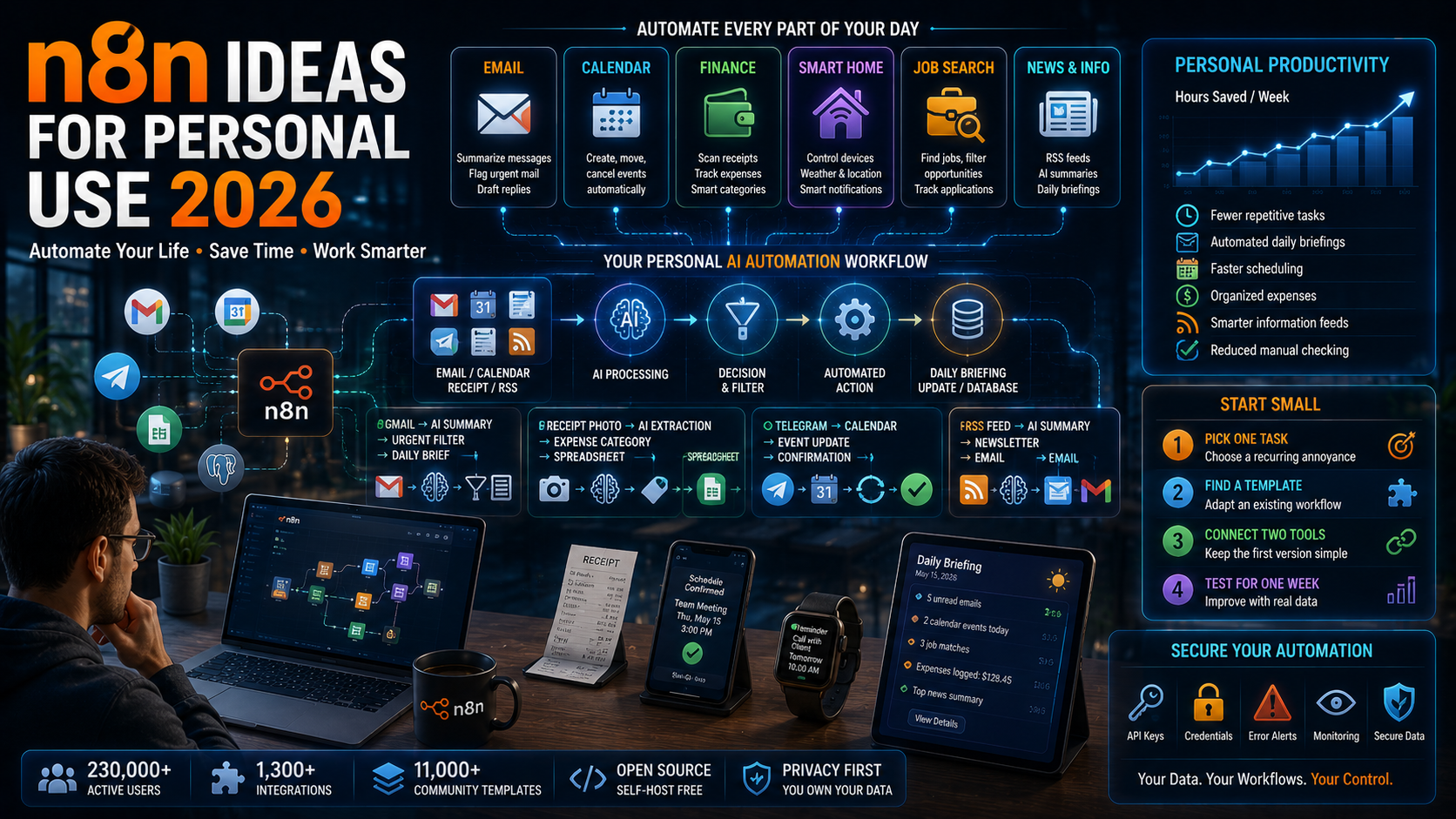
You do not need a business budget to put automation to work. n8n has grown to more than 230,000 active users worldwide. A large share of that community builds workflows for themselves, not for a company. This guide walks through the best n8n ideas for personal use, organized by category. It also covers how to automate the parts of daily life that eat up your time.
Why n8n Works So Well for Personal Automation
Most automation tools charge per task or per user. That model makes sense for a business, but not for a single person managing email and errands. n8n flips that. Self-hosting is free, and even the cloud plan is priced for individuals experimenting on their own.
That pricing model helps explain the community’s size. Combined with over 1,300 native integrations, it is why n8n’s community now maintains more than 11,000 shared workflow templates. Many of those templates were built by people solving their own problems first.
n8n Ideas for Personal Use by Category
Personal automation tends to cluster around a handful of recurring problems. Here is where n8n users are getting the most value right now.
Email and Communication
An email personal assistant workflow can summarize unread messages, flag anything urgent, and draft replies for you to approve. Similarly, a daily briefing workflow pulls from email, calendar, and chat apps into a single morning digest. Instead of checking four apps, you read one message. Overall, that single habit change saves real time every day.
Calendar and Scheduling
Voice or text-based calendar workflows let you create, move, or cancel events by messaging a bot. Instead of opening a calendar app, you just send a message. For example, sending “push my 3pm to Thursday” to a Telegram bot can trigger the actual Google Calendar update behind the scenes.
Personal Finance Tracking
Expense-tracking workflows log spending the moment it happens. For instance, you send a receipt photo or a quick text. An AI model then extracts the amount, category, and merchant automatically. Over time, that removes the monthly scramble to reconstruct where the money went.
Home and Smart Devices
n8n connects to smart home platforms just as easily as it connects to business software. As a result, you can trigger lights, thermostats, or notifications based on your location or the weather. That means no dedicated smart-home hub subscription is needed.
Job Search and Career Management
Job-search workflows pull new postings from LinkedIn and other boards. In addition, they filter results against your criteria and log applications into a spreadsheet automatically. That keeps a search organized without manually re-checking five job boards every day.
News and Information Feeds
Instead of scrolling multiple apps, a personalized newsletter workflow pulls from RSS feeds. It then summarizes them with AI into one daily email. Meanwhile, you control exactly which topics and sources feed into it.
Step-by-Step: Building Your First Personal n8n Workflow
Use this simple process to move from idea to a working automation without getting overwhelmed.
Step 1: Pick One Recurring Annoyance
First, choose a task you already do manually every single day or week. A daily annoyance is easier to notice than an occasional one. As a result, the payoff becomes obvious right away.
Step 2: Find a Template Close to Your Idea
Rather than building from a blank canvas, search n8n’s community template library for something similar. In fact, adapting an existing workflow is almost always faster than starting from scratch.
Step 3: Connect Just Two Tools First
Keep your first workflow to two connected apps, such as Gmail and Google Sheets. So, once that simple version works reliably, you can add more steps and conditions later.
Step 4: Test It on Real Data for a Week
Run the workflow on your actual inbox, calendar, or expenses for at least a week. In fact, edge cases only show up once real, messy data passes through the automation. Overall, that testing week is what separates a reliable workflow from a fragile one.
Common Mistakes With Personal n8n Automation
Even a well-intentioned personal automation project can stall out. Watch for these early.
- Automating a task you rarely do: overall, the setup time only pays off for tasks that repeat often.
- Skipping error handling: a workflow that silently fails is worse than no workflow at all. So, add basic notifications for failures.
- Over-engineering the first version: in fact, a five-step workflow with branching logic is much harder to debug than a simple two-step one.
- Ignoring credential security: personal workflows often touch email and financial data. So, store API keys and tokens properly instead of hardcoding them.
- Never revisiting old workflows: apps change their APIs. Meanwhile, a workflow that worked six months ago can quietly break without you noticing.
Tools and Resources for Personal n8n Projects
If you are new to the platform, our n8n workflow automation guide covers setup and core concepts in more depth. Likewise, many of the same automation principles apply at a smaller scale. Our guide to AI automation projects covers more of those principles. For the latest workflow ideas straight from the community, n8n’s personal productivity template library is updated constantly with new, ready-to-adapt examples.
Frequently Asked Questions About n8n Ideas for Personal Use
Is n8n free for personal use?
Yes. Self-hosting n8n is free and open-source, though it does require some basic technical setup. The cloud-hosted plan also offers a free tier suited to light personal use.
Do I need coding skills to use n8n for personal projects?
Not usually. Most personal workflows only need n8n’s visual, drag-and-drop editor. However, an optional code node is available for anyone who wants to add custom logic.
What is the easiest first n8n project for a beginner?
An email or calendar automation tends to be the easiest starting point. That is because the triggers are simple and the templates are well documented.
Can n8n replace apps like Zapier for personal use?
In many cases, yes. Self-hosting removes the per-task pricing that makes tools like Zapier expensive for heavy personal use. It does, however, require more initial setup.
How much time can personal automation actually save?
It varies by workflow. However, users commonly report reclaiming several hours a week once email, calendar, and finance tasks are automated together.
Key Takeaways
The best n8n ideas for personal use start small: one annoying, recurring task connected between two apps. For instance, an email digest or an expense tracker often delivers the fastest, most obvious payoff. Instead of trying to automate everything at once, build one reliable workflow, then expand from there. Overall, personal automation works the same way business automation does. Start narrow, prove it works, and grow it over time.
This guide reflects n8n features and community data as of August 2026. Specific integrations and pricing change frequently, so confirm current details before building a workflow.