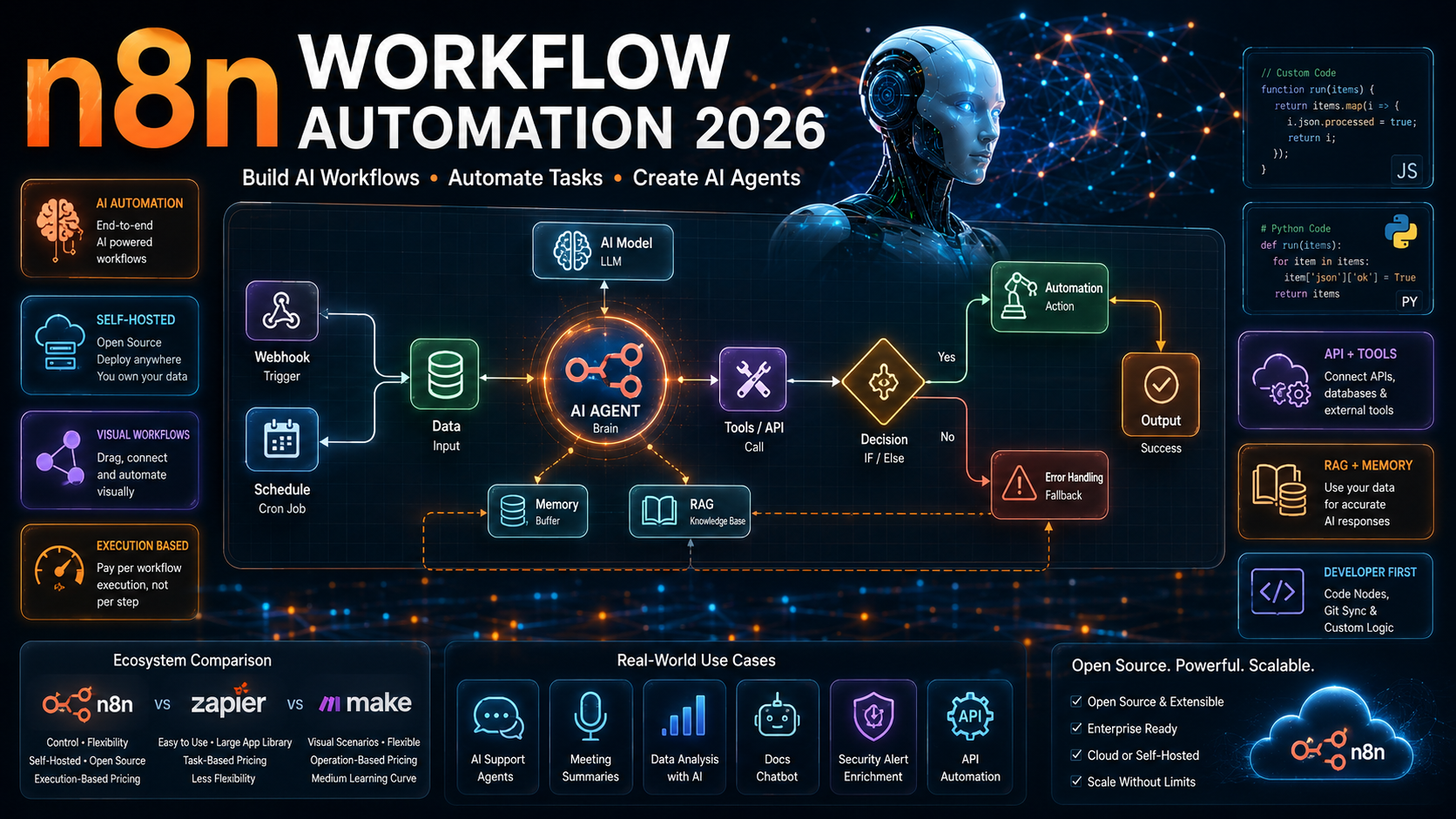
Small teams are shipping AI-powered automations this year without a full engineering department. If you have explored how, you have almost certainly run into n8n workflow automation. It has become one of the fastest-growing tools in the space. It sits at the intersection of no-code simplicity and full developer control, and it now doubles as a serious platform for building AI agents. This guide breaks down what n8n workflow automation actually is. It also covers how the platform works under the hood, what it costs in 2026, and where it fits next to tools like Zapier and Make.
What Is n8n Workflow Automation?
n8n (short for “nodemation”) is an open-source workflow automation platform. It lets you connect apps, APIs, and AI models into automated pipelines using a visual, node-based canvas. Unlike purely no-code tools, n8n workflow automation serves people who want the speed of drag-and-drop building blocks. It also gives you the option to drop into raw JavaScript or Python whenever the built-in nodes are not enough.
Each workflow is made up of nodes. Each node represents one action: sending an HTTP request, reading a spreadsheet, posting to Slack, or calling an AI model. Nodes connect in sequence, and data flows between them. The result is a repeatable automation that can run on a schedule, respond to a webhook, or get triggered by another system entirely.
n8n Workflow Automation in Plain English
Think of it as a flowchart that actually executes. You drag a trigger onto the canvas, say “a new row appears in this spreadsheet.” Then you chain together steps that react to it. Summarize the row with an AI model, post the summary to Slack, and log it in a database. Because n8n is open source, you can also self-host it and inspect exactly what it is doing with your data. You can extend it with your own custom nodes too.
How n8n Workflow Automation Works: Nodes, Triggers, and Executions
Every n8n workflow follows the same basic anatomy. Understanding it makes the rest of this guide much easier to follow.
- Triggers start a workflow: a webhook call, a scheduled cron job, a form submission, or an event from a connected app.
- Nodes perform the actual work: transforming data, calling an API, branching logic with an IF node, or invoking an AI model.
- Connections define how data flows from one node to the next. They also handle merges, loops, and conditional branches.
- Executions are the individual runs of a workflow. They are what n8n actually bills for on its paid plans, rather than billing per individual step the way some competitors do.
That last point matters more than it sounds. Because n8n workflow automation charges per execution rather than per step, a single workflow with fifteen internal steps still counts as one execution. For anyone building complex, multi-step AI pipelines, that pricing model can be dramatically cheaper than step-based competitors. This is especially true once a workflow grows past a handful of actions.
n8n vs Zapier vs Make: How the Platforms Compare
n8n workflow automation is usually compared to Zapier and Make. The differences come down to control, pricing, and audience.
Zapier
Zapier remains the easiest entry point for non-technical users. It has the largest library of pre-built app integrations. Zapier bills per task, though, which becomes expensive quickly once a workflow involves many steps or runs at high volume.
Make
Make sits between the two platforms. It offers a more visual, scenario-based builder than Zapier with somewhat more flexibility, though it is still billed per operation rather than per execution.
n8n
n8n workflow automation targets developers and technical teams who want full control. That means custom code nodes, self-hosting, git-based version control for workflows, and execution-based pricing. The tradeoff is a steeper learning curve than Zapier. Even so, the visual canvas keeps it far more approachable than writing automation scripts from scratch.
Building AI Agents With n8n Workflow Automation
The single biggest shift in n8n over the past two years has been its evolution from a pure integration tool into a genuine AI agent builder. n8n now ships native connectors for major LLM providers, including OpenAI, Hugging Face, and Cohere. It also includes a built-in AI Agent node that supports memory, tool use, and guardrails.
Instead of hardcoding every branch of logic, an AI agent inside n8n workflow automation can reason about which tool to call next. It can retrieve relevant context and decide how to respond, all inside the same visual canvas used for traditional automations. That means a single n8n workflow can blend deterministic steps, like fetching a record or formatting a field, with agentic steps. An agentic step might decide how to answer a customer, or choose which API to call based on intent.
Common n8n AI Agent Building Blocks
- Memory buffers that let an agent hold context across a conversation instead of treating every message as brand new.
- Tool nodes that give an agent the ability to search the web, query a database, or call an internal API on its own.
- Retrieval-augmented generation (RAG) setups that let an agent answer questions from a company’s own documents rather than general training data.
- Guardrail nodes that constrain what an agent is allowed to do, which matters once agents make decisions with real consequences.
Real-World n8n Workflow Automation Use Cases
The clearest way to understand what n8n workflow automation is good for is to look at what people are actually building with it right now.
- AI support agents that combine a language model with live web search and conversation memory to answer customer questions without a human in the loop for every ticket.
- Vision-based web scrapers that read a page visually with a multimodal model instead of relying on brittle DOM selectors, then write structured results into a spreadsheet.
- Natural-language data analysts that turn a plain-English question into a SQL query, run it, and return a chart. No analyst required.
- Meeting notetakers that transcribe a call in real time, summarize the discussion, and push action items straight into a project database.
- Internal documentation chatbots that use retrieval-augmented generation to let employees ask questions against a company’s own Google Drive files.
- Security alert enrichers that automatically research a flagged security alert, map it to known attack patterns, and open a ticket with remediation steps already attached.
What ties these together is that none of them required a custom-built application. Each one is a workflow assembled from existing nodes inside n8n workflow automation. That is exactly the pitch: automation that used to require a developer sprint now takes an afternoon.
n8n Pricing in 2026: Cloud, Self-Hosted, and Enterprise
n8n workflow automation offers both a free, self-hosted path and a managed cloud service. That flexibility is part of why it appeals to such a wide range of users.
- Community Edition: free and self-hosted, with unlimited executions, for teams comfortable running their own infrastructure.
- Starter plan: a low-cost cloud tier with a capped number of monthly executions, aimed at individuals and small teams.
- Pro plan: a mid-tier cloud option with a higher execution ceiling for growing automation needs.
- Business plan: built for teams running high-volume workflows, with expanded executions and collaboration features.
- Enterprise: custom pricing with SSO, advanced permissions, and dedicated support for larger organizations.
Because n8n bases billing on workflow executions rather than individual steps, teams often find their costs scale more predictably than with step-based competitors. This holds especially true for complex, multi-node AI pipelines running through n8n workflow automation, where internal complexity keeps growing.
Self-Hosted n8n vs n8n Cloud
Choosing between self-hosting and the managed cloud version of n8n workflow automation usually comes down to three questions. How much infrastructure does your team want to own? How sensitive is your data? And how quickly do you need to get running?
n8n Cloud gets a workflow live in minutes with zero server maintenance, automatic updates, and a choice of EU or US data hosting. Self-hosted n8n, deployed through Docker or Kubernetes, hands you full control over data residency, custom plugins, and security configuration. That matters for teams working under HIPAA, GDPR, or SOC 2 requirements. The tradeoff is that self-hosting means your team owns uptime, updates, and scaling.
Getting Started With n8n Workflow Automation
For anyone building their first workflow, the path is straightforward. Start by picking a single, well-defined problem rather than trying to automate an entire process on day one. Add a trigger node that matches how the workflow should start, whether that is a webhook, a schedule, or an event from a connected app. From there, add one node at a time. Test the execution after each addition rather than building the whole chain blind.
Once the basic data flow works, layer in the more advanced pieces. Add conditional branches with IF nodes, and build in error handling so a failed API call does not silently break the workflow. If the use case calls for it, add an AI Agent node that can make decisions rather than follow a fixed path. n8n’s execution logs make this debugging loop fast, since every run is visually replayable step by step.
Is n8n Workflow Automation Right for Your Team?
n8n workflow automation is the strongest fit for teams that have at least some technical comfort. It works best for those who want automations that can grow in complexity without hitting a pricing or flexibility wall. If your team is entirely non-technical and needs the simplest setup experience, Zapier’s larger integration library may still be the better starting point. Its learning curve is gentler too. But for teams building AI agents or running high-volume pipelines, n8n has become one of the clearest choices in the automation space. That is especially true for teams wanting to self-host and fully own their data.
Frequently Asked Questions About n8n Workflow Automation
Is n8n free to use?
Yes. The Community Edition is free and open source, and it can be self-hosted with unlimited executions. n8n also offers paid cloud plans for teams that want a managed, maintenance-free version.
Does n8n require coding knowledge?
Not necessarily. Most workflows can be built entirely with the visual node editor. n8n workflow automation also supports custom JavaScript and Python code nodes for teams that want to go further than the built-in integrations allow.
Can n8n build AI agents?
Yes. n8n includes a native AI Agent node with support for memory and tool use. It connects to LLM providers such as OpenAI, Hugging Face, and Cohere, making it possible to build agentic workflows alongside traditional automations.
How is n8n different from Zapier?
The biggest differences are pricing and control. n8n bills per execution rather than per step, supports self-hosting, and allows custom code. Zapier, by contrast, charges per task and targets non-technical users who want the simplest possible setup.
Can n8n be self-hosted?
Yes. You can deploy n8n via Docker or Kubernetes on your own infrastructure. That gives teams full control over data residency and security configuration, an important factor for regulated industries.
What are common n8n use cases?
Popular use cases include AI customer support agents, natural-language data analysis, meeting transcription and summarization, internal documentation chatbots, and security alert enrichment. Traditional app-to-app integrations remain common too.
Key Takeaways
n8n workflow automation has grown from a developer-friendly Zapier alternative into a genuine platform for building AI agents. It has not given up the execution-based pricing and self-hosting options that drew technical teams to it in the first place. For builders, this means a single tool can now cover both simple app-to-app automation and full agentic AI pipelines. For businesses, it means automation projects that once required custom engineering can often be assembled visually in a fraction of the time. And for teams evaluating their options, the real decision usually comes down to how much control and technical flexibility they need versus how quickly they want to get started.
This guide reflects n8n’s product, pricing, and AI agent capabilities as of August 2026, alongside the broader trends covered in our AI News September 2026 roundup. As with any fast-moving automation platform, check n8n’s official documentation for the latest feature and pricing updates before making a purchasing decision.