Subtotal $0.00



Email : 4
If you are comparing n8n vs Zapier vs Make, you have probably noticed something. All three solve the same problem in very different ways. They let you connect apps and automate repetitive work without writing a full application. But the pricing models are different. The technical skill required is different. The AI capabilities are different too. This guide breaks down what actually matters. That way you can pick the right tool instead of just the most popular one.
Quick Answer: n8n vs Zapier vs Make at a Glance
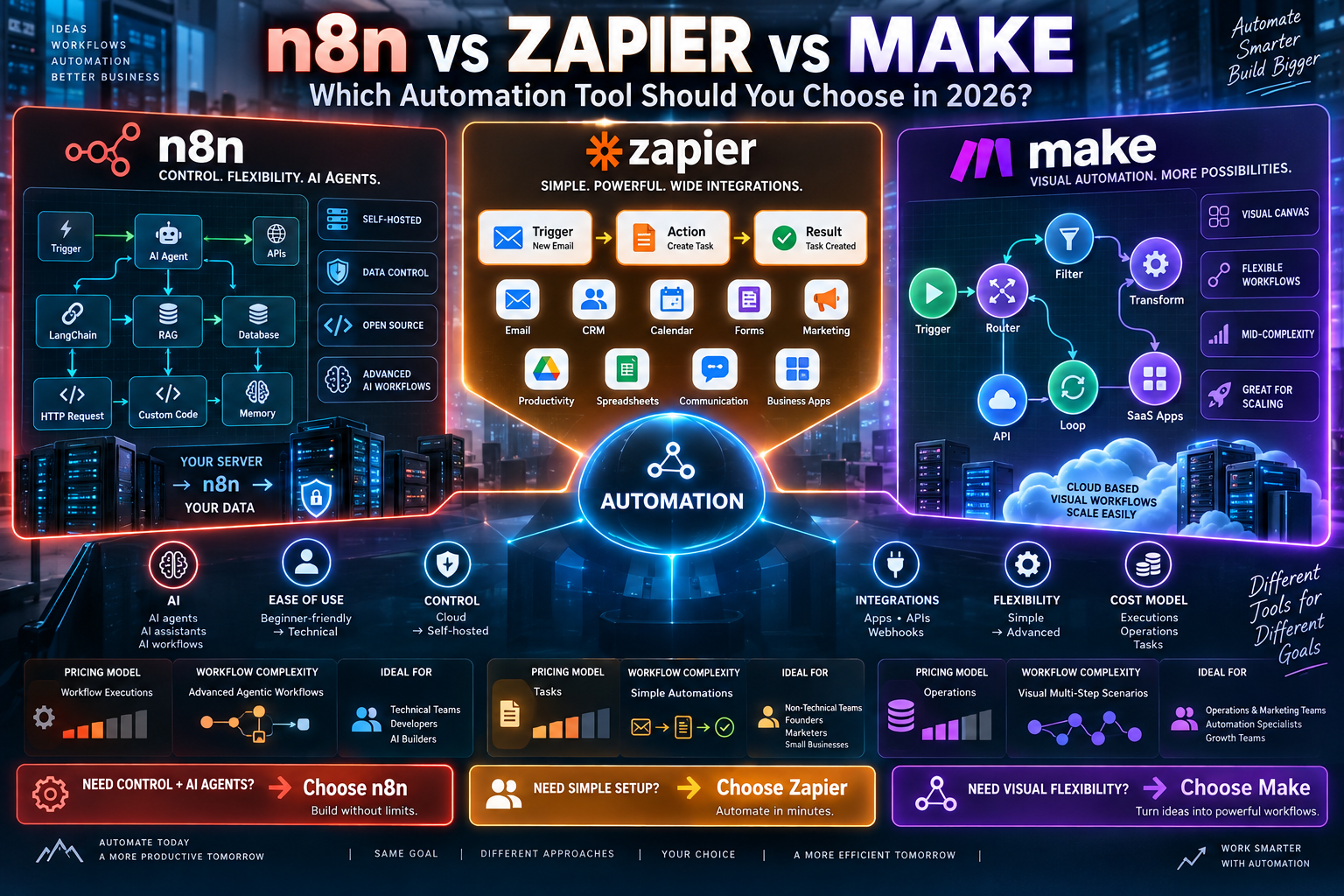
Pick n8n if you want full control over your data. It also fits best if you plan to self-host or need deep AI agent capabilities. Pick Zapier if you want the fastest setup and the widest range of app integrations. No technical skill is required. Pick Make if you want a visual, mid-complexity option. It balances cost and flexibility better than Zapier. It also skips the technical demands of n8n.
n8n vs Zapier vs Make: Pricing Compared
Pricing is where these tools differ the most. The billing model matters as much as the sticker price. According to a 2026 comparison from Cipher Projects, n8n’s cloud plan starts around $22 a month. That covers 2,500 workflow executions. It bills per full workflow run rather than per step. That makes complex, multi-step workflows cheaper to run at scale. n8n is also the only one of the three with a free, fully self-hosted option, if you are willing to manage your own server.
Make offers a free plan with 1,000 monthly operations. Paid tiers start around $9 to $16 a month for 10,000 operations. It bills per individual operation. That means workflows with a lot of filtering or looping can burn through your quota fast. Zapier’s free plan caps out at 100 tasks and 5 Zaps. Paid plans start near $20 a month for 750 tasks. Zapier bills per task, where one task is one processed action. High-volume automations can get expensive quickly as a result.
n8n vs Zapier vs Make: Self-Hosting and Data Control
This is the clearest differentiator of the three. n8n is open-source and can run entirely on your own infrastructure. That gives you full data sovereignty. This matters if you handle sensitive customer data or operate under strict compliance rules. Zapier and Make are both cloud-only. Neither offers a self-hosted option. Your workflow data always passes through their servers as a result. Make does offer strong built-in security certifications, though, for teams that need compliance guarantees without managing infrastructure themselves.
Ease of Use: How Fast Can You Actually Build Something?
Zapier is built for non-technical users. Its trigger-and-action format is close to plain English. Most people can build a working Zap within an hour of signing up. Make sits in the middle. Its visual canvas is more powerful than Zapier’s linear format. But it takes longer to learn, often a few days to reach solid proficiency. n8n has the steepest learning curve of the three. Its node-based editor rewards technical users. Mastering advanced patterns, like branching logic or custom code nodes, can take real time.
AI and Agent Capabilities
If your main use case involves AI agents, this comparison changes quickly. n8n leads by a wide margin here. It ships with dozens of nodes built specifically for AI work. These include LangChain integration for building retrieval-augmented generation systems and autonomous agents. Our own guide to building AI agents using n8n walks through exactly how deep this goes.
Make takes a more pragmatic approach. It integrates well with OpenAI and other AI providers. Its AI assistant can help build a scenario from a plain-language description. Zapier focuses on accessibility over depth. Its AI tools, like Copilot and its automated Zap suggestions, are built to help beginners move fast. They are not designed for advanced, custom AI architecture.
n8n vs Zapier vs Make: Integrations Compared
Zapier has built its reputation on breadth. It connects to thousands of apps, more than either competitor. That matters if your stack includes a lot of smaller or niche tools. Make also offers a large integration library. It tends to support deeper, more customizable connections for the apps it does support. n8n has fewer built-in integrations than either. But it makes up for this with generic HTTP request nodes. These can connect to almost any API directly, which matters more to technical teams than non-technical ones.
Who Should Use n8n
n8n fits technical teams that want to own their infrastructure. It is a strong choice if you process high volumes of workflow executions. It also fits teams building genuine AI agents rather than simple triggers. The same goes for teams working under compliance rules that require self-hosted data. If your team already ships code, the learning curve is much less of a barrier.
Who Should Use Zapier
Zapier fits teams that want results today, not after a learning curve. It works well for non-technical founders. It also suits small teams juggling many different SaaS tools. Anyone who wants a fully managed service, with no infrastructure to think about, fits here too. The tradeoff is cost at scale and less depth for advanced AI workflows.
Who Should Use Make
Make sits in a useful middle ground. It suits teams that have outgrown Zapier’s simplicity. It also suits teams that do not want the technical overhead of n8n. Its visual canvas handles complex branching and data transformation well. That makes it a solid pick for marketing operations and mid-complexity workflows that still need a real interface, not code.
Frequently Asked Questions About n8n vs Zapier vs Make
Is n8n really cheaper than Zapier and Make?
It depends on your workflow. n8n is usually cheaper for complex, high-volume, multi-step work. That is because it bills per execution, not per step or per task. For simple, low-volume automations, Zapier or Make’s entry-level plans can actually cost less.
Can I switch between n8n, Zapier, and Make later?
Yes, but it takes manual rebuilding. None of the three offer a direct import from the others. Most teams start with whichever tool matches their current technical skill. They migrate later only if their needs outgrow it.
Which tool is best for building AI agents?
n8n is the strongest choice for building genuine AI agents. That is thanks to its LangChain integration and dedicated AI nodes. Zapier and Make support AI features too. But they are built more for accelerating simple automations than for custom agent architecture.
Do I need coding skills to use any of these tools?
No, all three are built around visual, no-code interfaces. n8n does support custom code nodes for advanced use cases. Still, you can build functional workflows in any of the three without writing code.
Final Thoughts
There is no single winner when you compare n8n vs Zapier vs Make. There is only a better fit for your situation. Choose based on your actual constraints. Consider how technical your team is and how much control you need over your data. Consider whether AI agents are a core part of your workflow or just a nice extra. Start with the tool that matches where your team is today. You can always graduate to a more powerful option once you know exactly what you are missing.