Introduction
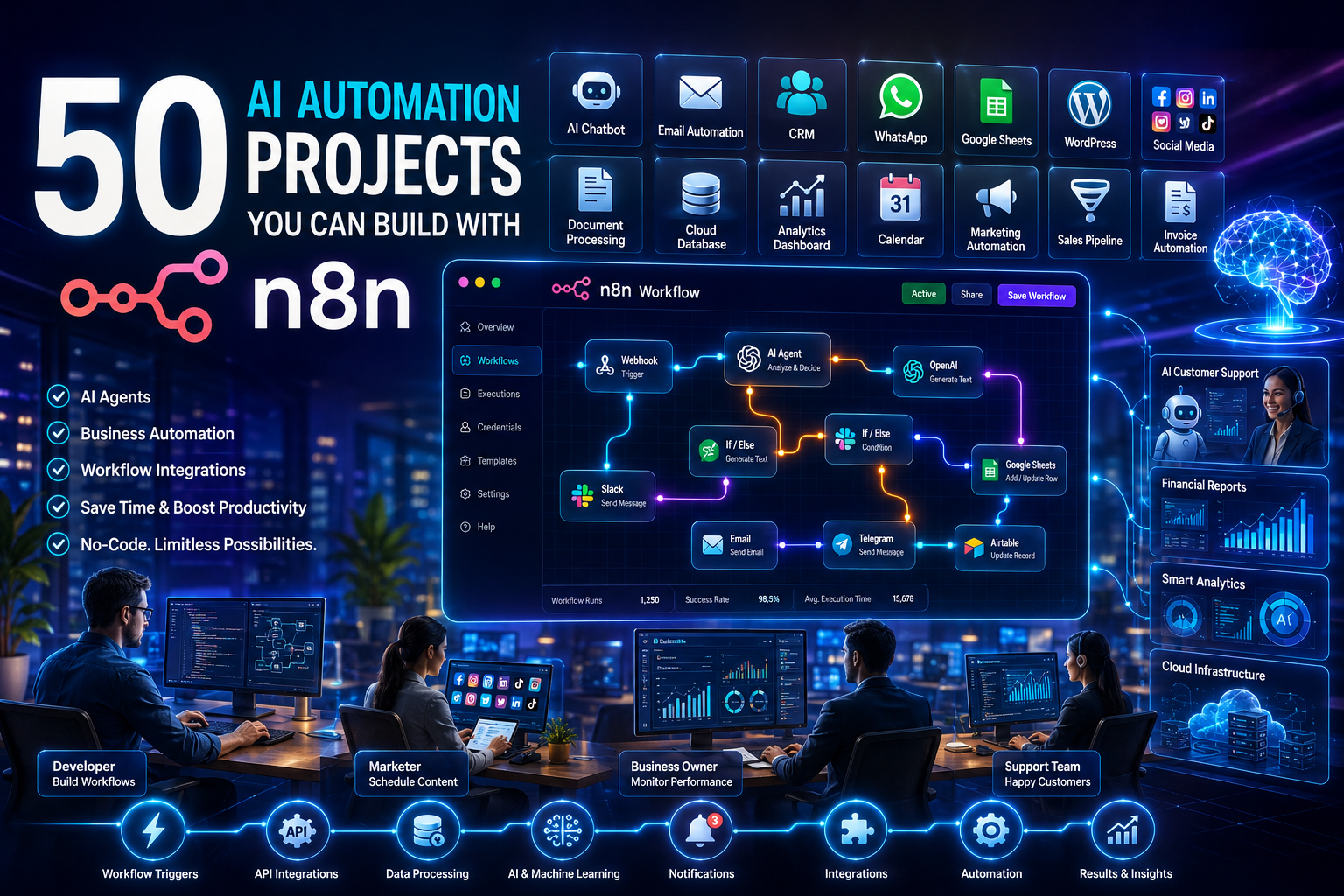
Artificial Intelligence is changing the way people work. Businesses, freelancers, marketers, developers, and even students are using AI to save time and improve productivity. Instead of repeating the same tasks every day, you can automate them using smart workflows. This is where n8n becomes one of the most powerful AI automation tools available. It allows you to connect different applications, automate repetitive work, and even build intelligent AI-powered systems without writing much code.
If you have ever wanted to automate emails, create AI-generated content, manage leads, summarize documents, reply to customers, or build your own AI assistant, then n8n can help you do all of that from one platform. It supports hundreds of integrations and works perfectly with popular AI models such as ChatGPT and many other APIs.
In this guide, you will discover 50 AI Automation Projects You Can Build with n8n. Every project is explained in simple language so beginners can understand it easily. Whether you are learning automation for the first time or looking for ideas to grow your business, this article will help you build practical workflows that save hours every week.
What is n8n?
Before exploring automation ideas, it is important to understand what n8n is and why so many businesses are adopting it.
n8n is an open-source workflow automation platform that allows users to connect different applications and automate repetitive tasks. It works by creating workflows that move data from one application to another without manual effort.
Unlike many automation platforms, n8n offers greater flexibility because you can host it on your own server or use its cloud version. It also supports JavaScript for advanced customization while remaining beginner-friendly through its visual workflow builder.
With n8n, you can connect applications like:
- Gmail
- Google Sheets
- Slack
- Discord
- Telegram
- Notion
- WordPress
- Airtable
- HubSpot
- Salesforce
- Shopify
- WhatsApp APIs
- OpenAI
- Anthropic
- GitHub
- Stripe
- Hundreds of other services
The biggest advantage is that you can combine these applications with AI models to create intelligent workflows that make decisions automatically.
Why Use AI with n8n?
AI alone is powerful, but combining it with automation creates endless possibilities. Instead of manually asking AI to perform tasks, n8n can automatically send data to AI, receive responses, and continue the workflow.
Some major benefits include:
- Save hours of manual work every week.
- Improve productivity.
- Reduce human errors.
- Generate content automatically.
- Automate customer support.
- Create intelligent business workflows.
- Connect hundreds of applications.
- Scale your business without hiring additional staff.
Whether you run a startup or a large company, AI automation can help improve efficiency.
Project 1: AI Email Reply Assistant
One of the most common business tasks is replying to emails. Instead of writing every response manually, you can let AI create professional replies while you review them before sending.
This workflow can monitor your inbox, identify new emails, generate replies using AI, and either save them as drafts or send them automatically based on your preferences.
Steps involved:
- Monitor Gmail for new emails.
- Send the email content to ChatGPT.
- Generate a professional response.
- Save the reply as a draft.
- Notify you through Slack or Telegram.
Benefits include:
- Faster customer communication
- Reduced response time
- Professional email writing
- Better customer satisfaction
Project 2: AI Blog Writer
Content creation takes time, but AI can help speed up the process.
Using n8n, you can automatically generate blog articles from keywords entered into Google Sheets or Airtable.
The workflow usually follows these steps:
- Detect a new keyword.
- Send the keyword to an AI model.
- Generate a complete article.
- Optimize headings.
- Save the article in Google Docs or Notion.
- Notify the editor.
This project is useful for:
- Bloggers
- SEO agencies
- Content writers
- Marketing teams
Project 3: AI Social Media Post Generator
Social media requires consistent posting, which can become time-consuming.
This workflow automatically creates engaging posts for different platforms using AI.
Typical process:
- Enter a topic.
- AI writes captions.
- AI generates hashtags.
- Schedule the post.
- Publish automatically.
Supported platforms include:
- X
- Threads
Project 4: AI Customer Support Chatbot
Providing customer support around the clock is difficult for many businesses.
You can build an AI chatbot using n8n that answers frequently asked questions and forwards complex issues to a human agent.
The workflow includes:
- Receive customer messages.
- Search the knowledge base.
- Generate an AI response.
- Send the answer.
- Escalate unanswered questions.
This reduces support workload while improving response speed.
Project 5: AI Meeting Summarizer
Meetings often produce long notes that are difficult to review later.
This workflow records meeting transcripts and asks AI to create concise summaries with action items.
The automation performs these tasks:
- Collect meeting transcript.
- Send transcript to AI.
- Generate summary.
- Identify important decisions.
- Extract action items.
- Email participants automatically.
Ideal users include:
- Managers
- HR teams
- Remote teams
- Consultants
Project 6: AI Resume Screening System
Hiring teams often receive hundreds of resumes.
Instead of reviewing every application manually, AI can rank resumes based on job requirements.
Workflow process:
- Receive resumes.
- Extract candidate details.
- Compare skills.
- Assign scores.
- Create ranking.
- Notify recruiters.
Benefits include:
- Faster hiring
- Better candidate selection
- Reduced manual work
Project 7: AI Lead Qualification
Sales teams spend significant time identifying quality leads.
This workflow automatically evaluates incoming leads based on predefined criteria and AI analysis.
The automation can:
- Capture leads.
- Analyze business information.
- Score lead quality.
- Update CRM.
- Notify sales representatives.
Project 8: AI Invoice Data Extraction
Businesses receive invoices in PDF format every day.
Instead of manually entering information, AI can read invoices and extract important details.
Workflow:
- Receive invoice.
- Perform OCR if needed.
- Extract invoice number.
- Identify supplier.
- Capture amount.
- Store data in accounting software.
Project 9: AI Document Summarizer
Many professionals read lengthy reports daily.
AI can summarize documents into key insights.
This workflow works by:
- Uploading a document.
- Sending content to AI.
- Generating summary.
- Saving notes.
- Sending notification.
Useful for:
- Researchers
- Students
- Lawyers
- Executives
Project 10: AI Translation Workflow
Businesses serving global customers often need multilingual communication.
AI can instantly translate documents, emails, and messages.
Workflow steps:
- Receive text.
- Detect language.
- Translate.
- Review.
- Send translated content.
Supported languages include dozens of global languages.
Project 11: AI Sentiment Analysis
Customer feedback provides valuable insights, but reading thousands of reviews manually is difficult.
This workflow collects reviews from emails, surveys, or social media and uses AI to identify whether customers are expressing positive, neutral, or negative opinions.
The automation follows these steps:
- Collect customer feedback.
- Send text to an AI model.
- Analyze sentiment.
- Categorize responses.
- Save results in Google Sheets or a CRM.
- Alert the support team if negative feedback is detected.
This helps businesses respond quickly to unhappy customers and improve their products or services.
Project 12: AI FAQ Generator
Creating a Frequently Asked Questions section for a website can take time. AI can automatically generate useful questions and answers based on your business information.
The workflow can perform these tasks:
- Collect product or service details.
- Send the information to AI.
- Generate relevant FAQs.
- Review the content.
- Publish it to your website or knowledge base.
This project is ideal for businesses launching new products or updating their websites.
Project 13: AI Product Description Generator
Writing unique product descriptions for hundreds of products can be a challenge for eCommerce stores.
With n8n, you can automate this process using AI.
The workflow usually includes:
- Detect a new product in your database.
- Send product details to AI.
- Generate an SEO-friendly description.
- Create bullet-point features.
- Save the content in your online store.
Benefits include:
- Faster product uploads
- Consistent writing style
- Improved SEO
- Better customer engagement
Project 14: AI Image Caption Generator
Images without captions may not provide enough context for users or search engines.
This workflow uses AI to analyze images and generate meaningful captions.
The process involves:
- Upload an image.
- Send it to an AI vision model.
- Generate a descriptive caption.
- Save the caption.
- Publish it with the image.
This is especially useful for bloggers, photographers, and online stores.
Project 15: AI YouTube Script Generator
Creating YouTube videos starts with writing a strong script. AI can generate well-structured scripts based on your chosen topic.
The workflow works as follows:
- Enter a video topic.
- Generate a script using AI.
- Create an engaging introduction.
- Add key talking points.
- Write a conclusion with a call to action.
- Save the script in Google Docs or Notion.
This automation helps content creators publish videos more consistently.
Project 16: AI Podcast Show Notes Creator
Podcast creators often spend additional time writing summaries after recording an episode.
AI can automatically create professional show notes.
The workflow includes:
- Upload the podcast transcript.
- Generate a concise summary.
- Extract important topics.
- Create timestamps if available.
- Save the notes.
- Publish them with the episode.
This improves discoverability and saves editing time.
Project 17: AI News Summary Bot
Keeping up with industry news every day can be overwhelming.
This automation collects articles from selected sources and creates a short daily summary using AI.
The workflow performs these actions:
- Gather news articles.
- Remove duplicate stories.
- Summarize each article.
- Combine summaries into one report.
- Send the report by email or Slack.
This is useful for business leaders, marketers, and researchers who need quick updates.
Project 18: AI CRM Data Cleaner
Customer relationship management systems often contain duplicate or outdated information.
AI can help organize and improve your CRM data automatically.
The workflow can:
- Scan CRM records.
- Identify duplicate contacts.
- Standardize names and addresses.
- Correct formatting errors.
- Flag incomplete records.
- Update the CRM.
A clean CRM improves reporting and customer communication.
Project 19: AI Sales Follow-Up Generator
Following up with leads at the right time increases the chances of closing a sale.
This workflow generates personalized follow-up emails based on previous conversations.
The automation typically works like this:
- Detect inactive leads.
- Review previous communication.
- Generate a personalized follow-up email.
- Save it as a draft or send it automatically.
- Record the activity in the CRM.
This helps sales teams maintain consistent communication without spending hours writing emails.
Project 20: AI Website Content Improver
Many websites contain pages with outdated or poorly written content. AI can review existing text and suggest improvements for readability, SEO, and user engagement.
The workflow includes these steps:
- Retrieve website content.
- Send the text to an AI model.
- Improve grammar and clarity.
- Optimize headings and keywords naturally.
- Suggest stronger calls to action.
- Save the updated version for review.
This project is especially valuable for digital marketing agencies, bloggers, and businesses that regularly update their websites.
Project 21: AI WhatsApp Customer Support
Many businesses receive customer questions through WhatsApp every day. Responding manually to every message can become difficult as your business grows. With n8n, you can automate customer support while still providing accurate and helpful answers.
The workflow receives incoming WhatsApp messages, sends them to an AI model for analysis, and replies with relevant information. If the question is too complex, the workflow can transfer the conversation to a human support agent.
The workflow generally follows these steps:
- Receive a WhatsApp message.
- Analyze the customer’s question using AI.
- Search your knowledge base if needed.
- Generate a helpful response.
- Send the reply automatically.
- Forward complex cases to a support representative.
Benefits include:
- Faster customer support
- Reduced response time
- Available 24/7
- Better customer satisfaction
Project 22: AI Lead Generation System
Finding potential customers takes time, especially for sales teams. AI can automatically collect, organize, and evaluate leads from different sources.
This workflow gathers lead information from websites, forms, LinkedIn, or other sources and stores qualified leads in your CRM.
The workflow includes these steps:
- Collect lead information.
- Remove duplicate records.
- Analyze business details using AI.
- Score the quality of each lead.
- Save qualified leads in the CRM.
- Notify the sales team.
This automation allows sales professionals to focus on high-quality prospects instead of manual research.
Project 23: AI Email Newsletter Creator
Creating newsletters every week requires planning and writing. AI can generate engaging newsletters based on your latest content or selected topics.
The automation process includes:
- Collect recent blog posts or news.
- Send the content to AI.
- Generate a newsletter draft.
- Create a compelling subject line.
- Save it for approval.
- Send it through your email marketing platform.
This project is useful for bloggers, businesses, and marketing agencies.
Project 24: AI SEO Content Optimizer
Publishing content is only one part of SEO. Articles also need proper optimization to rank well in search engines.
This workflow reviews existing articles and recommends improvements based on SEO best practices.
The automation performs the following tasks:
- Import an article.
- Analyze keyword usage.
- Improve headings.
- Suggest better meta descriptions.
- Optimize readability.
- Save the updated content.
Benefits include:
- Better search rankings
- Improved readability
- Higher organic traffic
- Stronger user engagement
Project 25: AI Website Chat Assistant
Visitors often leave websites without finding the information they need. An AI chat assistant can answer questions instantly.
The workflow can:
- Receive visitor questions.
- Search your documentation.
- Generate accurate answers.
- Recommend products or services.
- Escalate complicated requests.
This improves the visitor experience while reducing the workload of customer support teams.
Project 26: AI Contract Summarizer
Legal contracts are often long and difficult to understand. AI can summarize important information into simple language.
The workflow follows these steps:
- Upload the contract.
- Extract the text.
- Identify key clauses.
- Generate a summary.
- Highlight risks.
- Send the report.
This project helps lawyers, business owners, and managers review documents more efficiently.
Project 27: AI Expense Management Workflow
Managing business expenses manually increases the risk of errors. AI can automatically organize and classify expenses.
The workflow includes:
- Receive receipts or invoices.
- Extract expense details.
- Categorize expenses.
- Store records in accounting software.
- Generate monthly reports.
Benefits include:
- Accurate bookkeeping
- Faster reimbursement
- Better financial reporting
Project 28: AI Voice-to-Text Automation
Voice recordings are becoming common in business communication. AI can convert speech into searchable text automatically.
The workflow works like this:
- Receive an audio recording.
- Convert speech to text.
- Generate a transcript.
- Summarize important points.
- Save the transcript.
This automation benefits journalists, students, consultants, and business teams.
Project 29: AI Knowledge Base Search
Employees often waste time searching for documents. AI can quickly locate the right information from company resources.
The workflow can:
- Receive a search query.
- Search internal documents.
- Generate an accurate answer.
- Provide document references.
- Share the result.
This project improves productivity across organizations.
Project 30: AI Recruitment Interview Assistant
Recruiters spend considerable time preparing interview questions. AI can automatically generate customized interview questions based on job descriptions.
The workflow includes:
- Upload the job description.
- Analyze required skills.
- Generate interview questions.
- Categorize technical and behavioral questions.
- Save the interview guide.
This helps hiring teams conduct more structured interviews.
Project 31: AI Customer Feedback Analyzer
Customer feedback contains valuable insights that help businesses improve products and services. AI can analyze large amounts of feedback much faster than manual review.
The workflow performs these tasks:
- Collect customer reviews.
- Group similar comments.
- Detect common complaints.
- Identify positive feedback.
- Generate a summary report.
- Send recommendations to management.
This allows businesses to make better decisions based on customer opinions.
Project 32: AI Daily Business Report Generator
Managers often spend time preparing daily reports from multiple systems.
This workflow automatically gathers business data and creates an easy-to-read report.
The automation process includes:
- Collect sales data.
- Retrieve website analytics.
- Gather marketing performance.
- Summarize important metrics using AI.
- Email the report to stakeholders.
This keeps decision-makers informed without manual reporting.
Project 33: AI PDF Data Extractor
Businesses receive many PDF files containing valuable information.
AI can automatically extract important details from these documents.
The workflow includes:
- Upload a PDF.
- Read the document.
- Extract names, dates, and numbers.
- Organize the data.
- Save it in a spreadsheet or database.
This automation reduces manual data entry significantly.
Project 34: AI Product Recommendation Engine
Online stores can increase sales by recommending products based on customer behavior.
This workflow analyzes previous purchases and browsing history to suggest relevant products.
The workflow performs these steps:
- Collect customer activity.
- Analyze purchase history.
- Generate product recommendations.
- Display recommendations.
- Track customer interactions.
Benefits include:
- Higher average order value
- Better customer experience
- Increased repeat purchases
Project 35: AI Sales Forecast Generator
Predicting future sales helps businesses plan inventory and budgets more effectively.
AI analyzes historical sales data and identifies trends.
The workflow includes:
- Collect sales history.
- Analyze seasonal patterns.
- Predict future sales.
- Generate charts.
- Share the report.
This helps businesses make informed financial decisions.
Project 36: AI Competitor Monitoring
Keeping track of competitors manually requires constant effort.
This workflow monitors competitor websites, blogs, and announcements automatically.
The automation works by:
- Collect competitor updates.
- Detect important changes.
- Summarize new information.
- Send notifications.
- Save historical records.
Marketing teams can react quickly to industry changes.
Project 37: AI Website Performance Monitor
Website problems can reduce customer trust and affect search rankings.
This workflow regularly checks website performance and generates reports.
The workflow performs:
- Monitor website uptime.
- Measure page speed.
- Detect errors.
- Generate AI summaries.
- Notify administrators immediately.
This ensures websites remain available and perform well.
Project 38: AI Code Review Assistant
Software developers can improve code quality with AI-powered reviews.
The workflow can:
- Detect new code commits.
- Send code to an AI model.
- Review coding standards.
- Identify possible bugs.
- Suggest improvements.
- Notify developers.
This speeds up development while maintaining code quality.
Project 39: AI Marketing Campaign Planner
Planning marketing campaigns requires research and creativity.
AI can generate campaign ideas, target audiences, and promotional content automatically.
The workflow includes:
- Enter campaign objectives.
- Analyze target audience.
- Generate campaign strategy.
- Create promotional content.
- Suggest publishing schedules.
- Save the campaign plan.
This automation helps marketing teams launch campaigns more efficiently.
Project 40: AI Personal Productivity Assistant
One of the most useful AI projects in n8n is building a personal productivity assistant.
This workflow helps organize your daily work by connecting calendars, emails, tasks, and notes.
The automation performs these actions:
- Collect today’s meetings.
- Review pending tasks.
- Analyze emails.
- Prioritize work using AI.
- Generate a daily schedule.
- Send reminders throughout the day.
Benefits include:
- Better time management
- Improved productivity
- Reduced missed deadlines
- Organized daily planning
Why These AI Automation Projects Matter
These first 40 projects demonstrate how flexible n8n can be when combined with artificial intelligence. Instead of using AI for a single task, n8n allows you to build complete workflows that connect multiple applications, automate decisions, and eliminate repetitive work.
Whether you are a freelancer, digital marketer, software developer, content creator, HR professional, sales manager, or business owner, these automation ideas can help you save time, improve accuracy, and scale your operations without increasing manual effort.
By starting with simple workflows and gradually adding more integrations, you can create powerful AI-powered systems that work around the clock and handle tasks that previously required hours of manual effort.
Project 41: AI Customer Onboarding Automation
Welcoming new customers is an important part of building long-term relationships. Instead of sending emails and creating accounts manually, n8n can automate the entire onboarding process.
The workflow automatically collects customer information, creates accounts, sends welcome emails, and provides helpful resources.
The workflow generally follows these steps:
- Receive a new customer registration.
- Verify customer information.
- Create accounts in required applications.
- Send a personalized welcome email.
- Share onboarding documents and tutorials.
- Notify the internal team.
Benefits include:
- Faster onboarding
- Better customer experience
- Reduced manual work
- Consistent communication
Project 42: AI Automated Invoice Reminder
Many businesses lose valuable time following up on unpaid invoices. AI automation can identify overdue invoices and send professional payment reminders automatically.
The workflow performs these tasks:
- Check unpaid invoices daily.
- Identify overdue payments.
- Generate personalized reminder emails.
- Send reminders automatically.
- Notify the finance team if payment remains pending.
This project improves cash flow and reduces manual follow-up.
Project 43: AI Website SEO Audit
A regular SEO audit helps websites maintain strong search engine rankings. AI can automatically review your website and identify areas for improvement.
The workflow includes:
- Crawl website pages.
- Analyze titles and meta descriptions.
- Check heading structure.
- Review keyword placement.
- Detect broken links.
- Generate an SEO improvement report.
This automation is especially useful for SEO agencies and website owners.
Project 44: AI Email Spam Classifier
Businesses receive hundreds of emails every day. AI can automatically classify messages into important emails, promotional emails, and spam.
The workflow performs these actions:
- Monitor incoming emails.
- Analyze email content.
- Detect spam patterns.
- Categorize emails.
- Move spam to the appropriate folder.
- Notify users of important emails.
This helps users focus on important communication.
Project 45: AI Automatic Meeting Scheduler
Scheduling meetings with multiple people often involves many emails.
This workflow automates the scheduling process.
The workflow includes:
- Receive a meeting request.
- Check calendar availability.
- Suggest available time slots.
- Send invitations.
- Confirm attendance.
- Update the calendar automatically.
This saves time for teams and reduces scheduling conflicts.
Project 46: AI Financial Report Generator
Business owners need regular financial reports to monitor company performance.
AI can automatically create simple summaries from accounting data.
The workflow performs:
- Collect financial records.
- Calculate income and expenses.
- Generate charts and summaries.
- Highlight unusual changes.
- Email the report to stakeholders.
This project supports better financial decision-making.
Project 47: AI Inventory Management Assistant
Managing inventory manually can lead to stock shortages or overstocking.
AI can monitor inventory levels and provide timely recommendations.
The workflow includes:
- Check inventory levels.
- Detect low-stock products.
- Predict future demand.
- Recommend reorder quantities.
- Notify purchasing teams.
Benefits include:
- Better inventory control
- Reduced stock shortages
- Lower storage costs
- Improved customer satisfaction
Project 48: AI Task Prioritization Workflow
Many professionals struggle to decide which tasks should be completed first.
AI can evaluate deadlines, workload, and business priorities to organize daily tasks.
The workflow performs:
- Collect pending tasks.
- Analyze deadlines.
- Estimate task importance.
- Prioritize work.
- Create a daily task list.
- Send reminders.
This helps individuals and teams stay productive.
Project 49: AI Multi-Platform Content Publisher
Publishing the same content across different platforms manually can be repetitive.
This workflow allows you to publish content to multiple channels from a single workflow.
The process includes:
- Receive approved content.
- Optimize content for each platform.
- Generate hashtags.
- Schedule publishing.
- Publish automatically.
- Track publishing status.
Supported platforms may include:
- WordPress
- X
- Medium
This automation helps maintain a consistent online presence while saving valuable time.
Project 50: AI Business Dashboard Assistant
A business dashboard helps decision-makers understand company performance quickly.
Instead of reviewing multiple reports, AI can gather information from different systems and generate one comprehensive summary.
The workflow performs these tasks:
- Collect sales data.
- Retrieve marketing analytics.
- Gather customer support metrics.
- Analyze financial performance.
- Generate an executive summary.
- Send a daily or weekly dashboard report.
This project gives business owners a clear overview of important business metrics without manually preparing reports.
Best Practices for Building AI Automation Projects with n8n
Building AI workflows is not only about connecting applications. Good planning and testing make automations reliable and easy to maintain.
Follow these best practices when creating your workflows:
- Start with a simple workflow before adding advanced features.
- Test every step using sample data.
- Keep workflows organized with clear node names.
- Store sensitive API keys securely.
- Add error-handling nodes to manage failures.
- Use logging to monitor workflow performance.
- Schedule regular workflow reviews.
- Keep prompts simple and specific for consistent AI responses.
- Remove unnecessary steps to improve performance.
- Create backups of important workflows.
Following these practices helps you build stable and scalable automations.
Common Mistakes to Avoid
Many beginners experience problems because they overlook basic workflow design principles.
Avoid these common mistakes:
- Creating overly complex workflows from the beginning.
- Ignoring error handling.
- Forgetting API usage limits.
- Using unclear AI prompts.
- Skipping workflow testing.
- Not validating incoming data.
- Running workflows without monitoring.
- Forgetting security best practices.
- Storing confidential information insecurely.
- Not updating workflows when connected applications change.
Avoiding these mistakes will save time and reduce troubleshooting later.
Who Should Learn n8n AI Automation?
n8n is suitable for people from many different industries because it combines automation with artificial intelligence in an easy-to-use visual interface.
It is especially useful for:
- Digital marketers
- Business owners
- Content creators
- SEO professionals
- Freelancers
- Sales teams
- HR professionals
- Customer support teams
- Software developers
- Data analysts
- Startup founders
- eCommerce businesses
- Agencies
- Consultants
- Students learning AI automation
Even beginners with no programming experience can start building useful workflows and gradually learn more advanced automation techniques.
Future of AI Automation with n8n
Artificial intelligence is becoming a standard part of modern business operations. Instead of automating only repetitive tasks, organizations are now building intelligent workflows that can understand information, make recommendations, generate content, and assist with decision-making.
As AI models continue to improve, n8n will become even more powerful by connecting advanced language models, document processing tools, voice recognition systems, image analysis services, and business applications into one unified workflow.
Businesses that start learning workflow automation today will be better prepared for future technologies. They will save time, reduce operating costs, improve customer experiences, and increase productivity without significantly expanding their workforce.
Whether you want to automate a single daily task or build an AI-powered business system, n8n provides the flexibility to grow with your needs.
Conclusion
Artificial intelligence and workflow automation are transforming how people work. Instead of spending hours on repetitive tasks, businesses and individuals can use n8n to create smart workflows that handle emails, customer support, marketing, reporting, document processing, sales, finance, and much more.
The 50 AI Automation Projects You Can Build with n8n covered in this guide demonstrate that automation is no longer limited to developers or large enterprises. With a visual workflow builder and powerful AI integrations, anyone can automate daily work, improve productivity, and reduce manual effort.
Start by choosing one small project that solves a real problem in your work. As you become more comfortable with n8n, you can connect additional applications, improve your workflows, and build intelligent systems that save time every day. The more you experiment, the more opportunities you will discover to streamline your business and focus on higher-value work.
Read More Blogs-AI Startup Edge
Frequently Asked Questions (FAQs)
1. What is n8n used for?
n8n is a workflow automation platform that connects different applications and automates repetitive tasks using visual workflows and AI integrations.
2. Is n8n free to use?
Yes. n8n offers a free self-hosted version, while cloud-hosted plans provide additional convenience and features.
3. Can beginners learn n8n?
Yes. Beginners can create workflows using the visual editor without extensive programming knowledge.
4. Can n8n work with ChatGPT?
Yes. n8n integrates with AI models through APIs, allowing you to build AI-powered workflows for writing, summarization, customer support, and more.
5. Which businesses benefit most from n8n?
Digital marketing agencies, eCommerce stores, SaaS companies, healthcare providers, educational institutions, finance teams, startups, and consulting firms all benefit from workflow automation.
6. Can n8n automate social media posting?
Yes. It can create, schedule, and publish content across multiple social media platforms automatically.
7. Is coding required to use n8n?
No. Most workflows can be built using drag-and-drop nodes. Basic JavaScript is only needed for advanced customizations.
8. Can I connect Google Workspace with n8n?
Yes. n8n supports Gmail, Google Sheets, Google Drive, Google Calendar, Google Docs, and many other Google services.
9. Is n8n suitable for enterprise businesses?
Yes. Many enterprises use self-hosted n8n for secure, scalable, and customizable workflow automation.
10. Can n8n process PDF documents?
Yes. With AI and OCR integrations, n8n can extract, summarize, classify, and organize information from PDF files.
11. How secure is n8n?
n8n supports secure authentication methods, encrypted credentials, self-hosting options, and role-based access, making it suitable for businesses that require greater control over their data.
12. What AI models can I use with n8n?
You can connect n8n with popular AI models and providers through their APIs, enabling tasks such as text generation, summarization, translation, image analysis, and intelligent decision-making.
13. Can n8n automate eCommerce operations?
Yes. It can automate inventory updates, order processing, customer notifications, product management, payment workflows, and marketing campaigns for online stores.
14. How long does it take to build an n8n workflow?
Simple workflows can be created in a few minutes, while advanced AI automation projects involving multiple integrations may take several hours or days depending on their complexity.
15. Why should I learn AI automation with n8n in 2026?
AI automation is becoming an essential business skill. Learning n8n in 2026 enables you to streamline repetitive tasks, improve productivity, reduce operational costs, and build intelligent workflows that scale with your personal or business needs.