

Artificial Intelligence is moving beyond simple chatbots. Today, AI agents can research information, write code, browse websites, manage documents, use APIs, remember previous conversations, and complete multi-step tasks with less human involvement. But building a powerful AI agent is not as simple as connecting ChatGPT to an API. You need different skills, frameworks, tools, and systems that work together.
This is where open-source AI agent projects on GitHub become important. Thousands of developers are using these projects to build smarter and more reliable AI systems. Some tools help agents think and plan, while others provide memory, browser automation, coding abilities, and workflow management.
In this guide, we explore 20 important AI agent skills and GitHub projects that can help you understand and build a real agent stack. Whether you are a beginner, developer, or startup founder, this guide will help you choose the right technologies.
What Does an AI Agent Stack Mean?
Before exploring the 20 skills, it is important to understand what an AI agent stack actually means.
An AI agent stack is a collection of technologies that work together to make an AI agent useful. It includes the AI model, reasoning system, memory, tools, workflows, data sources, security, and testing systems.
Think of an AI agent as a digital employee. It needs a brain to understand instructions, memory to remember information, tools to perform work, and a system to check whether the work is correct.
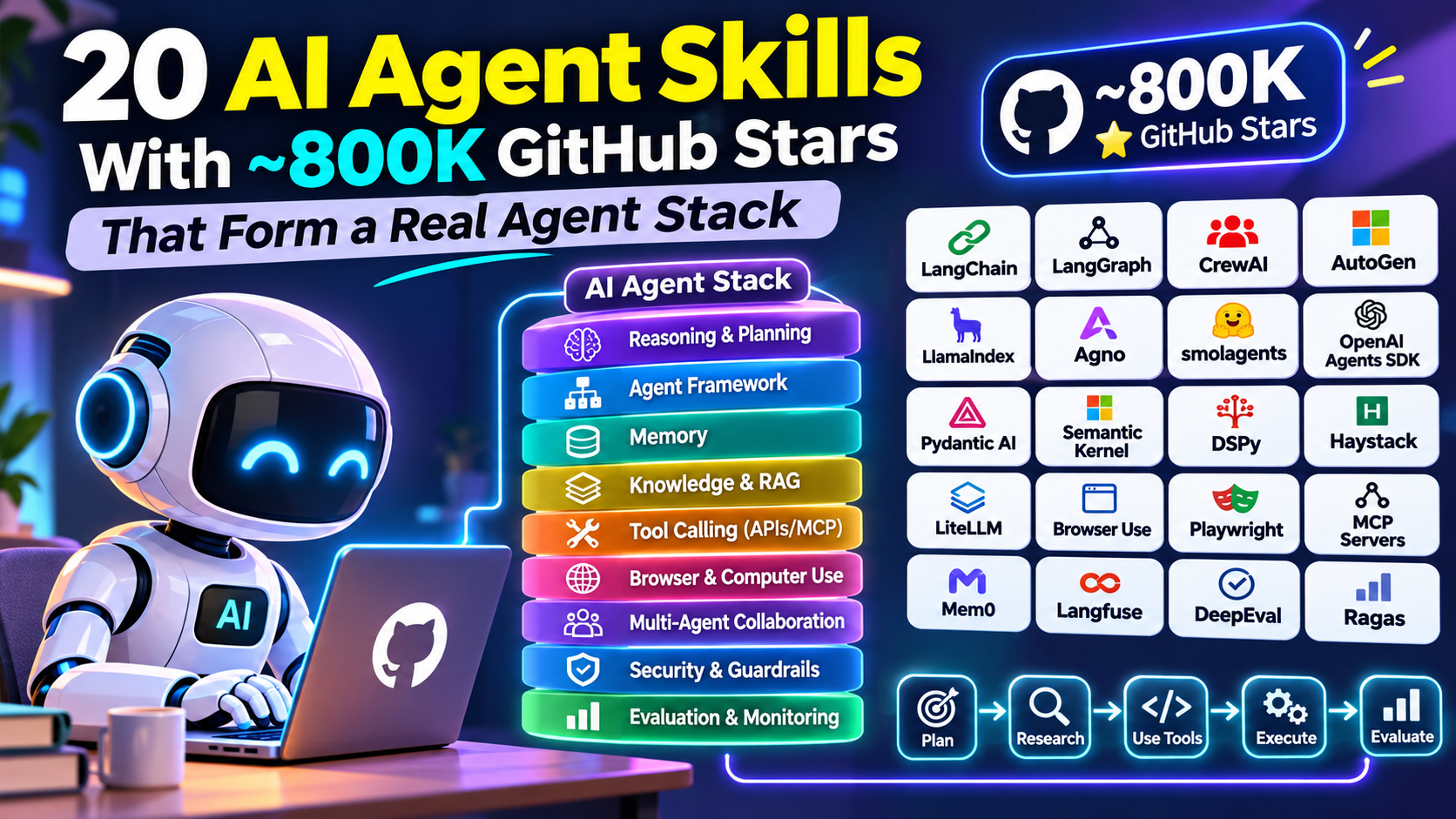
A real agent stack generally contains these layers:
- Brain and reasoning: Understands user instructions and makes decisions.
- Agent framework: Controls the agent’s tasks and workflow.
- Memory: Stores useful information for future interactions.
- Knowledge and RAG: Finds relevant information from documents and databases.
- Tool calling: Connects the agent with APIs and external services.
- Browser and computer use: Allows the agent to interact with websites and applications.
- Execution environment: Provides a controlled place to run code.
- Multi-agent collaboration: Allows multiple agents to work together.
- Security and guardrails: Controls what an agent can and cannot do.
- Evaluation and monitoring: Measures performance and finds mistakes.
This layered approach is also reflected in enterprise agent architecture guidance from AWS and Google Cloud. BCG Global+2
20 AI Agent Skills and GitHub Projects You Should Know
The following projects represent different building blocks of a practical agent development stack. They are not all direct competitors. Some build agents, some provide infrastructure, and others help test or operate them.
A note about GitHub stars: The approximately 800K figure in the headline should be treated as an indicative popularity claim, not a verified combined total for these exact 20 repositories. Star counts change regularly, and the total depends on which repositories and versions are included. For example, November 2026 tracking shows LangChain at around 150K stars, AutoGen around 62K, and CrewAI around 61K. Stars indicate developer interest, not technical quality. buildagentic.ai+1
1. LangChain – The Foundation for Building AI Applications
Category: Agent development and integrations
GitHub: langchain-ai/langchain
LangChain is one of the most popular open-source frameworks for developing applications powered by large language models.
It helps developers connect language models with external tools, databases, documents, and APIs. Instead of writing every integration from scratch, developers can use existing components.
What makes it useful?
- Connect different AI models.
- Integrate external tools and APIs.
- Build retrieval-augmented generation (RAG) applications.
- Create AI assistants and agent workflows.
- Connect agents with external knowledge.
Real-world example: A customer support agent can use LangChain to understand questions, search company documents, and prepare relevant answers.
2. LangGraph – Advanced Agent Workflow Management
Category: Agent orchestration
GitHub: langchain-ai/langgraph
LangGraph helps developers create advanced AI agents that follow structured workflows.
A normal chatbot generally responds to a message. However, an advanced agent may need to perform several actions before completing a task.
LangGraph uses graph-based workflows to manage these actions. Developers can define steps, conditions, decisions, and loops.
Important capabilities:
- Stateful agent workflows.
- Human approval and intervention.
- Checkpointing and recovery.
- Multi-agent coordination.
- Long-running task management.
Real-world example: An AI research agent can search the internet, collect information, check sources, prepare a report, and request human approval before publishing.
3. CrewAI – Building Teams of AI Agents
Category: Multi-agent collaboration
GitHub: crewAIInc/crewAI
CrewAI allows developers to create teams of AI agents with different responsibilities.
Imagine running a digital marketing company. You could create one agent for keyword research, another for writing articles, another for SEO optimization, and another for content quality checking.
Each agent receives a role and a task.
Key capabilities:
- Role-based AI agents.
- Task delegation.
- Sequential and hierarchical workflows.
- Shared context and collaboration.
- Custom tools and integrations.
Real-world example: A content marketing team can use multiple agents to research a topic, write an article, create SEO metadata, and review the final content.
4. Microsoft AutoGen – Agents That Communicate
Category: Multi-agent communication
GitHub: microsoft/autogen
AutoGen is a Microsoft open-source framework for building applications where multiple AI agents communicate and collaborate.
Instead of depending on a single AI agent, developers can create different agents that exchange information and complete tasks together.
Important capabilities:
- Agent-to-agent communication.
- Multi-agent conversations.
- Tool execution.
- Human involvement.
- Event-driven workflows.
Real-world example: One agent writes Python code, another reviews it, and a third helps identify errors.
Important: Check Microsoft’s current Agent Framework direction before starting a new project. AutoGen and Semantic Kernel have been part of Microsoft’s evolving agent development ecosystem. GitHub+1
5. LlamaIndex – Give AI Agents Access to Knowledge
Category: Knowledge retrieval and RAG
GitHub: run-llama/llama_index
An AI model cannot automatically understand every private document or company database. LlamaIndex helps developers connect AI systems with their own data.
It is especially useful for retrieval-augmented generation.
Key capabilities:
- Document processing.
- Data indexing.
- Information retrieval.
- Knowledge-based applications.
- Data-connected agents.
Real-world example: A company can build an internal AI assistant that answers employee questions using company policies, PDFs, and business documents.
6. Agno – Build Intelligent AI Agents
Category: Agent framework and runtime
GitHub: agno-agi/agno
Agno is a framework for building AI agents and multi-agent systems.
It provides capabilities for combining models, tools, memory, and knowledge. Developers can use it to build agents that perform different tasks.
Key capabilities:
- Individual AI agents.
- Multi-agent teams.
- Memory and knowledge.
- Tool integration.
- Multimodal applications.
Real-world example: A business can create an AI assistant that answers customer questions, retrieves product information, and connects with business tools.
7. Hugging Face smolagents – Lightweight AI Agents
Category: Code-based agent development
GitHub: huggingface/smolagents
smolagents is a lightweight framework from Hugging Face.
It makes it easier to experiment with agents that use code to perform actions. Developers can create small agents without starting with a complicated architecture.
Key capabilities:
- Simple agent creation.
- Code-based actions.
- Tool calling.
- Model flexibility.
- Lightweight development.
Real-world example: An agent can receive a mathematical question, write a small Python program, execute the calculation, and return the result.
8. OpenAI Agents SDK – Create Agents With Tools and Handoffs
Category: Agent SDK
GitHub: openai/openai-agents-python
The OpenAI Agents SDK provides developers with building blocks for creating AI agents.
It supports tool usage, agent handoffs, instructions, and guardrails. This makes it useful for applications where one agent needs to transfer work to another specialist agent.
Key capabilities:
- Agent instructions.
- Function and tool calling.
- Agent handoffs.
- Guardrails.
- Workflow tracing.
Real-world example: A customer service system can send billing questions to a billing agent and technical questions to a technical support agent.
9. Pydantic AI – Structured and Reliable Agent Development
Category: Python agent framework
GitHub: pydantic/pydantic-ai
Pydantic AI helps developers build AI applications using Python with structured data and validation.
AI responses are not always predictable. Sometimes an agent may return missing fields, incorrect formats, or unexpected information.
Pydantic AI helps developers define the expected structure of responses.
Key capabilities:
- Structured outputs.
- Type validation.
- Tool integration.
- Model flexibility.
- Dependency management.
Real-world example: An AI sales assistant can extract customer names, email addresses, phone numbers, and enquiry details into a structured format.
10. Microsoft Semantic Kernel – Connect AI With Business Software
Category: Enterprise AI integration
GitHub: microsoft/semantic-kernel
Semantic Kernel helps developers connect AI models with existing applications and business systems.
It is particularly relevant to organisations working with Microsoft technologies and enterprise software.
Key capabilities:
- AI integration.
- Plugins and functions.
- Workflow orchestration.
- Memory integration.
- Enterprise application connectivity.
Real-world example: A business assistant can connect with internal applications to retrieve information and help employees complete routine tasks.
11. DSPy – Improve How AI Systems Reason
Category: AI programming and optimization
GitHub: stanfordnlp/dspy
DSPy is a framework that helps developers program and optimize language model systems.
Instead of manually changing prompts repeatedly, developers can define the task and use optimization methods to improve the system.
Key capabilities:
- Prompt optimization.
- Structured AI pipelines.
- Language model programming.
- Evaluation-driven improvement.
- Reusable AI components.
Real-world example: A company can improve an AI document classification system by testing different configurations against real examples.
12. Haystack – Build Search and RAG Applications
Category: Search and retrieval
GitHub: deepset-ai/haystack
Haystack is an open-source framework for building search systems, RAG applications, and AI pipelines.
It helps applications retrieve relevant information before generating answers.
Key capabilities:
- Document retrieval.
- Search pipelines.
- RAG applications.
- Data processing.
- Integration with language models.
Real-world example: An educational platform can build an AI tutor that searches textbooks and course material before answering student questions.
13. LiteLLM – Connect Different AI Models
Category: Model gateway and routing
GitHub: BerriAI/litellm
Developers often work with different AI model providers. LiteLLM provides a unified interface for connecting with many model APIs.
It can help simplify model management and routing.
Key capabilities:
- Multiple model connections.
- Unified API interface.
- Model routing.
- Usage and cost tracking.
- Fallback configurations.
Real-world example: An application can use one AI provider for general questions and another model for tasks that require different capabilities.
14. Browser Use – Give AI Agents Browser Skills
Category: Browser automation
GitHub: browser-use/browser-use
Browser Use allows AI agents to interact with websites through a browser.
This is important because many business tasks happen on websites rather than through APIs.
Key capabilities:
- Website navigation.
- Browser interaction.
- Form filling.
- Information extraction.
- Web-based task automation.
Real-world example: An agent can visit a website, find product information, collect relevant details, and prepare a comparison report.
15. Playwright – Control Browser Actions
Category: Browser automation and testing
GitHub: microsoft/playwright
Playwright is a browser automation framework used by developers to control browsers and test websites.
It is not an AI agent framework by itself. However, it can provide browser control to an AI agent.
Key capabilities:
- Browser automation.
- Website testing.
- Form interactions.
- Screenshots.
- Cross-browser support.
Real-world example: An AI testing agent can open a website, check its navigation, fill out forms, and report broken functionality.
16. Model Context Protocol (MCP) Servers – Connect Agents With Tools
Category: Tool interoperability
GitHub: modelcontextprotocol/servers
MCP is an open protocol that provides a standard way for AI applications to connect with external tools and data sources.
MCP servers expose capabilities that compatible AI clients can discover and use.
Key capabilities:
- Tool discovery.
- External service connections.
- Data access.
- Reusable integrations.
- Standard communication.
Real-world example: An AI agent can connect to a database, retrieve information, and use another tool to prepare a report.
Always check the permissions and security of individual MCP servers before connecting them. Google Cloud Documentation+1
17. Mem0 – Give AI Agents Long-Term Memory
Category: Agent memory
GitHub: mem0ai/mem0
Memory is an important part of an intelligent agent.
Without memory, an agent may need users to repeat information in every conversation. Mem0 helps developers add memory capabilities to AI applications.
Key capabilities:
- Long-term memory.
- User preferences.
- Context retention.
- Memory retrieval.
- Personalised interactions.
Real-world example: A customer support agent can remember a customer’s previous issue and use that context in a later conversation, subject to the application’s privacy and data policies.
18. Langfuse – Monitor and Understand AI Agents
Category: Observability and tracing
GitHub: langfuse/langfuse
Building an AI agent is only the beginning. Developers also need to understand what happens when an agent performs a task.
Langfuse helps developers monitor AI applications and investigate their performance.
Key capabilities:
- AI tracing.
- Prompt management.
- Performance monitoring.
- Cost tracking.
- Evaluation.
Real-world example: If an agent provides an incorrect answer, developers can inspect its execution steps and understand where the problem occurred. Langfuse+1
19. DeepEval – Test AI Agent Performance
Category: AI evaluation and testing
GitHub: confident-ai/deepeval
Traditional software testing checks whether code produces expected results. AI systems need additional testing because their answers can vary.
DeepEval helps developers evaluate language model applications and agent performance.
Key capabilities:
- Response quality testing.
- Hallucination evaluation.
- RAG evaluation.
- Agent performance checks.
- Automated evaluation.
Real-world example: A business can test whether its customer support agent provides accurate answers using a collection of prepared questions and expected results.
20. Ragas – Measure the Quality of RAG Systems
Category: Retrieval evaluation
GitHub: vibrantlabsai/ragas
Ragas helps developers evaluate retrieval-augmented generation systems.
A RAG application needs to find the right information and generate an accurate response. Both stages matter.
Ragas provides evaluation methods to understand whether retrieved information and generated answers are useful.
Key capabilities:
- Retrieval quality evaluation.
- Answer relevance.
- Context precision.
- Context recall.
- RAG testing.
Real-world example: An AI assistant that answers questions from company PDFs can be tested to check whether it retrieves the correct document sections and provides relevant answers.
How These 20 Projects Work Together to Form a Real AI Agent Stack
Knowing individual GitHub projects is useful, but the real power comes from combining the right technologies.
For example, imagine you want to build an AI marketing agent that can research keywords, write blog posts, create SEO descriptions, and prepare social media content.
You can design the system using different tools for different responsibilities.
context-engineering.vizuara.ai
Example of a Practical AI Agent Architecture
| Layer | Recommended project | Responsibility |
|---|---|---|
| Model connection | LiteLLM | Connect AI models |
| Main framework | LangChain | Build AI applications |
| Workflow | LangGraph | Control task execution |
| Multi-agent team | CrewAI | Delegate tasks |
| Knowledge | LlamaIndex | Access documents |
| Search | Haystack | Retrieve information |
| Reasoning optimization | DSPy | Improve AI pipelines |
| Structured output | Pydantic AI | Validate responses |
| Browser | Browser Use | Browse websites |
| Browser control | Playwright | Execute browser actions |
| Tool connections | MCP | Connect external tools |
| Memory | Mem0 | Remember useful context |
| Monitoring | Langfuse | Track agent execution |
| Testing | DeepEval | Test agent quality |
| RAG testing | Ragas | Evaluate retrieval |
This is an example architecture, not a requirement to install every project. Many tools provide overlapping capabilities. Select only the components that your application actually needs.
How a Real AI Agent Completes a Task
Consider a user asking:
“Find 10 trending AI topics, research them, write an SEO-friendly article, and prepare social media content.”
Here is how the agent stack could work:
- Understand the request: The language model identifies the user’s goal.
- Create a plan: LangGraph breaks the request into smaller tasks.
- Research information: Browser Use collects information from websites.
- Retrieve knowledge: LlamaIndex searches connected documents and information sources.
- Delegate work: CrewAI assigns research, writing, and SEO tasks to different agents.
- Remember context: Mem0 stores useful information when permitted.
- Generate content: LangChain or another framework coordinates content generation.
- Validate output: Pydantic AI checks the structure of the generated information.
- Evaluate quality: DeepEval and Ragas help test the results.
- Monitor performance: Langfuse records execution details and helps identify problems.
The final result is a system that does more than generate text. It can plan, research, use tools, complete tasks, and check its work.
This approach follows the broader agent architecture principles described in AWS and Google Cloud guidance. d1.awsstatic.com+2
Which AI Agent Skills Should Beginners Learn First?
You do not need to learn all 20 projects at the same time. Starting with too many frameworks can make development confusing.
A better approach is to learn the basic skills first and then move towards advanced agent development.
Beginner Learning Roadmap
Stage 1: Understand the basics
Start with these skills:
- Python programming.
- Basic API integration.
- Prompt engineering.
- JSON and structured outputs.
- Understanding large language models.
Stage 2: Build your first AI agent
Learn:
- LangChain.
- OpenAI Agents SDK.
- smolagents.
- Pydantic AI.
Create a simple assistant that can answer questions and use an external tool.
Stage 3: Learn advanced agent workflows
Move towards:
- LangGraph.
- CrewAI.
- AutoGen.
- Semantic Kernel.
Build agents that can delegate work and follow multi-step workflows.
Stage 4: Add memory and external knowledge
Learn:
- Mem0.
- LlamaIndex.
- Haystack.
- MCP.
Create an agent that remembers relevant context and accesses external information.
Stage 5: Make your agent production-ready
Finally, understand:
- LiteLLM.
- Playwright.
- Browser Use.
- Langfuse.
- DeepEval.
- Ragas.
Learn how to control agent actions, test results, monitor performance, and manage failures.
Best Practices for Building a Real AI Agent Stack
A powerful AI agent is not necessarily the one with the most tools. It is the one that completes its assigned work accurately, safely, and consistently.
Before launching an agent, consider these important practices.
1. Start with one clear purpose: Build an agent that solves one problem before creating a large multi-agent system.
2. Use the right framework: Choose a framework based on your workflow, programming language, and project requirements.
3. Give agents limited permissions: Do not provide unrestricted access to files, databases, or external applications.
4. Use human approval: Important actions such as payments, publishing, deleting files, or sending business messages should have suitable approval controls.
5. Add memory carefully: Store only useful information and follow appropriate privacy and data retention policies.
6. Test every workflow: Test normal situations, unexpected inputs, failed APIs, and incorrect AI responses.
7. Monitor performance: Track response quality, execution time, API usage, and costs.
8. Protect against prompt injection: Treat external website content and retrieved documents as untrusted input.
9. Avoid unnecessary agents: A simple workflow can sometimes perform better than a complicated team of autonomous agents.
10. Keep humans involved: AI agents should operate within clear boundaries, especially when handling important business operations.
Frequently Asked Questions (FAQs)
1. What are AI agent skills?
AI agent skills are the technical abilities required to build and operate autonomous AI systems. They include reasoning, planning, memory management, tool calling, browser automation, coding, and workflow execution.
2. What are the best GitHub projects for AI agents?
Some popular projects include LangChain, LangGraph, CrewAI, AutoGen, LlamaIndex, Agno, smolagents, and the OpenAI Agents SDK. Each project serves a different development purpose.
3. Can I build an AI agent without coding?
Yes. You can start with visual workflow builders and automation platforms. However, learning Python, APIs, and agent frameworks will help you build more advanced systems.
4. Which programming language is best for AI agent development?
Python is an excellent starting point because it has a large AI development ecosystem. JavaScript and TypeScript are also useful, especially for web-based AI applications.
5. What is the difference between LangChain and LangGraph?
LangChain provides components for building AI applications and connecting models with tools. LangGraph focuses on controlling complex, stateful agent workflows using graph-based execution.
6. What is the difference between CrewAI and AutoGen?
CrewAI focuses on creating teams of agents with defined roles and responsibilities. AutoGen focuses on communication and collaboration between AI agents.
7. Why do AI agents need memory?
Memory helps agents retain useful information between interactions. It can improve continuity, personalisation, and the ability to complete tasks using previous context.
8. What is MCP in AI agent development?
Model Context Protocol (MCP) is an open protocol that allows AI applications to connect with external tools, services, and data sources through a standard interface.
9. What is RAG in an AI agent stack?
RAG stands for Retrieval-Augmented Generation. It allows an AI system to retrieve relevant information from external documents or databases before generating an answer.
10. Which tools help test AI agents?
DeepEval and Ragas are useful for evaluating AI applications. Langfuse can help developers monitor and investigate agent execution.
11. Are GitHub stars important when choosing an AI framework?
GitHub stars indicate community interest, but they do not guarantee quality, security, performance, or long-term maintenance. Always check documentation, releases, issues, licensing, and project activity.
12. Can multiple AI agents work together?
Yes. Multi-agent frameworks such as CrewAI, AutoGen, and LangGraph can support systems where different agents perform separate tasks and share results.
13. How much does it cost to build an AI agent?
The cost depends on the AI model, API usage, hosting, database, browser infrastructure, and development requirements. Open-source frameworks can reduce software licensing costs, but they do not make infrastructure or model usage automatically free.
14. What is the best AI agent stack for startups?
A practical starting stack could include LangGraph for workflows, an AI model through its API, LlamaIndex for knowledge retrieval, Mem0 for memory, and Langfuse for monitoring. Add other components when the project requires them.
15. What is the future of AI agent development?
AI agent development is moving towards more reliable workflows, better tool integration, long-term memory, secure execution, multi-agent collaboration, and improved evaluation. Developers will increasingly focus on building systems that can complete real tasks rather than simply generate responses.
Conclusion
AI agents are becoming an important part of modern software development. They can help businesses automate repetitive work, improve productivity, research information, manage documents, and perform complex digital tasks.
However, building a successful AI agent requires more than selecting a powerful language model. You need the right combination of frameworks, memory systems, tools, knowledge retrieval, browser automation, security, and evaluation.
The 20 GitHub projects discussed in this article provide a useful starting point for understanding the modern AI agent ecosystem.
If you are a beginner, start with LangChain, LangGraph, and the OpenAI Agents SDK. Once you understand the fundamentals, explore CrewAI, LlamaIndex, MCP, Mem0, and evaluation tools.
The real opportunity is not simply building an AI chatbot. It is building an AI system that can understand a goal, plan its work, use tools, complete tasks, and deliver reliable results.